Desertcart purchases this item on your behalf and handles shipping, customs, and support to British Virgin Islands.
๐ Power up smarter โ never miss a charge, never settle for less!
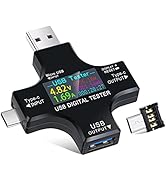
The Eversame 2 in 1 Type C USB Tester is a professional-grade digital multimeter designed to measure voltage (3.6-30V), current (0-5.1A), and power parameters of USB-C devices. Featuring 8 customizable color LCD screens, it supports major fast-charging protocols (QC3.0, PD) and offers comprehensive safety protections including over-voltage and over-current alarms. Ideal for tech-savvy professionals, it enables precise monitoring and logging of charging performance across multiple devices, ensuring optimal power delivery and device safety.


| Asin | B07JYVPLLJ |
| Best Sellers Rank | #10,228 in Tools & Home Improvement (See Top 100 in Tools & Home Improvement) #19 in Multi Testers |
| Brand Name | Eversame |
| Color | Black |
| Compatible Devices | USB-C enabled devices |
| Customer Reviews | 4.4 4.4 out of 5 stars (3,177) 4.4 out of 5 stars |
| Eu Spare Part Availability Duration | 18 months |
| Item Dimensions | 2.36 x 2.36 x 0.43 inches |
| Item Weight | 1.1 ounces |
| Manufacturer | Eversame |
| Maximum Operating Voltage | 30 volts |
| Measurement Type | Multimeter |
| Minimum Operating Voltage | 3.6 volts |
| Model | 00005 |
| Number Of Items | 1 |
| Number Of Packs | 1 |
| Part Number | 00005 |
| Power Source | Electric |
| Style Name | Voltage Tester |
User
Nice product but instructions are lacking
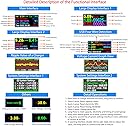
This tester is quite useful and is reasonably priced. It takes a little time to master its operation so I offer the following description to help other users:I purchased the Eversame 2 in 1 USB Digital Tester which seems identical to the KJ-KjayI 2 in 1 Multifunctional Digital Multimeter Tester.When powering the tester with the type-C input, either a type-C device must be connected to the output or the micro USB adapter must be connected for the tester to function. The tester will also function when it is powered using the USB-A input regardless of the USB adapter. Even though the tester can be powered using the output connectors (according to some Youtube videos) it does not function correctly so don't do it.When first powered, the tester displays the first of several screens. All of these screens switch to the "Standby" screen (which can be changed in "settings") after one minute regardless of any load connected to the tester. Pressing the button once in "Standby" returns to the screen that was active before timing out. Clicking again advances to the next data screen. Double clicking resets the amp-hour field. Triple clicking resets the watt-hour field. Clicking four times resets the timer. Long pressing resets all three fields. All data is logged in the current test group. Data logged in a particular test group are separate from data in other test groups. There are 10 test groups that can be selected by clicking five times. The current test group will be displayed after cycling tester power.Individual data Screens:1) This display shows voltage and current on the top line using a medium font. The second line shows power and ohms (the equivalent load resistance). The third line shows watt hours, temperature, and amp hours. The last line is a timer (that only counts while powering a load for calculating time dependent values) and test group number. Click once to go to screen #2.2) On the first line, the voltage of the negative power line is shown (isn't this always zero?) followed by USB protocol in effect and the equivalent resistance of the load. The next two lines show the data line voltages and the bottom line is the voltage of the positive power line. Click once to go to screen #3.3) This display is mostly in Chinese which is the same data as screen #4.4) This screen is self explanatory.5) Large fonts without time.6) This screen graphs voltage and current with the color and range of voltage on the left with current on the right. Time resolution ranges from 0.5 to 5 seconds and is selected by long pressing. The variance of voltage and current is shown center on the bottom line.7) This screen is also a graph similar to #6 except the data lines are shown. The vertical scale is from 0 to 5 volts. I'm not sure what the two lower center voltages show but they always seem to be 1.0V. Time resolution operates the same as screen #6.8) System Settings:Long press to enter this function. Step thru the parameters by clicking once. When the desired parameter is highlighted, perform a long press until the highlighted parameter starts flashing. Clicking once decrements the parameter. Long pressing while highlighted quickly lowers the value. Double clicking increments the value. After incrementing the value, long pressing will quickly raise the value. Single click to go back lowering the value. After a few seconds of not clicking, the displayed value is saved and the tester shows "OK".There are eight system parameters:1. Over Voltage Protection (OVP) (supposedly it beeps when over this value)2. Lower Voltage Protection (LVP)3. Over Current Protection (OCP) (I think it shuts down and must be reset)4. Screen Rotation with long press (flips display 180ยฐ)5. Default Set with long press (return to factory default values)6. Clear Data with long press (clears all data in all test groups)7. Standby Style screen after timeout (either original or volts, amps, watts are displayed)8. Capacity Ratio (I guess it calculates power bank capacity as percentage)9. Exit now with long press instead of waiting for timeout9) This display starts a countdown timer to turn the display off. Click once to advance to the first display screen before the countdown finishes and turns off the display. To re-enable the display, long press which brings up reference settings. Voltage and current are displayed and I guess can be modified to calibrate these values and I'm not sure how this works but my tester seems fairly accurate as shipped.Happy testing!
User
Awesome (so far)!
Love this piece of kit. Gives you the critical readings you need e.g. V, W, A plus a lot more, at an awesome price. I'm assuming, of course, that it's calibrated accurately and that it'll last!
User
Nice tester for USB-A.
<Update> Apparently, Eversame read this review, and has refunded my entire purchase price of the tester, without being asked! Believing my unit was just a one-off, I am going to purchase the same item again. Thank You Eversame for the excellent customer service! They have been upgraded a star.This review is for the Eversame 2 in 1 Type C USB Tester, AISN: B07JYVPLLJ.This is a nice little tester that has come in VERY handy since I ordered it in January, 2025. I have used it probably 4-5 times per week since then, so I feel that I have a pretty good handle on how to use it and read the information.The tester is accurate, I have crossed checked it with my FLUKE 17B. The readout always comes within 0.1vDC of the FLUKE.All the USB-A ports work beautifully. However, the USB-C Male port does not work. The female USB-C port works great. The Male port does not. There is some kind of small adapter to be inserted to โtrigger the PD charging functionโ, but that does nothing. By the time I found this out, the exchange/return window had passed. I have had to buy a USB-C specific tester, which Iโm not too pleased with.This is a great little tester for USB-A. I canโt recommend it for USB-C testing.
User
Shows volts and will also show amps under load
I just got it and have used it for testing a few ports. I like it, and I particularly like that you can also put a load on it so that you get both volts and amps.
User
Works as advertised; great value; nice design
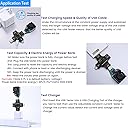
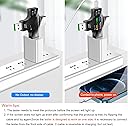
Very nice little multimeter, ideal for at least three applications, each described on the one-page user's manual: (1) Test power/voltage of USB charger, (2) Test impedance of USB cable used for charging, (3) test capacity of portable batteries for USB charging.Due to the design of the USB-C mechanical connector, it's possible to hook up the sink/load where the source should be (or vice versa); this will cause the amperage reading to be zero. You must attach the sources and sinks/loads correctly. Put the power source at an "input" connector and the power load at an "output" connector. It is not idiot-proof which may make it unsuitable for some part of the potential market. I'm sure that the manufacturer will address this issue in some future incarnation and thereby eliminate most of the 1-star reviews...and double the size of their US market.I was surprised by the variability of the current delivered to my "on" cell phone. This variability disappeared when the phone was turned "off"--giving me renewed confidence in the accuracy of the multimeter.I was pleased to watch the multimeter detect the step up from 5v to 9v when I charged my Quick Charge v3.0-enabled cell phone and matching power adapter.When I first used the multimeter, I found it in (or put it in) a mode showing 0.42A current without a load. I finally realized that I needed to "zero out" the current meter by pressing the control button 7 times in rapid succession.Two questions for the manufacturer* exactly what is the load (in watts) of this device? Documentation says "Self Current Consumption: <0.02A".* is the voltage reported that on the input or the output of the device? If the device load is 0.02A at 5V (or 0.1 W), this is much more than the "resolution" of the device which is specified to be 0.01W.Everyone who owns USB devices (phones, cables, batteries, chargers) should own this multimeter.
User
Good Tester
Good Tester. could have clearer instructions but for the most part you can figure it out
User
Simple / Basic Voltage Tester With Visibility and Durability Limits that makes it hard to reccomend
You are getting basic functionality at a very low price, and if your expectations are modest it can serve its purpose. It reads voltages and continuity reasonably close to expected values, so for occasional home use itโs acceptable.This does not feel like a long-term tool you would rely on daily or in demanding environments. It feels budget-grade, and I wouldnโt depend on it for professional troubleshooting.Build material quality reflects its price point - the casing is made from very thin plastic that feels flimsy in hand and could crack if dropped or stressed. Buttons and the dial work, but they donโt inspire confidence for heavy use. The display is clear in shaded indoor settings, but in bright lightโespecially outdoors around solar arraysโit becomes difficult to read, which makes precise measurement challenging.To use this multimeter effectively, turn the dial to the measurement you need (voltage, resistance, continuity, etc.) before touching the probes to the circuit under test. For basic DC voltage checks on batteries, small electronics, and light solar setups, keep the display shaded or use your body to block glare so you can see the numbers clearly.The tool is best for occasional checks and simple DIY electrical tasks where advanced features and ruggedness arenโt required. Itโs not well-suited for heavy field use, professional work, or environments where clear visibility and robust housing are essential.
User
Cures a lot of headaches when it comes to cables and chargers.
This is a valuable tool for sorting cables, chargers etc. It the second one I've bought.The first one is in someone else's tool box.
User
Good Quality, accurate and shows all reading.
1. Working as expected.2. Value for money.3. Lots of review here are about measuring wrong current , where they show a current in mobile app and current measured by this USB tester are different, but the app shows the addition of input and output current of battery while this USB tester shows only input current and voltage of the battery , so the difference in the current shown by the app and this tester is acceptable.4. Some people says that it is not measuring wrong capacity (mAH) but if you see how it calculates capacity then you can manually calculate the capacity by dividing the Wh reading by 3.7 volt. For example , in the image i have attached with review, it is showing 38Wh. And it is showing 2804mAh. But my battery is 10,000mAh. The reason it is showing 2804 mAh is because , while charging ,it was Charging with 14V fast charging voltage, so it divided 38Wh by 14 which comes around 2804mAh. So to get the accurate mAh capacity just divide the Wh reading by nominal voltage of single battery that is 3.7v , if we divide 38Wh by 3.7V , it comes around 10,000mAh, so this tester is accurate. So accuracy is good.5. Quality is also good.
User
Good product
Works great, as advertised
User
Nice
very useful when you need to troubleshoot some devices..Works well
User
Told me exactly what I needed to know
I just needed to know which of my USB cables was dodgy, and this tool told me exactly what I needed to know. I tested each cable connected from a plug-in charging point, through this power meter and into my phone. And then I noted the voltage (V), amps (A) and watts (W) for each (see attached photo). My good cables showed 1.7 to 1.8A, my lesser-but-still OK cables showed 1.4 to 1.5A, and my duds showed 0.2A, 0.5A and ~1A. Then I tagged each one with a piece of coloured cotton thread, so now I know which ones to ditch, which ones to use, and which ones to keep on hand as spares if need be. Perfect! Very happy with how simple and useful this tool is.
User
Not bad
The item works well, shows everything. But it didn't live up to my expectations. Maybe it's my problem, not the item's. I'm not smart enough to accurately understand the numbers it shows ๐
Trustpilot
2 weeks ago
1 month ago