๐ก Print smarter, not harder โ wireless freedom meets lasting performance!
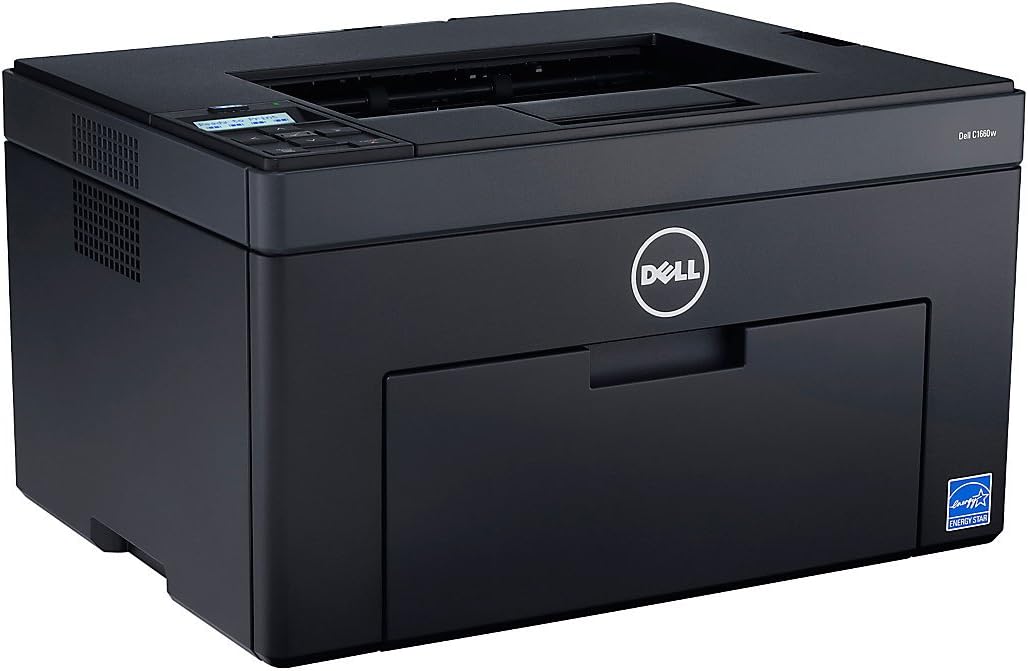
The Dell c1660w Wireless Color Printer offers robust wireless connectivity with easy Wi-Fi setup, enabling seamless printing from Android and iOS devices via dedicated apps. Its durable drum and fuser units minimize maintenance, while ENERGY STAR-qualified LED technology ensures energy-efficient operation. Compatible with Windows 8, this printer is designed for modern, eco-conscious offices seeking reliable color printing.


| ASIN | B00A2KFGDO |
| Additional Printer Functions | All In One |
| B&W Pages per Minute | 12.00 |
| Best Sellers Rank | #1,001,147 in Office Products ( See Top 100 in Office Products ) #1,386 in Laser Computer Printers |
| Brand | Dell |
| Built-In Media | Drum Unit |
| Color | Black |
| Color Depth | 24 bpp |
| Color Pages per Minute | 10.00 |
| Compatible Cartridge | Laser Toner Cartridges |
| Compatible Devices | PC, Smartphones |
| Connectivity Technology | USB |
| Control Method | App |
| Controller Type | iOS |
| Customer Reviews | 3.7 out of 5 stars 129 Reviews |
| Display Type | LED |
| Dual-sided printing | Yes |
| Duplex | true |
| Hardware Interface | USB 2.0 |
| Ink Color | color |
| Item Weight | 28.7 Pounds |
| Manufacturer | Dell Marketing USA, LP |
| Maximum Copy Resolution Black and White | 600 dpi |
| Maximum Copy Resolution Color | 600 dpi |
| Maximum Copy Speed Black and White | 12 ppm |
| Maximum Media Size | 8.5 x 11 inch |
| Maximum Print Resolution Black and White | 600 x 600 dpi |
| Maximum Sheet Capacity | 250 |
| Maximum print Resolution Color | 600 x 600 dpi |
| Model Name | C1660W |
| Model Number | C1660W |
| Model Series | c1660 |
| Number of Drivers | 1 |
| Number of Trays | 1 |
| Other Special Features of the Product | Auto Document Feeder |
| Paper Size | 8.5 inches |
| Print media | Glossy photo paper |
| Printer Connectivity Type | USB |
| Printer Output Type | Color |
| Printer Type | Laser |
| Printing Technology | Laser |
| Resolution | 600 x 600 |
| Scanner Type | Auto-Document Feeder |
| Series Number | 1660 |
| Special Feature | Auto Document Feeder |
| Specific Uses For Product | home office |
| Total USB 2.0 Ports | 1 |
| Total Usb Ports | 1 |
| UPC | 884116098195 |
| Unit Count | 1.0 Count |
| Warranty Type | limited warranty |
| Wattage | 200 watts |
S**S
Excellent Color Laser for Photos, Graphics and Text. Clear the rare paper jam only as directed!
PRO's Excellent print quality text, graphics and photos even on plain paper. Per page cost is NOT high if you buy aftermarket refills. There are no nagging messages to use only Dell toner. When you click "print," the first thing that happens is nothing for a long 7 seconds as it warms-up. I made peace with that because I am more likely to be satisfied the first time with output from this printer. That saves a lot of time. It's quiet enough to have within arms reach and talk on the phone while printing. The driver was easy and fast to install because Dell detected my Windows 7 64 OS correctly and this is one driver for one printer. ( Keep in mind this is not a bundle of drivers for a multi-function kluge of 19 devices that get in each others way and do nothing very well and mostly never get used, plus a compliment of free and worthless software you'll wish you could delete, but can't without creeping out the one print driver you actually want which requires a complete re-install of the entire, 3-ring software circus, at least, four times in the life of the franken-multi-function device, but I digress. ) The wireless router setup is very well done with push-button authentication for security. CON's You can kill this printer by clearing a paper jam the wrong way. It will never print again. If you have a paper jam where a printed page comes the top, but only partially and stops, DO NOT PULL ON THE PAPER. Sure you can see the paper. You can easily grab the paper and pull on it. It's the logical thing to do. Don't do it. If you pull the paper the printer dies forever. After I pulled a paper out I found that others have had the same experience. TO CLEAR AN UPPER PAPER JAM: 1. Tilt open the back panel. The release is at the top center. 2. Inside the back panel near the top you'll see two blue levers. Pull the levers up to release the tension and leave them up. 3. Pull the paper out. 4. Push the blue levers back down to lock them back in place. 5. Snap the back panel closed. Actually I killed a Dell 1250c, but the only difference is it has only a USB cable input. I replaced it with the 1660 to get wireless and ether-net, but they are the same printer otherwise. Other people have written about this issue, but I liked the printer so much I just replaced it with the 1660 to get wireless.
E**H
Connectivity isssue, but decent for price.
Print Quality is good and speed is acceptable. I use it in my personal office and throughout the rest of the office we have some MFCs. Print quality on this is better but the other ones are cheap as well. I had to send one back because it was almost DOA. I would have to unplug and reboot it after each print. Dell sent me a replacement. The new one is working much better. Biggest annoyance is that when the printer goes to sleep, or my computer goes to sleep, it wont reconnect and print on waking up. I have to cycle the printer power every day to get it to connect. Windows recognizes the printer and connected, but I have to cancel the print job and restart it to get it to print after waking. This is with W7.
K**W
Was good until it wasn't.... :(
Was a little tricky to set up, but followed some of the tips found in the reviews section here and it worked well. We did have to use the USB to get it set up, but were able to disconnect and use wirelessly immediately after set up. Print quality is great and the included cartridges are not skimpy. We've printed A LOT since we've bought this printer and it's just now showing low toner messages, but my print quality is still good. After market cartridges are a decent price and have good reviews, which is very helpful. Overall we're extremely pleased with the quality and cannot beat the price! I do suggest reading the reviews to make sure this can meet your needs before purchasing. Apparently card stock is a problem, so we kept our old HP inkjet to handle those tasks, but will do all of or high volume printing with this one. UPDATE: I read the reviews here carefully prior to purchase and made sure to follow all advice. I've never printed on anything except for standard paper, but my printer is broken. It constantly says their is a paper jam (there has never been a true jam) and will not print. It will occasionally feed paper in a couple of inches, then stops and says it's jammed. I've contacted Dell and they plan to send me new rollers. If that doesn't work they will replace. HOWEVER, my printer is showing registered to someone else (possibly the seller), so they won't even begin to help me until I'm able to get the ownership information transferred. SERIOUSLY, I have the printer and the receipt and they can't help me transfer the ownership. I'm now waiting on the seller to contact me in the hopes that they can give me the proper info. This is all very disappointing considering the quality of the prints are great and the ink is reasonable. VERY DISAPPOINTED! If I had it to do over again I'd pay a little more for a printer with even better reviews and more capabilities (like printing on cardstock). UPDATE #2: Finally got info from the seller. Apparently they originally purchased the printer from Staples and even though it was still brand new, this caused some issues with Dell issuing the service ticket. Was finally able to get Dell to issue the ticket after sending them a copy of my receipt and correspondence between me and the seller. They did immediately send me a refurbished replacement that has a warranty for the length of my original warranty. While I'm grateful for this, I'm still left with a printer that I really can't use for anything other than standard paper without worrying about it ruining the printer and have to be worried about even the slightest jam ruining the printer, as well. Thankful to have this resolved for the moment, but really wishing I'd spent a bit more and bought a better quality printer.
A**O
Good, compact printer!
Size of the printer and quality of photos were important to me. I don't do very much printing, so cost per page was not as important. This printer has not disappointed me. It fits nicely where my old monochrome laser used to sit. Black print is not quite as dark as my old (very old) HP 4P produced, but the text is crisp. I have not done much color photo printing yet, but output looks quite good. I will need to compare it to other laser color printers to see if the reviews are correct in that this printer does a better job. Although the printer does not do automatic duplexing (two-side printing), it does have a duplex option in the driver. If you select this, it gives clear instructions on how to print the second side - very easy and effective. I am a retired computer science instructor who taught Cisco networking classes. Setting up the wireless networking was a rather chore. Took me too long! I can see where it can be very frustrating to someone not as familiar with networking as I am. Setting the wireless ID and Passcode took me a long time because I would make a minor error during input and the printer would lose the info and I needed to start over. Entry of each letter requires using the up and down arrow keys to select the number, symbol, or letter. I did not try hooking up the printer via USB to see if it is possible to configure it that way. The instructions do not point to such a setup, and they are rather unhelpful. I went online to find some independent help for setup. Downloading the latest drivers is easy, but I could not figure out how to install them from the download. Ended up using the supplied CD to install drivers. Don't know what one would do if the CD is lost. Dell could really use some improvement in this area. Conclusion: I am pleased with the printer, but setup can be a pain.
C**S
OK printer - can't connect to Wi-Fi, paper jam problems
This is just an ok printer. I have owned this printer for about 16 months now, and I am about to have to get rid of it. PRO: The print quality is great; we printed many pages of both B&W and color photos and documents without issue. CONS: 1. We have never, ever been able to get the Wi-Fi printing enabled. We spent many hours on MANY different occasions trying. Dell customer support could not help either. So, we ended up using it as a hard-wired printer the entire time we owned it. Inconvenient, but not overwhelmingly so. 2. Printing uses up a lot of toner. Buy extra cartridges. 3. The reason we are now tossing this printer is because of a problem that has been already listed by other reviewers: PAPER JAM. Seriously! This printer worked fine for over a year and survived through two moves with no problems. Then suddenly one day, the paper wouldn't feed through the rollers, and the printer kept reading "paper jam". Only problem was that there was no paper jam. Through many hours of internet searching, calling Dell customer support, and going to a repair store, we finally discover that the culprit is the fusing unit. To replace it, you basically have to completely disassemble the printer, and it would cost almost as much to have that part replaced as to buy a new printer. Of course this occurred less than 4 months after our warranty with Dell expired. It's a huge design flaw that a simple paper jam issue (which appears to not be uncommon with this printer model) would render a printer completely useless. It was a good printer while it lasted, but we won't be buying this again. Between a design flaw and inoperable Wi-Fi connectivity, it's not really worth the money.
K**5
This is a very good color laser printer
This is a very good color laser printer, especially for the price and cost of cartridges. I have had no problems, but want to pass along this advice I saw on Amazon,com about paper jams with this printer:CON's You can kill this printer by clearing a paper jam the wrong way. It will never print again. If you have a paper jam where a printed page comes the top, but only partially and stops, DO NOT PULL ON THE PAPER. Sure you can see the paper. You can easily grab the paper and pull on it. It's the logical thing to do. Don't do it. If you pull the paper the printer dies forever. After I pulled a paper out I found that others have had the same experience. TO CLEAR AN UPPER PAPER JAM: 1. Tilt open the back panel. The release is at the top center. 2. Inside the back panel near the top you'll see two blue levers. Pull the levers up to release the tension and leave them up. 3. Pull the paper out. 4. Push the blue levers back down to lock them back in place. 5. Snap the back panel closed. Actually I killed a Dell 1250c, but the only difference is it has only a USB cable input. I replaced it with the 1660 to get wireless and ether-net, but they are the same printer otherwise. Other people have written about this issue, but I liked the printer so much I just replaced it with the 1660 to get wireless.
G**A
It was a good product and a good printing quality while it worked
Do not buy! It was a good product and a good printing quality while it worked, after 9 months it started making some clicking noise and would not take the paper. I called customer service and they replaced it for another one. I was happy with customer service until it failed again after 4 more months, the printer started printing really fade, really hard to view, I got a new toner even when the printer said I had more than half toner. I called customer service and the warranty was over. I already took it to a recycle center. It was a bad purchase.
R**F
Excellent Printer
The first printer was bought around Christmas time (2012) from an Amazon dealer,it had a bad USB port and was returned for a full refund.The second printer I bought directly from Dell at about the same price. It was installed with no problems whatsoever, however, I only use the USB port. The only minor problem I have is that it does not print on paper stock weight over 45 pounds, I am not sure this is the exact figure, but it will not print on paper I use for my business cards. Also, because this is a fairly new printer there are no aftermarket supply of toner cartridges but I'm sure this will change in the near future. I am very pleased with both black and white and color prints. This is a great printer at a fantastic price. July 16, 2013, update: I see that there are some aftermarket toner cartridges with the chips becoming available. That is great news. I'm still very happy with the printer.
Trustpilot
2 weeks ago
1 month ago