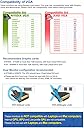
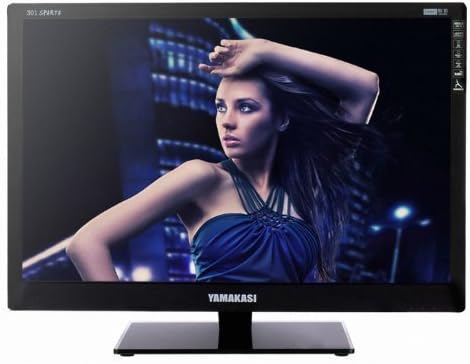
Plug type is C, Korea type, US plug adapter is included. 110~240 free volt power adapter. Please check out before buying. * Yamakasi Defective standard monitor :Up 5 dead pixels are normal. These are not the reason of return or compensate. * By-Pass model (No Ad board in monitor - Monitor use graphic card resource) * PC graphic board should support DVI-D(Dual link DVI) * On-board graphic card can not support QHD. Important notice for Safe usage *Recommended Graphic cards - NVIDIA: GTX460 or more than 1GB memory, with DVI-D Port - ATI: HD6850 or more than 1GB memory, with DVI-D Port *Dual Monitor configuration recommended - GTX580 or HD6970. The GPU shoud have 2 dual linked DVI port. - Please use DVI-D port only. cannot used with DVI-I or DVI-S. Also cannot be used by port converter. (D-sub, HDMI, DP) * Onboard graphics and APU chipset is not compatible. * Laptop or laptop with docking station and Macbook series does not recommended for this kind of By-pass (DVI output only) model. Specifications * Model: YAMAKASI 301 Sparta * Size: 30inch (76cm) Wide * Panel: LG S-IPS * Screen Size: 641.28mm x 400.8mm * Resolution: 2560 x1600 (WQHD) * Back Light: CCFL * Color: 16.7M (8 Bit) * Color Saturation: 72% * Aspect Ratio: 16:9 * Static Contrast Ratio: 700:1 * Brightness:380cd/m2 * Response Time: 6 ms * Viewing Angle: 178ยฐ/178ยฐ * In put port: DVI(Dual-Link) * Typical Power Consumption: 117W * Max Stand by Power(DPMS):2.5W * Vesa Mount: 100mm x 100mm * Function: Swivel * Dimensions (Included Stand): 695mm x 524mm x 180mm * Dimensions: 695mm x 470mm x 78mm Review: Doesn't last - Initial thoughts on receipt of item: Fantastic value. Picture looks amazing. If you do much work with spreadsheets, programming, etc, you need to get one of these! Very good for productivity. Even though the monitor itself is an off-brand, the LCD panel is made by Samsung and very high quality. But you do need a dual link DVI capable graphics card. It doesn't do DisplayPort, but that's clearly indicated in the description. Follow up: Customer service is terrible. Monitor failed just over 1 year later. Responses have been very slow and I'm told repairs may cost more than the monitor. Multiple other customers have left similar reviews. I wish I had just spent the extra money and got a more trusted brand. Review: Great budget monitor for gaming or productivity - The Sparta 301 is a great monitor for the price. The 30" display at 2560 x 1600 resolution provides a ton of screen real estate, and I find the 16:10 aspect ratio essential for gaming and working on long documents or writing code. The brightness is very good and the black level performance is acceptable. The matte coating is also quite acceptable. Although the coating is slightly grainy, I find that it is a non-issue at my regular viewing distances of about 18 - 22" or 46 to 56 cm. The panel has a five-or-fewer dead pixel guarantee, and mine has one or two, but they aren't very noticeable under regular use. Games like Crysis 3 or IL-2: Battle of Stalingrad look great on this monitor, and while I have not color-calibrated, I have found the large area to be very nice for photo editing. The monitor is quite bare-bones. There are seven buttons, but only three are labeled and have any effect (power and brightness up/down). There is no OSD of any kind. The stand swivels horizontally, but has no vertical adjustment or tilt. I placed mine on a monitor riser stand, and slipped some pieces of cardboard under the riser's front legs in order to get the desired height and tilt angle. The user manual is in Korean only, but the monitor has no additional functions so it doesn't really matter. Although it seems strange, the product information is correct in stating that only a DVI-D port and cable will function with the Sparta 301. Although DVI-I also provides dual-link capability, DVI-I is NOT compatible with the Sparta 301 (I have confirmed this personally). Finally, the provided, external power supply is a Korean 190 - 220V unit which has been safety tested at 110 - 120V (it comes with a Korean to US outlet adapter). As a result of the lower voltage, the unit gets as hot as 125F under continuous use. To compare, my Dell IPS panel (with an internal power supply) runs at ~110F. For now, I have simply set the power supply in the open window behind my desk, but I am considering replacing it (all that heat is just wasted electricity). The power supply has a standard 4-pin Kycon connector, 24V 7A output, so in theory it shouldn't be *that* difficult to find a replacement. The coating, non-adjustable stand and power supply issues do leave something to be desired, but at $400, the Sparta 301 remains an excellent monitor choice for gaming or productivity.
| ASIN | B00HJFL8VY |
| Brand | YAMAKASI |
| Color | Black |
| Connectivity Technology | dvi-d |
| Contrast Ratio | 700:1 |
| Customer Reviews | 2.6 out of 5 stars 9 Reviews |
| Display Resolution Maximum | 2560 x 1600 |
| Display Technology | LCD |
| Display Type | LCD |
| Hardware Connectivity | HDMI |
| Image Contrast Ratio | 700:1 |
| Item Dimensions D x W x H | 3.07"D x 27.36"W x 18.5"H |
| Manufacturer | WITECH INSTRUMENT |
| Mounting Type | Wall Mount |
| Native Resolution | 2560x1600 |
| Resolution | QHD Wide 1440p , QXGA Wide |
| Response Time | 6 Milliseconds |
| Screen Finish | Glossy |
| Screen Size | 30 Inches |
| Screen Surface Description | Glossy |
| Specific Uses For Product | personal |
| Total Number of HDMI Ports | 1 |
| UPC | 887810020233 |
| Viewing Angle | 178 Degrees |
G**G
Doesn't last
Initial thoughts on receipt of item: Fantastic value. Picture looks amazing. If you do much work with spreadsheets, programming, etc, you need to get one of these! Very good for productivity. Even though the monitor itself is an off-brand, the LCD panel is made by Samsung and very high quality. But you do need a dual link DVI capable graphics card. It doesn't do DisplayPort, but that's clearly indicated in the description. Follow up: Customer service is terrible. Monitor failed just over 1 year later. Responses have been very slow and I'm told repairs may cost more than the monitor. Multiple other customers have left similar reviews. I wish I had just spent the extra money and got a more trusted brand.
R**E
Great budget monitor for gaming or productivity
The Sparta 301 is a great monitor for the price. The 30" display at 2560 x 1600 resolution provides a ton of screen real estate, and I find the 16:10 aspect ratio essential for gaming and working on long documents or writing code. The brightness is very good and the black level performance is acceptable. The matte coating is also quite acceptable. Although the coating is slightly grainy, I find that it is a non-issue at my regular viewing distances of about 18 - 22" or 46 to 56 cm. The panel has a five-or-fewer dead pixel guarantee, and mine has one or two, but they aren't very noticeable under regular use. Games like Crysis 3 or IL-2: Battle of Stalingrad look great on this monitor, and while I have not color-calibrated, I have found the large area to be very nice for photo editing. The monitor is quite bare-bones. There are seven buttons, but only three are labeled and have any effect (power and brightness up/down). There is no OSD of any kind. The stand swivels horizontally, but has no vertical adjustment or tilt. I placed mine on a monitor riser stand, and slipped some pieces of cardboard under the riser's front legs in order to get the desired height and tilt angle. The user manual is in Korean only, but the monitor has no additional functions so it doesn't really matter. Although it seems strange, the product information is correct in stating that only a DVI-D port and cable will function with the Sparta 301. Although DVI-I also provides dual-link capability, DVI-I is NOT compatible with the Sparta 301 (I have confirmed this personally). Finally, the provided, external power supply is a Korean 190 - 220V unit which has been safety tested at 110 - 120V (it comes with a Korean to US outlet adapter). As a result of the lower voltage, the unit gets as hot as 125F under continuous use. To compare, my Dell IPS panel (with an internal power supply) runs at ~110F. For now, I have simply set the power supply in the open window behind my desk, but I am considering replacing it (all that heat is just wasted electricity). The power supply has a standard 4-pin Kycon connector, 24V 7A output, so in theory it shouldn't be *that* difficult to find a replacement. The coating, non-adjustable stand and power supply issues do leave something to be desired, but at $400, the Sparta 301 remains an excellent monitor choice for gaming or productivity.
R**I
A review of this average but almost awesome monitor
Pros Nice resolution is, No dead pixels on the one a received. Nice colors Cons Power Connection to the back is the WORST! The stand is incredibly flimsy tons of flex and wobbliness that you do no want going on with a huge 30 inch monitor. After wall mounting this and tapping the power connection in place similar to what an IV look like tapped in it works fine. Was also able to get a nice over clock on the refresh rate of 75 with EVGA's tool System Specs I7 4790K 2 1 TB Samsung EVO SSD's 16 GB of DDR3 1600mhz 2 EVGA GTX 980's in SLI ASUS Z97 SAbertooth Corsair H80i liquid cooler Corsair C70 Case Seasonic 1000 watt platinum psu
R**Y
Beware !!!
What a rip-off !!! 2560x1600 ???? it is actually no better than a regular monitor, and the tech department is so rude and insulting. I will never do business with this company again. They need to translate "customer service" to Korean a lot better. Very cheap product and they make it impossible to return, so as I said What a rip-off. Don't try to save money, this is not worth the box it comes in.
C**T
Fantastic price for large, high resolution monitor.
Purchased mine about 2 years ago. I was surprised even how fast it arrived. I am very happy with it. No dead pixels, price back than was good, but now I see even better. I needed a very high res, this was less then half price as other known brands at the time. I did have some issues with video about 2 months of usage, The tech support was very helpful after several emails and a call, some trouble shooting turned out I had a bad video card. Replaced it and been using it happily since. I am probably going to purchase another to keep as backup at the price I see today.
D**K
Dead after 10 months
Mine died today. Owned it for 10 months. Pros: 1) Great value for this size/resolution. It's rare to find a 16:10 monitor at this size, and of the ones they have, they are usually $1000+. Cons: 1) Almost completely featureless. The thing doesn't tilt and barely swivels 2) The power brick becomes extremely hot 3) The brightness could be a lot better. Even turned up at 100% it looked dark next to my second Acer monitor. 4) Color reproduction is so-so. Summary: A great value, but if I had to go back in time I'd shell out the extra money for a monitor that didn't die in less than a year.
A**A
Good resolution and value, but no flexibility with connections
Pros: Resolution, price. (kinda why I bought it) Cons: Expect a dead pixel or two, (in my case, 5x dead pixels) I think that's why these are cheap. You'd have to be looking for it though, they're hard to notice; a good test is to open up paint and splash the screen with all black, then set to full-screen. Only one input - dvi-D; and does not include the cable. Does not include an internal scaler. This means that if you are using onboard video or a lower end video card that cant push dual link, you will end up with 1280x768; and it is not supported, as the seller claims it will only work on that resolution for a short period of time before going dead. (I was hoping to run 1600x1280 until my video card showed up, but no such luck without the internal scalar.) Does not include HDMI connectivity, nor a display port, nor even VGA that I would've expected to be standard. **update: The product stopped working after some use; it would just turn on with a red light expecting a video signal from my GTX760. Leaving the monitor unplugged for a few hours alleviated the symptoms for a while. When it happened a second time, contacted them for a refund. Oh boy, did the seller not have appetite for returns; and a strong language barrier made the confrontation last days. They demand pictures of your rig, video card, connections, cord, etc., will tell you at least a half-dozen times to check your connection, and will make it very clear that 90% of customer returns the product is found to be just fine. Be prepared to make a strong case if you attempt to return it, have lots of patience, and most importantly: know for a fact that your equipment is not the culprit.
M**Z
Expect to replace this product soon!
A company I work for purchased 20 of these during 2014/2015 because they were "cost effective" for programmers. A handful of them went bad in 2016 and now we're replacing all of them in 2018 due to fire hazards with their power supplies (nearly started a fire when a few melted). I know this particular product is no longer available, but I would not recommend any Yamakasi branded product unless you want a replacement in a few years.
Trustpilot
2 weeks ago
4 days ago