Buy anything from 5,000+ international stores. One checkout price. No surprise fees. Join 2M+ shoppers on Desertcart.
Desertcart purchases this item on your behalf and handles shipping, customs, and support to British Virgin Islands.
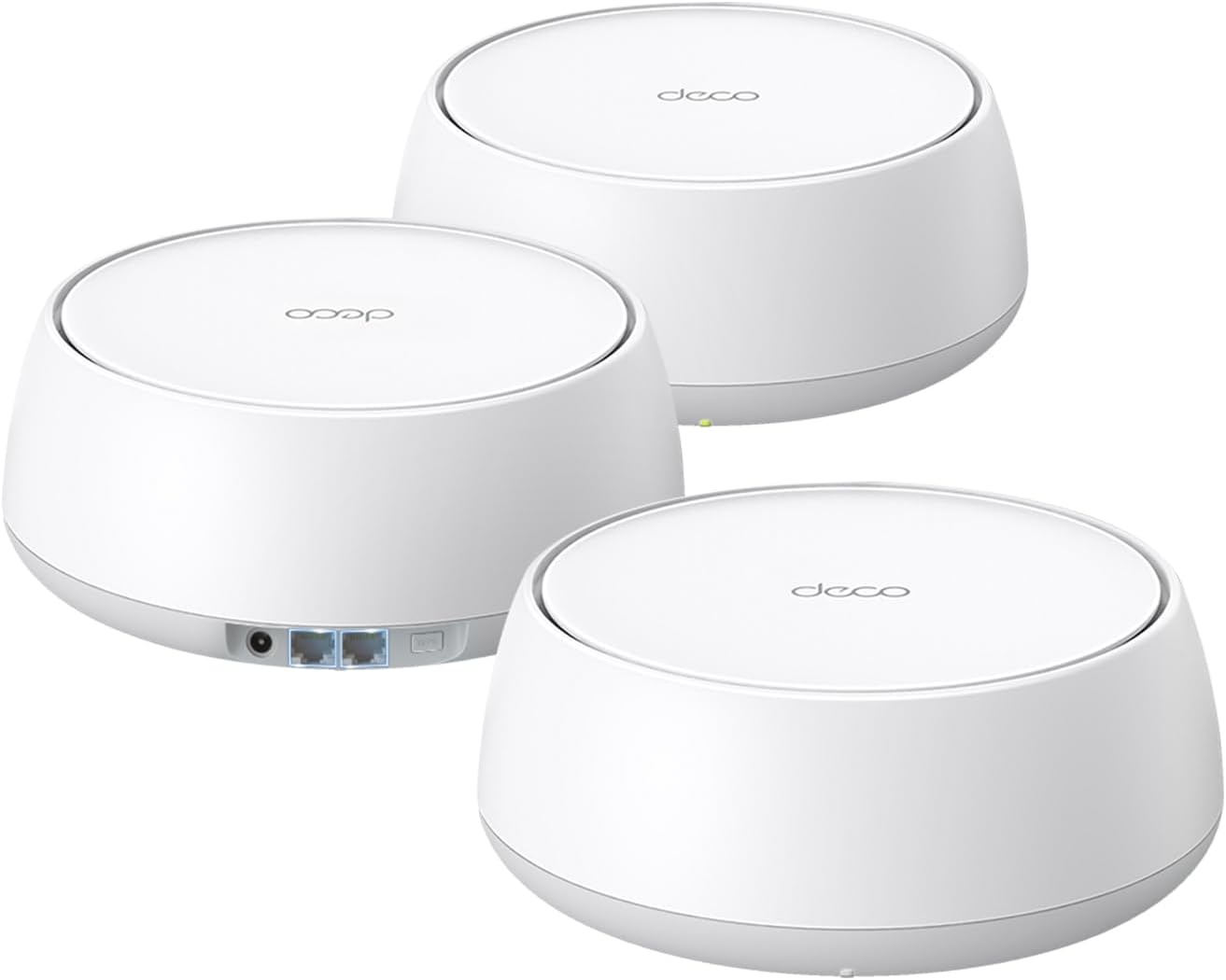
🚀 Future-Proof Your Home Network with TP-Link Deco 7 BE25 – Speed, Coverage, and Security in One!
The TP-Link Deco 7 BE25 is a cutting-edge WiFi 7 mesh system delivering up to 5 Gbps dual-band speeds and seamless coverage across 6,600 sq.ft. Equipped with AI-driven roaming, dual 2.5 Gbps wired backhaul ports, and advanced HomeShield security, this 3-pack system supports over 150 devices, ensuring ultra-fast, reliable connectivity for streaming, gaming, and smart home integration.


| ASIN | B0DKVDZXSN |
| Antenna Location | Home |
| Antenna Type | Internal |
| Best Sellers Rank | #3 in Computers & Accessories ( See Top 100 in Computers & Accessories ) #1 in Whole Home & Mesh Wi-Fi Systems |
| Brand | TP-Link |
| Built-In Media | 1 RJ45 Ethernet cable, 3 Deco BE25 units, 3 Power adapters, Quick Installation Guide |
| Color | White |
| Compatible Devices | Gaming Console, Personal Computer, Smart Television, Smartphone, Tablet |
| Connectivity Protocol | Wi-Fi, Ethernet |
| Connectivity Range | 6600 Square Feet |
| Connectivity Technology | Ethernet, Wi-Fi |
| Control Method | App, Remote, Voice |
| Controller Type | App Control, Voice Control |
| Coverage | 6600 square foot |
| Customer Reviews | 4.4 out of 5 stars 1,818 Reviews |
| Data Transfer Rate | 5000 Megabits Per Second |
| Frequency | 5 GHz |
| Frequency Band Class | Dual-Band |
| Has Internet Connectivity | Yes |
| Is Modem Compatible | Yes |
| Item Weight | 3.3 Pounds |
| LAN Port Bandwidth | 2.5 Gbps |
| Manufacturer | TP-Link |
| Maximum Upstream Data Transfer Rate | 5000 Megabits Per Second |
| Mfr Part Number | Deco BE25(3-Pack) |
| Model Name | Deco BE25(3-Pack) |
| Model Number | Deco BE25(3-Pack) |
| Number of Antennas | 2 |
| Number of Ports | 2 |
| Operating System | OpenWRT |
| Other Special Features of the Product | Alexa Compatible, Guest Mode, Internet Security, Parental Control, Remote Access |
| Router Firewall Security Level | Advanced |
| Security Protocol | WPA-Personal, WPA2-Personal, WPA3-Personal |
| Smart Home Compatibility | Smart Home Compatible |
| Special Feature | Alexa Compatible, Guest Mode , Internet Security, Parental Control, Remote Access |
| UPC | 810142820318 |
| Unit Count | 3.0 Count |
| Warranty Description | 2 Year Manufacturer |
| Wi-Fi Generation | Wi-Fi 7 |
| Wireless Communication Standard | 802.11.be, 802.11ac, 802.11ax, 802.11g, 802.11n |
| Wireless Compability | 802.11.be, 802.11ac, 802.11ax, 802.11g, 802.11n |
G**A
So good we ordered more — flawless WiFi upgrade
The TP-Link Deco BE25 (Deco 7) Dual-Band BE5000 WiFi 7 Mesh system has been an absolute game changer for our home network. Setup was surprisingly simple, and within minutes we had strong, stable coverage throughout the entire house. Dead zones we used to struggle with are completely gone. The signal stays consistent even when moving between floors and rooms, which makes a huge difference for streaming, video calls, and smart devices. Speed and reliability have both been noticeably improved. Everything feels faster and more responsive, especially with multiple devices connected at once. The app is also easy to use for managing settings and monitoring the network. It worked so well that we ended up ordering more units to expand coverage even further. That really says it all—this system just works, and it works well. Highly recommended for anyone looking to upgrade their home WiFi to something truly reliable.
E**C
Easy Setup, Great App, Really Fast
This is a great router with a really helpful, well designed app. It’s been a number of years before I’ve had to setup a router band while I don’t remember it being too difficult in the past, this router was extremely easy to setup. Step 1) Plug in the routers. Step 2) Open the app and follow the simple instructions. Our routers were setup in 2 minutes and have been nearly flawless ever since. They do have ports in the back you can plug directly into but that’s not something I use. It’s a major upgrade from our ISP provided router. The only issue that I have had is with just one device switching back and forth through the mesh system/different routers. The computers VPN didn’t like that and caused an issue. Luckily it was an easy fix in the app to keep my computer on one of the routers. All said, these work great, I’m getting Gbps speed, and the app is extremely well designed. The app allows for monitoring, adding a VPN to some or all devices, a dedicated IOT network, and honestly a lot more. I am very happy with this purchase.
M**O
Easiest connection and super coverage
No more dead spots! Easiest installation I’ve ever experienced! Plugged them in, connected the main by Ethernet cable to my Xfinity router, gave them a name and password and off they went. All three connected to each other flawlessly and I now have solid WiFi throughout my 2800sq. ft. home; even to my outside cameras.
V**E
Fixed my brick apartment problem
Moved to a new apartment and discovered that all walls had full brick hidden underneath. No access to coax except the front of the unit, and my office was at the far back of the unit 50+ feet away and separated by 4 brick walls. I tried several other lower end solutions and could not get anything higher than 30-40 Mbps in my office with lots of packet loss (1 Gbps coming out of the modem in the living room.) Some devices couldn't even see or connect to the wifi network in the back of the unit. This solution was incredibly easy to configure and setup. App works very well and has a lot of fun options for those who like to tinker. After a little tweaking to find the sweet spots for the 2 nodes, I now get 400-700 Mbps through the first 2 brick walls and 300-500 Mbps in my office with 0 packet loss. I'm sure I could improve the speed further upgrading to one of the $500 mesh solutions available, but for how difficult wifi range is for my brick unit, this device was a lifesaver and I highly recommend giving it a shot for anyone struggling with signal loss.
I**P
Great signal throughout the house and beyond
Got this set of 3 to replace the single rental EERO that the service provider put in when my mom got fiber. My biggest issue with the EERO was that the service provider set it up, meaning I had no way to control the device. Specifically, my mom is old and apt to click on scam ads or to call the number when a scam popup freezes her keyboard (thanks a lot, Zuckerberg). The only layer of protection I can give her is an adblock DNS, and to do so I need control. Also, I could not get her living room TV to connect to WiFi and signal was starting to drop off a bit in rooms farthest from that single device. At the time of purchase, this was the most economical 3 mesh device WiFi 7 system from a well established brand. The devices are a bit bulky, but are not eye sores and seem to be very well made. The available wall mount brackets for this style router appear to be more secure than the ones for the cylindrical models, and they won't look as goofy hanging on the wall which is another plus. Mounting brackets are sold separately. Her TV still does not connect to WiFi, so placed one of these near the TV and connected it via ethernet cable. The third is in one of the rooms farthest from the main base. The range is quite acceptable, with my phone getting full signal strength in the yard @ >50' from the house in some places. During setup, was given the option to set up MLO WiFi, aka Multi-Link Operation, which creates a second WiFi network that may provide higher throughput than the basic WiFi connection. It is not compatible with all devices, so likely best practice to connect lower need or 'potato quality' devices to the lower throughput base network (phones, TVs, tablets, guests, etc.). The fiber speed is around 300mbps. After extensive Speed Test usage to the point that they stopped allowing me to run Speed Test, both the Base WiFi and MLO WiFi performed similarly with possibly 10-20mbps higher average via MLO. My guess is that MLO may only be truly useful for gigabit connections. Going straight WiFi with these things doesn't add any significant latency or noticeable drop in throughput in my situation, but could be a concern in larger homes and/or when more walls/junk/metal is between mesh devices. Each of these has 2 ethernet ports, and hardwiring them together with ethernet cable will provide the strongest/fastest connection between mesh devices. The theoretical maximum reliable length is 328' (100 meters) for ethernet cable, so quality Cat6 cable could really put some distance between the main base and the 3rd mesh station (possibly with some WiFi dead spots in between). This is not unique to this system, as most mesh devices have 2 or more ethernet ports.
I**Z
Finally Fixed the Dead Zones in My House
I bought this after getting tired of dealing with weak Wi-Fi in certain parts of the house, and the difference was noticeable almost immediately. Setup was much easier than I expected and only took a few minutes. Before installing it, video calls would freeze, pages would take forever to load, and some devices would randomly disconnect when moving farther from the router. Since adding this mesh extender, the connection has been much more consistent and I’m getting coverage in areas that barely had a signal before. I also like that devices seem to switch between the router and extender smoothly without me having to think about it. If you're struggling with dead spots or unreliable Wi-Fi, this has been a worthwhile upgrade.
T**R
Good coverage, Simple installation.
Set-up is intuitive. Wireless range works well enough. I purchased for 2 different family member homes and made my account a manager of both. I can remotely troubleshoot for both them from my phone. I've had some bug issues with the guest network or adding an additional deco unit previously, however I was able to resolve issues quickly. I like that I can name the units then manually route which router each one should get it's feed from because they will all automatically try to connect to the main unit if in range even if signal may be much weaker. The 3 pack coverage is good, and the input voltage it can use ranges from 100V to 240V. One of the homes has similar looking plugs wired with both 110V or 220V so that flexibility was good for me.
3**R
honestly it's worth it, just buy it and be done.
I don't write a lot of reviews except when i feel its really valid. IT hardware is no exception as I have been in IT for over 25 years now and currently an IT Infrastructure manager for one of the largest healthcare org's in the US. Needless to say I know a thing or two. As most people do they get a combo router / firewall / wifi AP all in one unit or worse get one with a modem built in. I have always been with a separate modem and router / wifi / firewall, until now. Backstory: I moved from a 1020sf house on .2 acres to a 3200sf house on 2.2 acres and due to my job I need absolutely spotless wifi in my home and around my home. At first I wanted to see how the TP-Link router would work giving me wifi across the house and even outside (Archer BE9700), it worked OK inside the house but go through the walls and it fell on it's face which is expected to a degree, but where my office is in the basement had 0-1 bars wifi and would constantly drop out plus speed tests showed 60-100mbs for internet at best but other devices were 300-600mb, something wasn't right there with reception. FWIW not mad the router wasn't cutting it for me and needed to add on AP's, actually figured I would need to knowing what i was asking of the network. Internet: Internet is 2gb provided by spectrum. Going OCD: I quickly determined I needed to put in AP's to stabilize my wifi but more so basically make it perfect signal inside the house and give me maximum throughput for the AP's etc. To keep the amount of cables down and maximum flexibility I wanted a POE powered AP, and a 2.5gb link port was nearly essential so i can backhaul using 2.5gb over copper instead of the usual 1gb (i remember 10mb networks and token rings if that tells you anything). From my switch to the BE9700 I have created a bonded pair of (2) 2.5gb cables giving me a 5gb backhaul to the router (way way way overkill but why not), this gives me huge bandwidth to the router in the event i actually ever need it. Why so OCD: I have 11 cameras on the house both outside the house, 1 in the garage, 1 covering entrance to basement from the inside, 1 in detached garage / workshop. I've also got little bits of automation things like switches and such plus (6) 3D printers that are always running and often get large files sent to them. 3D printers are on a 100/1000 switch as they do not have 2.5gb in them so it's useless to use a 2.5gb switch and I do not want to over saturate the wifi (but honestly it's likely so robust it doesn't matter, but printers are in the same room as the switches etc so why not i'm right there). Upgrades: Added 2.5gb 8 port switch with SFP ports for fiber down the road (which might go in the detached workshop garage with 10gb multi mode fiber) (2) AX3000 AP's (only 1 used at this time, likely returning one because results are stellar) (1) BE5000 AP for outside to blast that signal outside without any walls blocking the signal AP's were powered with POE on the cat6 cable to the 2.5gb switch, notice I'm using 2.5gb across the board here??? As i type this review the BE5000 AP is still inside but at a window (placing outside in the next 48 hours) and 1 of the AX3000's is on the far side of the garage on the furthest wall. Inside the house in my office i now get perfect signal and the network went from marginal to blazing fast, seriously. I created a mesh network of sorts in the house with all AP's using the same SSID and Password so it will seamlessly move around from AP to AP as needed when signals get stronger or weaker, this is how enterprise systems essentially work. In the end the BE9700 wifi has no clients on it at all, even devices that are under 10' away do not check into it and check into the AX3000 or BE5000 AP so that should tell you how well they work! The client devices are connecting to the respective AP closest to the device which is what it should be doing so the AP's essentially have half the house load of all things wireless and a huge 2.5gb backhaul (under 75' ea). Doing it this way will show in the router that these devices are "wired" but they are really wireless using the AP's and not the router for WiFi. I prefer to have my products physically wired as opposed to using wireless but the results are soo good that I am nearly sold on wireless now. You can trust me on this review, this is what i do for a living so i am really picky.
Z**I
قوي
ممتاز وقوي
A**I
منتج ممتاز
المنتج جميل ولكن يجب الانتباة إلى المواصفات قبل و بعد الطلب لان له عدة خيارات من حيث القوة و المسافة للأداء
N**T
Fácil red en malla , los puedes combinar con otros decos de modelos anteriores.
La red en malla de Tp link es muy fiable y es muy fácil de instalar. Este profe ductor lo usé para extender mis deco M5 , los puse como principales y tener wifi 6 en las zonas mas importantes y los m5 en zonas secundarias. Aunque la ventaja de tener los decos vía inalambrica es brutal... la diferencia con poder cablear algunos los hace muy rápidos y eficientes.
J**J
Great Upgrade Over Eero – Fast and Easy to Set Up
The Deco BE25 has been a fantastic upgrade from my previous Eero setup. The link between the two nodes is incredibly fast, delivering consistent performance throughout my home. Setup was a breeze—straightforward and quick, even for a non-techie. One small downside: it comes with US plugs by default, so I had to order UK plugs separately. Also, I wish it was powered via USB-C for more flexibility. Still, these are minor issues compared to the overall performance and ease of use. Highly recommended if you're looking to step up your home network.
C**1
For a British consumer, this is a nightmare.
This router has a US plug, not a UK plug, which was not mentioned in the product information. It is difficult to imagine buying a US electrical appliance on Amazon UK. How should a consumer distinguish between them?
Trustpilot
2 days ago
1 day ago