Desertcart purchases this item on your behalf and handles shipping, customs, and support to British Virgin Islands.
๐ Elevate your desk game with the Deco Gear 39" curved powerhouse!
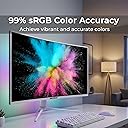
The Deco Gear 39 Curved Ultrawide Gaming Monitor features a 39-inch 2560x1440 QHD VA panel with a 3000R curve, HDR400 support, and 99% sRGB color accuracy. It boasts a rapid 165Hz refresh rate with Adaptive Sync for smooth gaming, a clutter-free 65W USB-C single-cable connection, and ergonomic adjustments plus eye-care technologies, making it ideal for professionals and gamers seeking immersive visuals and productivity in a sleek white limited edition design.


| ASIN | B0CNBRW7GQ |
| Adaptive Sync | FreeSync |
| Additional Features | Adaptive Sync, Blue Light Filter, Flicker-Free, OverDrive and Game Plus, Picture By Picture, Picture In Picture |
| Aspect Ratio | 16:9 |
| Best Sellers Rank | #29,895 in Electronics ( See Top 100 in Electronics ) #1,118 in Computer Monitors |
| Brand | Deco Gear |
| Brightness | 350 candela_per_square_meter |
| Color | White |
| Color Gamut | 99 |
| Compatible Devices | Laptop, Desktop, Gaming Console, Some Tablets |
| Connectivity Technology | DisplayPort, HDMI, USB Type C |
| Contrast Ratio | 3000:1 |
| Customer Reviews | 4.0 out of 5 stars 639 Reviews |
| Display Resolution Maximum | 2560 x 1440 |
| Display Technology | VA |
| Display Type | VA LED |
| Global Trade Identification Number | 00196641100657 |
| Hardware Connectivity | DisplayPort, HDMI |
| Image Contrast Ratio | 3000:1 |
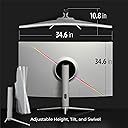
| Item Dimensions D x W x H | 11.3"D x 34.6"W x 25.4"H |
| Item Weight | 25.6 pounds |
| Manufacturer | Deco Gear |
| Model Name | DGVIEW391WHT |
| Model Number | VIEW391WHT |
| Mounting Type | Wall Mount |
| Native Resolution | 2560x1440 |
| Number of Component Outputs | 4 |
| Picture Quality Enhancement Technology | HDR400 |
| Pixel Pitch | 0.33 |
| Power Consumption | 65 watts |
| Processor Count | 1 |
| Refresh Rate | 165 hertz |
| Resolution | QHD Wide 1440p |
| Response Time | 25 milliseconds |
| Screen Finish | Non-glare |
| Screen Size | 39 inches |
| Screen Surface Description | Non-glare |
| Shape | Rectangular |
| Specific Uses For Product | Gaming |
| Total Number of HDMI Ports | 1 |
| UPC | 196641100657 |
| Viewing Angle | 178 degrees |
| Warranty Type | 1 Year Limited Warranty |
O**H
So far so good
So my office got me a laptop with the resolution of a decent monitor in 1999. It's pretty much useless to me as anything other than a keyboard and to plug into a different monitor, so I decided to get the biggest monitor I could find rather than try and work on multiple screens. This definitely seemed too good to be true compared to the competitors and this particular model had fairly mixed reviews but I figured why not. The extra screen space is super helpful with my job -- I figure on the 1440 I can pull up 3 documents simultaneously and I can probably pull up 4-5 on this. As for the product -- it did work out of the box with no functional issues. Of course, two screws on the back of the monitor had fallen out before I even got the monitor out of the box and every other screw was also extremely loose. Everyone is quite right that this thing feels a little cheaply built. Highly recommend checking the screws (and I wonder if that is leading to some peoples' issues with this product). That said, it works for me. No dead pixels, no damage, no flickering. The resolution is definitely as stated and the colors are surprisingly sharp. Good luck finding any office laptop that will run this resolution with over 60hz refresh rate but apparently it'll go to 75 which, imo, is good enough for most single-player gaming (I'll update if I give it a try - kind of dying to play Total War or RDR at this res if they even support it). Rumor has it that it's an LG panel and I wouldn't be surprised. It also comes with these features included; Freesync, super resolution, PIP, all pretty handy but stuff I haven't had occasion to use yet. I'll update as I use them.
A**Y
Great monitor - great deal - easy on the eyes for coding - recommend
Great monitor - good resolution, easy on the eyes, and just that extra sideways space that's super helpful. Half price of similar others, was sceptical but happy I have it a shot (and the size is just right) NOTE: MAC: On MacBook Pro the HDMI connector doesn't support this high a resolution and looks weird when you first connect it. You have two options: a) can make HDMI support it but need to take it down from 60hz refresh rate to 30hz: need to install custom software that modifies the built in resolutions, or b) give up on HDMI and go to usbc (much more built in support.. so put the lower res monitor on hdmi) NOTE: VESA: my VESA mount didn't fit and had to be filed down - after that it was able to connect. And if you hook up vesa with regular screws the decorative piece doesn't fit anymore. went back to included stand and it's fine.
J**.
Buyer Beware - product failure & the worst support
SUMMARY: Originally loved this monitor, worked well until it didn't. The USB-C connector failed, making it challenging to work with my set up and peripherals. Product support is HORRIBLE - so if you device has an issue you are likely on your own/losing out on the money you invested in the purchase. I wanted to give this 2 stars as the Monitor was great until the USB-C port failed. I have a work around but picture quality has suffered. 1 star due to horrible support ( can't be reached and when you do they do not follow through on any actions). Looks like your money can be better invested in other alternatives *will update if/when DecoGear support responds --------------------------- THE GOOD: - PRICE: I did a lot of research - this was the best option at a great price point that provided a curved monitor / built in hub / monitor size / picture quality - SIZE: the 40 inch was a perfect option and fits my set up well. - BUILT IN HUB: The monitor has a built in hub and additional power out options, making it ideal for connecting and integrating multiple devices and peripherals. I aim for a minimalist desk set up with fewer / hidden wires and this helped a lot toward that end --------------------------- THE BAD: - TECHNICAL FAILURE: About 2-3 months into owning the monitor, I began to have issues with my devices connecting into the USB-C port on the monitor hub. This was my primary connection and provided the best picture / resolution from my devices. - SUPPORT: Horrible all around - It is near impossible to get a human on the phone or engaged in a chat. After a long effort I was able to make progress and they agreed to send replacement monitor when it was back in stock, they said to expect it within a month and it has been over 6 months now....can't seem to get them back on the phone or in chat after MULTIPLE attempts since they promised to send replacement (note: I would have to ship monitor I have now back - so if you do make purchase save the box it came in just in case)
P**E
Iโm a dev & Iโm impressed
With the mixed reviews and cheap price, I was skeptical. But this curved 40โ 22:9 5k2k monitor is great. Donโt know if it will last bc of previous reviews, so I got the extra warranty. But first thoughts, Iโm impressed. The stand is solid and make setting up so perfect, I ditched my favorite articulating monitor arm. I can successfully get full res with Display Port via a dock or direct USB-C. The USB ports work if you go straight USB-C. Just note that to set my Mac at full res, the text is super clean but a bit too small. But would be epic for gaming, Iโm sure. Iโm running slightly lower than full res, since my primary use is coding. With BTT, I can customize my hot areas and drag my windows onto them for custom repeatable window sizing & placement. With BetterDisplay Pro, I can do PIP to add a browser in full screen within the PIP, allowing me to view video or websites without wasting space on the window frame and other browser UI stuff. Also, the blacks werenโt quite as rich as I hoped, but a minimal adjustment to the black compensation setting in the monitorโs built-in setting and itโs looking crisp without messing up the colors or contrast curve. A+ so far. ๐ค๐ผ
R**N
Lots of visual real-estate.
I just received my second monitor. I accidently got the white frame but so far so good. I plan to upgrade my video card to max the capabilities but right now running with onboard video and no issues. I am not sure there is a larger monitor for this price. Seems like a good deal. The only issues I see is: 1. No suggested support for the weight. This this is about 15 - 20 lbs. I bought 2 sets of these and double them and placed about 6 inches from each end. See link --- https://www.amazon.com/dp/B07NKP4MPZ?ref=ppx_yo2ov_dt_b_fed_asin_title&th=1 2. Mounting to a custom stand is a little wonky. Sems a little hazardous for the monitor. 3. Strongly suggest two people to mount. Safer for you and the monitor. 4. Have not found a place to register the monitor, kind of concerning. Might want to buy Amazon protection. 5. Packing. Amazon shipped on in a large box but the second one was not. The second one showed signs of where one corner was dropped. I will leave another review later after I get both monitors connected.
D**P
THE BEST MONITOR IN IT'S CLASS, ONCE YOU SET EVERYTHING CORRECTLY
This is the best monitor I've ever owned. It's very easy to set-up with some required study. The graphics card and Windows Operating System are the only obstacles because they will look at it as they see it should be, based on what you used before. Auto-detection at first does not display properly, but it's easy to fix this with the provided instructions, and within Windows. The video card software (I have AMD) will fix itself if you reset the software and allow it to truly see what this monitor does. The refresh rate is 60 Hz by default, but you can easily switch to 75 Hz within Windows. Games see it fine, once you have it set properly. FSX needs to be told about the new screen size, best done through the Aircraft.cfg file. As you play with the built-in monitor settings with the buttons on the bottom right, you can control so many things your head will spin. I did all of this in about 1 hour's time. The only problem I had was trying to read the details of initial construction, especially attaching the stand. Although screw holes are countered to make it easier to figure out, you can still do it wrong if you rush it, like me. You can also wall mount this monitor, but you need additional hardware available on Amazon (usually listed under this monitor as additional items). The packaging was done well, and I could see that UPS didn't use much care getting it to me, and the contents were protected from their lack of concern. "THE WORLD ON TIME" doesn't necessarily mean "In Good Condition", and the manufacturer must know this very well. It only took a few days to arrive, and was on-time as indicated by the original delivery date when I ordered. I use this monitor in my bedroom mainly for Flight Simulation, and now I can see details while lying on my bed a good distance away ... before it was a squinting game. I really don't think any of the issues I've mentioned above should deter anyone from purchasing this monitor, if you want the best of the best, on time, and for an unbeatable price. I'd have to say this monitor is worth at least $100 more than it is being sold for. Take my word for it ... I've been around the block with monitors since day one.
G**N
Totally recommend
Best money I have spent on anything computer. I bought it just a few months ago. Not sure of the screen quality, I think itโs great. The size is amazing. For that alone, I recommend it. The only issue I have had is every time I stand up from my chair, it goes black for a few seconds. Every time. Apparently this is common with this brand and many others. Static electricity causes it. That happened on carpet and does not seem to do it on a wooden floor. Sound is horrible, but I donโt use it for sound.
K**U
Best cheap 5k2k, amazing next to 32" 4k
If you need 4k, but ultra wide 5120x2160, you have very few options and none of them are OLED. This model is by far the cheapest, uniform brightness, and supports freesync and 75 Hertz refresh rate... You'll have to spend at least double to get a Dell model with 120hz support, if not triple. This is bare bones, but does the job, has decent speakers in a pinch and supports USBC. Stand is sturdy and height adjustable... If you don't have space for three 32-in 4K monitors, get this and place it next to a single 32 inch. It supports splitting the screen in half, 2560x2160, which is nice. It's no the best contrast, and looks average off angle, but for the price, it's a steal.
Trustpilot
4 days ago
2 weeks ago