Desertcart purchases this item on your behalf and handles shipping, customs, and support to British Virgin Islands.
๐ฅ๏ธโก Unlock the Power of Six Displays and Lightning-Speed Workflow โ Because Your Desk Deserves the Best!
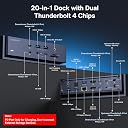
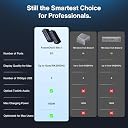
The iVANKY FusionDock Max 1 is a premium docking station designed for MacBook Pro models with M1 to M5 chips, enabling up to six extended displays (quad 6K@60Hz + dual 4K@60Hz) via dual Thunderbolt 4 chips. It features a powerful 180W adapter for up to 96W laptop charging, ultra-fast 40Gbps data transfer across six Thunderbolt 4 ports, seven USB 3.2 ports, SD/TF card slots, and a 2.5Gbps Ethernet port. With plug-and-play ease, a 24-month warranty, and dedicated customer support, itโs the ultimate productivity hub for professionals demanding flawless multi-display setups and high-speed connectivity.


| ASIN | B0FQJ3Q5ZB |
| Additional Features | Plug and Play |
| Best Sellers Rank | #6,826 in Computers & Accessories ( See Top 100 in Computers & Accessories ) #488 in Laptop Docking Stations |
| Brand | IVANKY |
| Color | Black |
| Compatible Devices | MacBook series(2016 and after) |
| Customer Reviews | 4.2 out of 5 stars 449 Reviews |
| Data Transfer Rate | 40000 megabits_per_second |
| Hardware Interface | Ethernet |
| Manufacturer | Shenzhen Velocity Technology Innovations Co., Ltd. |
| Minimum Required Operating System Version | Mac OS 13 Ventura |
| Number of Items | 1 |
| Number of Ports | 15 |
| Operating System | macOS |
| Special Feature | Plug and Play |
| Total USB Ports | 7 |
| Total Usb Ports | 7 |
| Unit Count | 1 Count |
| Warranty Description | 24-month Warranty |
P**E
Really nice product, great performance, great support
The FusionDock Max 1 is a great product and IVANKY "does support right" My experience was so good that I ended up getting a second product variant for my wife. Anyway, the Max 1's performance was perfect for my M1 based Macbook Pro application since it enabled me to get two screen support (using DisplayLink) plus support a bunch of additional ports including a high speed external M2 SSD for my photo library. With the awesome bandwidth both from the Mac and to the SSD, it's like working with a local SSD. With the I/O that's supported I can hook up all the peripherals I have or imagine to have. Although this product is more expensive than other products, it was worth it to me to be assured that I was not going to experience any I/O bottlenecks. I did have a problem with the first item shipped. One of the HDMI ports was intermittent. It didn't bother me since these things happen. Customer support was awesome and sent me a replacement unit right away which made all the difference to me Build quality is solid for the unit itself, cabling and power supply. Very happy with this purchase.
B**N
Very handy for my purposes, and great customer service
I use this unit in my office, running multiple Studio Displays. It's been great and has tons of ports, plus it has optical audio out and ethernet. After about 12 months of intermittent use, I had an issue where one channel would flicker on my Studio Displays. After trying all combinations I was able to isolate the issue to the top input port or its internal channel. After reaching out to customer service, a new unit arrived within a couple of days. So far, no other issues and it's one of the few units that can handle parallel TB channels and 4 Studio Displays on a silicon Mac.
A**H
Works great on a M4 Max.
When I received the package, I thought for sure there was a brick in the box instead of a dock. This thing is SOLID! It's an all metal enclosure with a very solid feeling power supply. The thunderbolt cables supplied are very high quality and long enough to give you room to place the MacBook where you need it. I very much like the look of the dock and the rear ports are adequate while placing enough ports on the front to make it easy to use without having to reach behind it during normal daily use of plugging and unplugging various devices I need to test (I'm a mobile app developer). The dock gets very warm, hot even, to the touch. Do not place anything on top of it. It does have an internal fan, however I do not normally hear it running, but I also have an air purifier running 24/7 in my office, so I probably wouldn't hear it unless it was loud. I worry about the longevity with it running so hot, but we will see how long it lasts. For the price, I hope it doesn't burn out, especially since I like it so much. I have a MacBook Pro M4 Max and it is driving 3 external monitors with no issues so far. For testing, I did try it on a Mac Mini M2 Pro and it would not drive more than 2 monitors from the dock, no matter what configuration of cables I used. This isn't designed for Mac Mini's, but I thought I would note that in case anyone was wondering. The only weird issue I had was this morning. I had taken the MacBook into the other room and when I came back in, I just put it on my desk and didn't connect it. I let it go to sleep on it's own. I connected the thunderbolt cables and when my external keyboard lit up, I moved the mouse and my monitors came on, but my MacBook screen did not. It stayed black. It was showing up in the display manager, but I could not get it to turn on. I tried unplugging the cable and it was still off, even after shutting the lid and re-opening it. I had to plug it back it, shut it down completely, and turn it back on to get the screen come back on. I am up to date on the latest OS. This might be a Mac bug, or it might be a dock bug, hard to say right now. Overall, I would definitely recommend it.
T**S
Exactly the dock I needed for my MBP! Great customer support!
When I transitioned from an iMac to my MacBook Pro as my main editing computer, I was looking for a dock that provided as many ports as I had on my desktop. This dock from iVanky was the only one that had the connections I needed, and then some. I was hesitant on the price but figured it was cheaper than upgrading my aging iMac so I took the plunge. When the package arrived I was impressed with the heft to it. This dock is not cheap....and not cheaply made. It is solid and built like a tank! It looks great on my desk and has worked perfectly until...... 6 months later. Just this past week, one of my USB C ports quit working. I tried multiple devices and it was completely dead. I contacted iVanky, and they walked me through some troubleshooting steps. I made a video demonstrating what was occurring and they quickly agreed to replace my dock. 3 days later, the package arrived and the new dock (in the photo) is working great. Hopefully I just got a dud unit but will definitely update this review if any additional problems occur. I must say, I am very happy with the support I received..and with the dock itself. I "docked" (pun intended) it a star for value due to the issue with USB-C port but if it is indeed a reliable dock I feel it is well worth the price. Time will tell.
S**M
Legitimately the dock that Apple should have made
Preface: I bought FOUR docks prior to this one. I purchased a M4 Max MacBook Pro and wanted the ability to run 3 monitors. Many docks claim to offer this but all rely on DisplayLink or other third party software. iVANKY took an excellent and unique approach by utilizing dual thunderbolt 4 chips, which is the only way to support more than 2 monitors without 3rd party software. The dock is truly plug and play, built well, has all the ports you'd expect, and is RELIABLE! This truly feels like an Apple product. Let's be clear -- this is an expensive dock. But if you need it, just already dropped $3k plus on the machine. Suck it up and buy this dock and don't look back. It's what your machine deserves.
I**A
Well I was hopeful...
I read the reviews. I saw the complaints. I took my chances. Now I am thankful for easy returns. That it gets hot - and wow, yeah it gets crazy hot - you can't keep your fingers on it. I have one 4K display, one 2.5K display and 2 1080p displays. Nothing special, should be easy for this dock to handle - NOPE! At first I plugged in my 2 USB displays, one 4K, one 2.5K, and they lit up, plugged into the front ports as they say not to use all the same ports in the rear cluster. Annoying, but fine, whatever. Then I plugged in the two 1080P displays via the rear HDMI ports. The bottom HDMI cable was loose, but it made a connection, both displays turned on, but one of the others turned off. After a few minutes of plugging and unplugging and resetting the device it became clear that the lower thunderbolt port on the front had died. So I plugged the last display into the back next to the HDMI cables - which they say NOT to do - but I had to test it - and it worked. So I have one dead thunderbolt port, that was working for a few seconds, and now have broken their advice, but I do have 4 displays running. The dead port and the extreme heat mean it's going back regardless though. And as I was writing this, another thunderbolt port failed and MacOS popped up and alert telling me the device is using too much power. It has it's own power-supply - It shouldn't be pulling any power from the Mac. What a drag. Returned!
J**T
๐ UPDATED AGAIN: From 1 star to 5.
Final Update: The product I originally received had issues. That is clear now. iVANKY replaced the original dock for me and the new one is NIGHT AND DAY better. No more random disconnects. No more screen flickers and distortion. Nothing but excellent performance and so many ports that I don't even use them all! Customer support was great: They addressed my problems, sent a new one FAST and FREE and the issues are resolved. NOTE: If you order this and get the cable with a block on both ends, send it back immediately. They upgraded the cable to split into two JUST like I suggested and it is night and day better. Don't even THINK about using the v1 cable. First update: I contacted the seller who sent me a new dock speedily! Time will tell if it is better, but so far so good. They even updated the cable JUST as I had wished. Apparently I was not the only one who found this problem. So far so good with the updated cable. If you buy this and get the cable with a block on BOTH ends, return it immediately and re-order to get one with the split cable. (See updated photo โ split cable is circled) Updating to three stars for exceptional service. If this one is reliable, it will go to 5 stars. - - - - - - - - - - - - - - - - - - - - - - - - - - ORIGINAL REVIEW: 15 days past my return window, it failed. Need I say more? Ok, I will . . . What's to love? Lots. โข More ports than anything else out there. Nicely balanced between front and back. Ethernet, audio, Thunderbolt, USB, it's got it all. (See photo for just how many of the ports are in use on a regular basis here.) โข It's even nice looking. This is one well thought out unit. What's not to love? โข The price. It's insanely expensive. โข The cable. Put this thing down and don't touch it. The two-connector cable is a bad bad idea. It should have a split cable with two separate connections because the block connectors (two prong) comes out with the slightest bump. I've learned to handle with extreme care when plugging and unplugging because you WILL bump it loose. What's to hate? (Here's what you came here for) ๐ 15 days past my return window, one of my Thunderbolt ports stopped working. Plug into the port above: all good. Plug into the port that quit: nothing. Dead. Sigh. If I'm down a port this quick, how long before the whole thing is junk? My advice: Get two hubs and deal with two plugs. The idea of one two-connector plug sounds nice, but it's a big flaw (you can learn to deal with it, but I promise you, you WILL bump the plug loose). This would have made it a 4-star product... But now with a port failure, game over. One star. Stay away.
D**N
Ethernet not working any port to iOS iPad Pro M2, My less expensive hubs shared ethernet no problem
Ethernet does not seem available through any port to thunderbolt 4 iOS 17.01 iPad Pro M2, 2022 . with other hubs that include ethernet. It is generally passed through to the iPad. Power does pass through and it does charge the iOS device, but I am unable to get thumb drives and SSDโs to stay mounted successfully on any iOS device. I will be contacting Support to see if this is a known problem. Thunderbolt four to thunderbolt for should just work. seems to work fine on my M1 Mac, 13 inch. however, my other hugs allow my iPad Pro to connect to my ethernet system and my OS X machines which is a big deal. I look forward to finding out a solution. I have used $39 hubs that have achieved this but I need more hours since I run a professional recording studio. Needed the optical and a lot of USB 4. the build quality is very good. The external case and materials are very high-quality. It is built like a brick and does not generate much heat when functioning. If I can get Support to work out the ethernet sharing, I would say this is the best hub on the market. I will revise this review after Support contact me with their opinions. If they are able to make the two machines share ethernet through fire wire, this is a five star, and I will write an entirely glowing review. Update: Support has been very helpful and seemingly upgraded. They have sent more directions and suggestions and they have offered to refund if there are any problems. I will mount the new cameras and test gave them one more star because of the Support communication which was greatly appreciated, I still have not gotten the hub to share ethernet with an iPad Pro other than using the sharing from my MacBook. I will be trying a few more things to make this happen. Will update. Update: I must say their effort for Support is very good. I have not been Able to work out ethernet support for this interface. However. I was sent another interface of a different model. It worked great but the speed was only five GB and I need 40 GB Ports everywhere. The new interface works great if 5Gb USB-C is good for you.
C**N
Se siente de muy buen calidd.
Se ve de buena calidad y me esta funcionando a la perfeccion con todass las coneccionesss que trae. El unico problema ess que no tiene boton de apagado, tuve que comprar un multicontactos para poder tener un boton para apagarlo cuando no lo utilice sin tener que estar apagando todo el ups que tengo.
M**A
Good quality and as advertised.
Good quality and as advertised, but missing DisplayPort to Thunderbolt cable, had to buy that separately.
V**F
Well made docing station.
It works well with the M1 MacBook Pro MAX. The Thunderbolt components are well-designed and work great. The card readers are OK, but there is nothing to write home about. The readers are older design Type 1. The front RCA headset plug is not working, at least for me. I have not tried a different headset yet. What I like about it is the speed of the T-Bolt ports. That makes for the RCA. As a designer, I would switch some ports for better cable management. Overall, it is a great product, albeit a bit expensive, but it offers a lot of ports and high standards.
T**M
Great customer support and a solid product
I have been using this dock for the last two years, and recently it stopped working. I contacted customer support, and to my surprise, they were happy to send me a full replacement. One of the ports had gone bad on my dock, and it took a few very simple emails to help troubleshoot and realize the port itself was not working. After that, in a few days I had a brand-new dock and everything working perfectly. I strongly recommend this one.
A**M
Powerful & Feature-Rich, But Runs Hot & Lacks Power Switch
The iVANKY dock offers an impressive range of ports: dual HDMI (for 2ร 4K60 monitors), 6 Thunderbolt 4, 2ร 10Gbps USB-C, 5ร 10Gbps USB-A, UHS-II SD/microSD card readers, 2.5Gb Ethernet, multiple audio ports, and optical out. It performs reliably and handles my NVMe drives and Time Machine backups flawlessly. However, be aware that both HDMI ports require two TB4 cables (not just one). Also, the unit runs hot (43โ44ยฐC) and remains powered on even when my Mac Studio is off โ with no power button, the only way to shut it down is to unplug it. The power adapter is quite large and not easily accessible under a desk setup. Great performance overall, but Iโd prefer better thermal management and a more elegant power control option.
Trustpilot
2 months ago
2 weeks ago