Buy anything from 5,000+ international stores. One checkout price. No surprise fees. Join 2M+ shoppers on Desertcart.
Desertcart purchases this item on your behalf and handles shipping, customs, and support to British Virgin Islands.
๐ฏ Elevate your workspace with precision and power โ see every pixel, own every project.
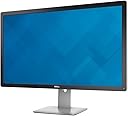
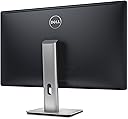
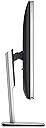
The Dell UltraSharp 32 UP3216Q is a professional-grade 31.5-inch IPS monitor delivering stunning 4K UHD resolution (3840x2160) with exceptional color accuracy via PremierColour technology. Covering 99.5% Adobe RGB, 100% sRGB, and additional color spaces, itโs tailored for color-critical work like photo editing and video production. Featuring extensive connectivity options including HDMI 2.0 at 60Hz and DisplayPort, plus ergonomic adjustments and eco-conscious design, this monitor is built to boost productivity and visual fidelity for discerning professionals.


| ASIN | B016IBVKNU |
| Adaptive Sync | FreeSync |
| Aspect Ratio | 16:9 |
| Aspect ratio | 16:9 |
| Brand | Dell |
| Brand Name | Dell |
| Colour | BLACK |
| Contrast Ratio | 2000:1 |
| Customer Reviews | 3.5 out of 5 stars 73 Reviews |
| Display Technology | IPS |
| Display Type | Ips |
| Global Trade Identification Number | 00884116177807 |
| Hardware Connectivity | HDMI |
| Has Color Screen | Yes |
| Image Brightness | m2 |
| Image contrast ratio | 2000:1 |
| Item Dimensions D x W x H | 2.14D x 7.5W x 4.83H metres |
| Item Weight | 5.9 kg |
| Manufacturer | Dell Computers |
| Maximum Display Resolution | 3840 x 2160 |
| Model Name | 210-AGUO |
| Model Number | 210-AGUO |
| Mounting Type | Wall Mount |
| Native Resolution | 3840x2160 |
| Network Connectivity Technology | HDMI, USB |
| Picture Quality Enhancement Technology | High Dynamic Range |
| Pixel Pitch | 0.182 |
| Power Consumption Size | 70 Watts |
| Product Features | Get extensive connectivity with a larger bandwidth. |
| Refresh Rate | 60HZ |
| Resolution | 4K UHD 2160p |
| Response Time | 6 Milliseconds |
| Screen Finish Type | Matte |
| Screen Size | 32 Inches |
| Screen size | 32 Inches |
| Screen surface description | Matte |
| Shape | Rectangular |
| Specific Uses For Product | Business, Education, Gaming, Photo Editing, Programming, Video Editing |
| Total HDMI Port | 1 |
| Total USB 2.0 Ports | 4 |
| Total USB 3.0 Ports | 4 |
| Total USB Ports | 4 |
| Total Video Out Ports | 2 |
| UPC | 884116177807 779177291671 779177291664 |
| Unit Count | 1.0 count |
| Viewing Angle | 178 Degrees |
| Voltage | 240 Volts |
S**K
but still it is amazing to see your photographs in an incredible sharpness and ...
I have had high-resolution monitors before, but working with the right colours had always been a problem until I bought this monitor. The colours/tones of photographs always differed when printed in a book. I was using different (non-professional) methods to sort the problem out. This monitor meets the professional standards to get the exact colours. Colour depth and the accuracy is incredible. It comes with colour calibration software to use with X-Rite i1Display Pro calorimeter, which is also available (separately sold) on Amazon. This monitor may be too much for a non-professional home use, but still it is amazing to see your photographs in an incredible sharpness and picture quality of an LED 4K monitor. Even when you are using Microsoft Word, it lightens up a bit the dull, design-disaster user interface (Word 2013) with the sharpness and brightness it brings to the screen. The monitor has a very wide working area, which makes everything easy, especially if you are a designer/photographer. Sleep/wake issue mentioned in the other review is computer related, nothing to do with the monitor. When you do the setup, connections and configurations right, you do not have any problems. Just enjoy the wonders that new technologies bring to us instead of complaining.
G**D
Guaranteed to destroy your eyes
This screen was made to ruin your vision. I have ignored other negative reviews, don't make the same mistake. A red tint dominated the left half of the display and the right side was too bright. The difference in lighting was incredibly straining, my eyes would get very tired after a few hours of use. I fiddled with different settings for days, nothing worked. The worst display I've ever used by a long stretch. It's most surprising since the Dell U2715H was the best display.
A**.
Not that homogenic for the contrast, but so big!
L**D
Brilliant but annoyingly flawed
Generally a fantastic monitor let down with one issue. A worthy update to the 3214 it offers excellent colour fidelity, a handy card reader, USB 3 hub and a screen size that is perfect for running at 100% scaling. The reason for the 3 star review are the issues it has with sleep/wake. The 3216 is on a GTX970 as the main monitor but if I power up the monitor and it enters sleep mode (Ie, power-on, scan, no signal detected, goes to sleep, all happening in a handful of secondss) then it wont ever come on until a reboot. Likewise if the PC sleeps and the monitor goes to power saving, its not correctly detected when the pc awakes. Odd thing is, in the nvidia control panel "set up multiple displays" it shows the monitor but you cant tick it to enable it. Sometime unplugging the mini display port cable and reconnecting works, but again, not if its in sleep mode. This was a problem running 4k@60hz with the 3214 and the problem still exists with this model. Is a very bad issue when the monitor costs so much - twice the price of the ageing 2407WFP it replaces which was fault free.
D**E
the internet seems to think this cant do 60hz at 4k over hdmi/dvi. IT CAN!
To everyone who says this monitor doesn't do 60hz at 4k without using displayport, all you need to do is set response from slow (the default) to fast in the monitor menu and boom. Annoying mouse lag, gone.
L**I
Beautiful picture with amazing color!
This review is for Dell UP3216Q. I was shopping for a high end 32" 4k monitor with wide gamut coverage and decided on the Dell. The build really is excellent. The bezels looks perfect--thinner doesn't always mean better. Would have liked a USB-C input for my laptop but that's a minor thing. SD reader on the side is also a nice touch. I decided on this one over comparable Asus model because while the Asus was listed as being a bit brighter, the Dell had a higher contrast ratio. Right off when I set it up I was honestly a bit unsure whether I'd be keeping it. The images did not impress. But then I ordered an Xrite I1 calibrator and calibrated for AdobeRGB with the software from Dell website, and now it's a definite keeper! Raw photos in Lightroom just look incredible. It's not the brightest display, but it clearly doesn't take away from how beautifully it can display my photos. Almost like being in the photos when I view them. Day to day activities like web browsing, etc. also look great. Text is very clean and sharp. White space in the browser isn't overbearing and adds to the overall pleasant appearance. The matte screen doesn't give the horrible orange peel effect that I've seen on other cheaper displays. If anything it looks like a super high quality printing paper. While I haven't personally seen what comparable competing models can do, I am very happy with this product can't imagine needing anything else for years to come.
S**J
Do not buy - learn from someone else's experience. Black screen problem.
Nice monitor - if it works. I bought this monitor about half a year ago on Amazon. It worked okay, but started having intermittent black screen issue recently: every minute or two the screen suddenly goes to black for a second, as if it's losing signal and then re-establishing the connection. This is very unnerving, and should not happen. After a brief online search, it looks like it's a standard issue for high-end Dell monitor.s The Amazon return window has long closed, so I contacted Dell support, which was quite an experience. Over the course of an hour they did their best to convince me that the problem was not their monitor, but they didn't succeed. During the last week I've tried two different video cards and different systems - the issue still persists, with all the latest drivers and firmware. They ended up sending me a refurbished monitor which I'm waiting for now. Overall verdict: a $1000+ monitor should work. This one does not. No matter what the specs are, if it intermittently goes black it's not working.
S**D
Best I've Ever Seen.
Have had this for 3 days and I am very impressed. I am a gamer and have been for many years. Last monitor was the 30" HP LP3065 with native 2560x1600 resolution. I've been enjoying 1600p gaming since 2007 with the HP so I am use to high res gaming. The 4K resolution of the Dell has blown me away. Have played all my old games to test the Dell and every game looks better. At 4K, none of my older games needed anti-aliasing on anymore; the increased resolution replaces needing to turn on MSAA. What a trip. The Dell is allowing me to perform better in online shooters as well; i.e. BFBC2, BF4, Rainbow Six Siege (beta). If you plan on gaming with this monitor at 4K, you might as well just pick up 2 GTX 980 Ti cards upfront. The color representation and detail of displayed anything is exquisite. At first I thought something was wrong with the monitor. Some things just seemed blurry and looked bad while other things looked incredible. This monitor will show you exactly how well or not something was created. I'm talking about images, logos, webpages and such. There are many settings to fiddle with so you can get the monitor to display just the way you want it to display. One of the most impressive things is that you can have this monitor change from RGB to Chroma 4:4:4. Not up on all the tech behind it, but switching to Chroma 4:4:4 made me say "Wow!". It is also PWM free. PWM is used by cheaper panels to dim the monitor which causes annoying flickering effects. Oh, it is also a true 10-Bit panel.
T**G
IPS Glow is a bit Distracting
Great-looking monitor with beautiful color reproduction. The only downside is the glow around the edges from the IPS is quite distracting on dark images. After fiddling with the settings for quite some time, there does not appear to be a good way around this. However, since most of my image editing occurs center-screen with toolboxes around the edges, it doesn't affect me significantly. The peripherals are well-placed and the KVM (picture-in-picture and picture-by-picture) features are decent. If you care about flat color reproduction across the whole monitor, I would not recommend this.
S**A
I really like this monitor
I really like this monitor. I'm upgrading from Dell 30" monitors. I'm also running Linux and i use this mainly for programming. I have a pretty resonable graphics card - i saw another person was running a Quadro video card but I use a 980ti and it works just fine. Friends tell me even a 970 can drive 4k at 60Hz. Just search the web and you'll find lots of details. I want to talk about using this monitor for coding and linux because all the reviews seem to be for Windows and design etc. One change is that compared to the non-4k Dell 30" monitors (3011, 3014 etc), I found that the contrast has to be set really high for things to be readable. Ubuntu 15 which is what i am running runs happily on this monitor (KDE, Gnome and XFCE)- all detect it straight out of the box, no fiddling with settings required. I will say that under linux you will have to spend a lot of time fiddling with font sizes. Intellij and Android Studio are especially bad of course because Java. I had to increase my font size from 11 to 20 point to get something i was comfortable with with about the same number of lines on the screen. If your eyes are younger/better you might have better luck. Emacs/terminals etc. are fine because those just get tuned by gtk. Also, it's quite possible that the first few days the monitor will give you a headache. This is probably not because of any problems with the monitor itself. It's just that the res. is so high, you''ll subconsciously be sitting further away from the monitor and trying to read text at the same size. I caught myself doing this a lot - with my old monitors, I wouldn't even bother leaning back in my chair because the text would be clearly illegible at a certain distance - with this monitor i keep trying to read tiny text from further away. So yeah, another solid effort from Dell. I recommend this monitor fully and will probably be getting a couple more.
Trustpilot
1 month ago
2 weeks ago