🚗 Drive smarter, arrive safer — your ultimate road companion!
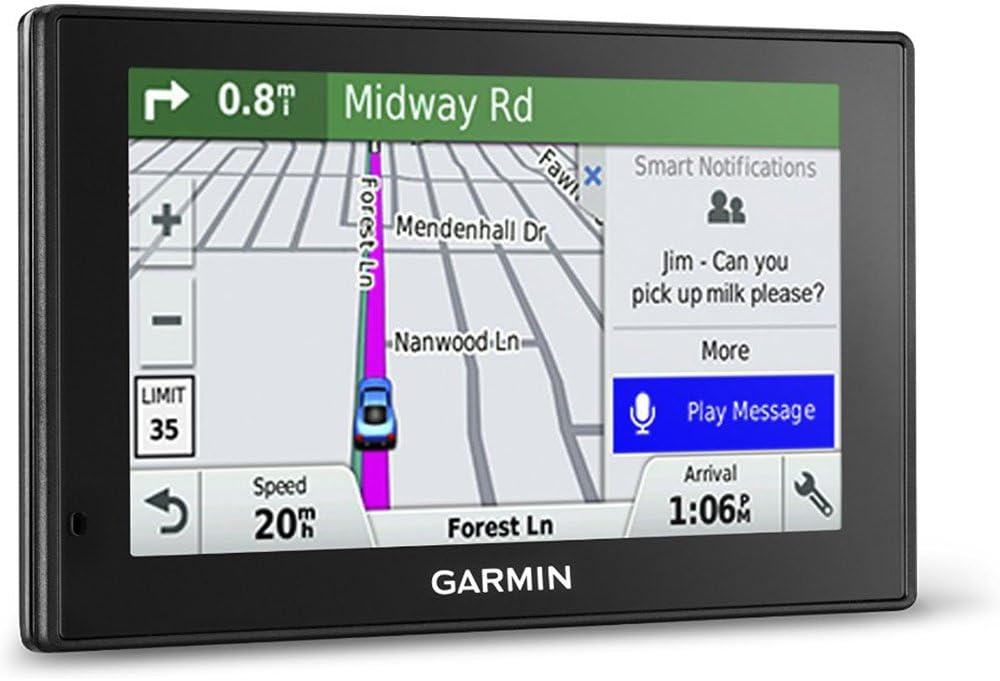
The Garmin DriveSmart 50 NA LMT is a 5-inch GPS navigator featuring lifetime North America maps and traffic updates, advanced driver alerts, Bluetooth hands-free calling, voice-activated navigation, and smart notifications. Designed for seamless, safe driving, it offers intuitive landmark-based directions, fatigue warnings, and fast in-car charging, making it an essential tool for the modern professional on the move.


| ASIN | B01A1HLC4E |
| Additional Features | Bluetooth, Lane Assist |
| Are Batteries Included | Yes |
| Audio Output Mode | Stereo |
| Best Sellers Rank | #354,276 in Electronics ( See Top 100 in Electronics ) #371 in Handheld GPS Units |
| Brand | Garmin |
| Built-In Media | Garmin DriveSmart^Vehicle suction cup mount^Lifetime traffic antenna/vehicle power cable^USB cable^Quick start manual |
| Compatible Devices | Smartphone |
| Compatible with Vehicle Type | Car |
| Connectivity Protocol | Bluetooth, USB |
| Connectivity Technology | USB |
| Control Method | Touch, Voice |
| Customer Reviews | 4.2 out of 5 stars 779 Reviews |
| Display Type | pinch-to-zoom, glass cap touch |
| Global Trade Identification Number | 00753759157210 |
| Human-Interface Input | Touchscreen |
| Item Dimensions L x W x H | 5.5"L x 5"W x 0.28"H |
| Item Weight | 0.38 Pounds |
| Manufacturer | Garmin |
| Map Types | City Tour, North America, Street |
| Mfr Part Number | 010-01539-01 |
| Model Name | Garmin DriveSmart |
| Model Number | 010-01539-01 |
| Model Year | 2016 |
| Mounting Type | Windshield Mount |
| Operating System | Mac OS |
| Resolution | 480 x 272 |
| Screen Size | 5 Inches |
| Special Feature | Bluetooth, Lane Assist |
| Supported Satellite Navigation System | GPS |
| Touch Screen Type | Capacitive |
| UPC | 753759157210 |
| Unit Count | 1.0 Count |
| Vehicle Service Type | Car |
J**G
Much improved Device!
Setup was quick and easy, if you have a previous Garmin, connect both to your PC at the same time and use Garmin Express to transfer your saved destinations to the new device. I upgraded from a Nuvi 1250 and the directions are far better, it gives you more than just the next turn, in many cases, it tells you if the turn is at a light, a stop sign, or at the end of a street. I love the voice command option that makes selecting a destination much faster, simpler and does not require taking my eyes off the road. Also great is the ability to link to my smartphone for hand-free use. Re-routing also works much more nicely with this model. In testing in the neighborhood, I wanted to see how the device reacted when I deviated from the original course calculated, and so I turned right a street earlier than where I was supposed to turn left. The device never said a word... no "Recalculating"... bad thing? No, because the street I turned right on still went through to the street I was heading for and the device apparently recognized that and just assumed the new route and gave the correct new turn instruction at the appropriate time! I've only had it a few hours and already thinking about getting a second one for the other car as this one, unlike my older one will probably reside in the car full-time, not just for trips. I also love being able to say the business I want to visit and find it without looking up an address. I'm sure as I use it more, I will find many more things I like! One thing to note is that charging from the car adapter is FAR faster than from either a PC or wall adapter. This could be that the USB cable is primarily for data, or the wall chargers I have aren't powerful enough for this device... I suspect it's probably the cable... in any case, in the car, it went from low battery to full charge in a two-mile trip to the grocery and back... about 20 mins.
B**Y
Worked great...easy to use
Worked great when I used it. My cars are equipped now so I'm not dependent on this GPS anymore.
A**L
Great service from Amazon! Hope the GPS is as good!
Ordered on a Sunday received it the very next day which was LABOR DAY! Awesome job Amazon! It came with a dead battery so I let it charge up before I gave a small test. It seems to work very well and I am so far very pleased with the unit. It came with 2016.20 maps installed and I haven't updated it yet. Will do so tomorrow so we'll see how that goes. The price is exceptional and with the added assurance of the 3 year Square Trade protection plan I feel this will be a good purchase for me. I've had a couple Garmins (a StreetPilot 550 and an Etrex handheld) before and they are still working after many years so I guess I'm going to be a Garmin person. I hope to be able to append this review after I have had it awhile (or maybe after tomorrows update) so stay tuned. And one odd thing, it came with a usb to usb micro cable and there is no micro port on the unit. I think I should have received a usb MINI cable instead. Good thing I have a hundred of them already!
J**H
Best Auto navigation system ever! Easy to use, easy to see, even if your vehicle has one pre-installed you need this!
Even if your vehicle has an in-car or in-truck navigation system pre-installed you need this Garmin. Great graphics, updateable maps for life, lets you split screen, full color, alerts you with a beep and warning BEFORE your turn arrives, shows your current speed, the speed limit, alerts you to speed traps, weather/traffic issues, restaurants, gas stations, you name it. The screen is just like an I-pad, you can touch it to move things around, enter items, change screens, volume, you can adjust the whole unit so it faces the driver, passenger, up, down, wherever. The sun does not fade it out. Beautiful full color graphics let you clearly see the roads ahead and to the sides of you, shows highway off and on ramps like no other, tells you which lane to be in so no last minute jerking to find your turn. I should have bought this a long time ago.
A**Z
A quality unit, with one BIG problem
Quick note about the differences between the Drive, Drive Smart and Drive Assist: The Drive is the base unit. The Drive Smart is the same unit with Voice Command and the Drive Assist has all that plus a traffic camera in the unit. The unit is reliable, of good quality, the voice command works well and it has a fine, clear display. The display is kind of "busy"; some of the map space is taken up with speed limit signs, your speed (rather than look at the speedometer in front of you you're going to look over at your GPS to find out how fast you're going?) and instead of just depicting them on the map it's constantly warning you about things (railroad tracks, school zones, curves ahead) in the upper address bar to the point where the warnings frankly become more annoying than helpful. Well meaning but kind of distracting. There are audible alerts you can set for things you would want to have your attention called to, but you can only get those if you also turn on the spoken directions, and frankly that lady is always chattering, so if you're at all familiar with the area, you're going to turn her off, but that means you also give up the audible ones that clue you you're in proximity to something you do care about. Still, there's a wealth of information here and lots of useful stuff, but it does have one BIG flaw. It has to do with the traffic and rerouting function. The software of some competitors, Magellan for one, are coded so that when on a route if there is a traffic delay greater than a certain percentage of the total time, will calculate a new quicker route and then asks you if you want to use it. Consent puts you on that new route (although it will not route you back to the original if it clears up; as far as it's concerned you're on a new trip, unless a big delay appears on this new route. Garmin does this by using a flat time for calculation. It only changes the route if the traffic delay is greater than 15 minutes, and if the alternate route will save more than 15 minutes. On a four hour trip that's no big deal. But let's say you're trying to get somewhere in town or not too far away, like the airport or going to work . Let's say the trip normally takes 20 minutes. As presently programmed, the unit will not route you around traffic until delays push your trip time past 35 minutes. In other words, there could be delays extending your trip time by 75% and it wouldn't warn or reroute you!. And even in that case, if the reroute only saves you 12 minutes (which would reduce your total delay to only 3 minutes) it wouldn't tell you about it either! Now when it does reroute you, it gives accurate times and it is the best route available at that moment, but for anything but long trips the traffic function isn't very helpful; it doesn't help you soon enough. one way to get around this is after starting on your route, cancel the trip and then immediately restart it. If traffic conditions have deteriorated from when you started, it will give you a better route because at this juncture it's starting a whole new trip and will try and route you by whatever's quickest at that moment since it's looking for the shortest route and in the initial routing (which this new trip would be) the 15 minute rule doesn't apply. But that's really annoying and not the safest action while driving. I mentioned that at least one other company, Magellan, does traffic rerouting better. Well, why not look at them? Because they seem to be in trouble. They have no customer/tech support phone line. They don't even have chat. If you need support and call or go to their web page, all it says is to send them an email. You get an automated acknowledgement and you May or May Not ever get any response to your question some days later Essentially, their products are now unsupported and who knows how long updates to maps or software are going to be available. I do not know how Tom-Tom works or is doing Garmin on the other hand, probably because they are also big in aviation and marine navigation, seem to be in it for the long haul. They have a real phone line and they will take time with you. It's a customer support, not a tech, line but they have access to the techs and they will work with you. For that reason, my recommendation is that if you're in the market for an automotive GPS that's easier to see and use and has more features than your smartphone, go with Garmin. If they would change their algorithm on how they do traffic to something more useful, I'd gladly give this five stars.
D**V
A well thought-out GPS
Bought as replacement for my Nuvi 350. The 5" screen is better than the 3.5" one. Comes with a traffic receiver (non-digital) but that's useless in my area. I do a lot of local deliveries and this fits the task. One of the annoyances of the 350 was having to enter the city and state for every address. Since this is almost always the same for every run, doing so just wastes time (and time is money when you want to maximize number of runs). The 50 LMT allows searching from street address alone and doesn't necessarily need to be a complete address. It has voice activated commands and can find spoken addresses and saved/recent locations. Handy for hands-free operation. Voice commands can be hit or miss though and pretty much need a quiet environment. The DriveSmart and DriveAssist versions can be paired with an Android or iPhone via Bluetooth. The destination can be set from the phone as needed (there are a few holes in the address database). Driving to an address isn't infallible but so far better than the 350. Gets confused by apartment complexes that share the same street name. Some complexes have barriers that bisect them and I still need to know which entrance to use -- the database doesn't help here. Address searching is local only. Took me some time to learn how to enter a faraway address (use Trip Setup). The Bluetooth allows phone operation from the 50 LMT and can be completely hands free if voice commands are used. Phoning uses the voice command app on the phone so YMMV. It can be hard to find a good one. Even without voice operation, it's handy to interface only one device. Maps are from 2016 and need to be updated. I upgraded to the latest maps (called 2018 for some reason) that I've also used for the 350. The database has some odd pronunciations and sometimes uses planned road name changes instead of the currently marked ones. The device doesn't come with a power line charger. I had to use the one for the 350. My 12V outlets in my Sentra aren't on all the time. At least the 50 powers up faster than the 350 plus it has a sleep mode. Suggest a vent mount. Dash and windshield mounts are harder to use. I've tried the windshield mount that never seems to hold for more than an hour and the bean bag mount which tends to slide around. I use the Akron vent mount but the Garmin vent mount should work too. Both the 50 and 350 use the Garmin ball mount. Dash mounting also has too much ambient lighting. The vent mount places the unit in a darker area making it easier to use and it's closer to me. Overall impression: super great. Should have switched long ago.
L**Y
Would not buy again, especially refurbished, cant even use even though it was only 3 months old......
Piece of crap, maybe because its refurbished. They took the battery icon off, so you cant see what the battery level is when you are using it. Garmin tech itold me "do not use it by battery, always plug it in, so I did, but need a double jack for my car lighter so I can also charge my phone. You can only use Garmin cables with it, it comes with a usb cable, but it can only be plugged into your computer, it will not charge it if you plug it into a wall socket charger. So now, OIF Garmin makes a cable that can plug into a USB, I will also need a double usb jack car charger, and Garmin makes one, but found it hard to corroborate that it would work with my GPS, so hadn't purchased it yet. Now I wont. I was on a trip when the warranty ran out and it broke the first time, but started working again. It NEVER worked well. Sent me on logging roads when set for no dirt roads, added about 20 minutes to estimated time of an hour trip, sent me 20 minutes out of my way when set for the fastest route. Voice recognition is misnamed. If you are happy with 30% accuracy rate, and taking a long time to get directions to most places by voice command, you wont mind. Frequently it would not turn on, mysteriously coming on hours later. I gave it up for dead, but then it turned on after hours and hours of black screen, worked for exactly 3 times, then dead again.
M**R
Professional User Approved
I was a bit scared to upgrade from my 2597. I've had several of those types and beat them up at work and home but they are dated and the touch screens aren't great. I was especially worried about reports of overheating since my unit is literally on for 8-10 hours per day. My unit does not overheat at all even after a full days use. I do not keep it in an area of sunlight, and it is metal and glass vs plastic. I suspect other users are getting sunlight issues. My unit runs cool, and does everything my 2597 did, only better and clearer, and with a MUCH better touchscreen that won't wear out because it's glass. The added tools to bend routes by touch, get the big picture, or juggle waypoints is much appreciated. I also like the "turns"sidebar option, and many of the other sidebar options that go on, off, or out of the way intuitively as you choose. Recommend. I am a full time professional driver that uses GPS 10X harder and 50X more than the average consumer. The 2597's lasted me about a year and a half before I moved them to a car for sluggushness or touchscreen issues, this unit is fast, and has a much better screen design, I expect years of commercial use, which means a decade or more for the average Joe user. By the way, with few exceptions I am very pleased with the voice recognition. It doesn't always get me, but 85% it gets me the first time. Which means I can pre-program some stops on the fly. Nice. Databyter
F**.
As good as I thought it was!
I've been handed a lot of different models from Garmin and Tom Tom over the years at car rental companies all over the world. The Drivesmart 50 is the one that has always stood out for me. Because I was using a rented device, I really never bothered with personalisation and settings. It did the job fine as a plug-and-play hassle free device, that's it. However, I recently bought one of my own and I am very pleased with it. It came completely discharged so I had to charge it for a while before playing with it. The first thing I did was to go through the updates, which was very simple. Then I installed the European Road map pack as I was preparing for a trip to europe. This was also very easy. I've since started to personalise my experience, save my locations, plan trips... It's a very easy to use, reliable device.
B**R
Dissaponted
I opened the box to find a completely different unit than what is displayed. I should have looked closer. What they show is the Drivesmart 51 model with full screen. The 50 does not have a full screen so I found out. Then I plug it in and Garmin express does not find it. It would not even power up. So I left it for 3 hours. Come back and restart Garmin Express. . Ah? there it is. Most recent map on it was 2016 so right now it is hopefully updating seems to be stuck on step 2 restart . And yes I reported the incorrect Image to Amazon. Bet I don't hear anything I'll report back if and when this thing works. Day 2, Map updated finally but then more frustration, it said 4 software updates, Following the onscreen instructions nothing would update tried a dozen time unplugging and plugging back in, well guess what , instructions are wrong , you have to unplug and power it up to get updates to install., THEN plug it pack into your computer to finish. Finally ready for real world test. Road trip this weekend.. Here what happened. Maps and locations are wrong, Even with the most recent map loaded Gas stations that closed 5 years ago are still on the map. , places that are well known are not on the map. Seems Canada in general is limited to 5 major cities for subscription services too. But I knew that If you live east of Quebec even don't buy it for traffic or any other subscription service, its not available. Update August 10th, I see they have changed the products pictures to match the item.
J**W
Satisfied!
I really like this unit. It's a bit different than the previous Garmin I owned, so I am not used to it yet but seems to have all the same features (and more) that I found reliable and convenient. Track log is a big deal to me. These units all come with it. I tried a different brand after my Garmin broke. I will never try another brand again. Garmin got it right. The traffic feature I activated but has never come up with a notice yet. Cant review that particular feature. Think I have to Build a suction plate on my dash and adhesive the mount to it directly. The suction cup on these Garmins, always kinda sucked.
Y**G
Great Deal for Road Trip Use
I just have it for one road trip so far. Before this, I always use my google map or Apple map for driving in the city. I think it is really helpful when you are going somewhere that you are not familar and not in the city. I found that speed limit sign notification really helps me driving safe without a concern of getting a cop’s station. This module doesn’t have a Wifi function, but I think it is okay, because you won’t stay in the car for 40 mins ish to get your GPS’s map updated (my first update took me 40 mins with a computer plugged in). Overall, the screen is responsive, and the function is so easy to use, and great deal for the money! No complaints!
A**R
Over all I am quite pleased with the Garmin Smartdrive 50
Over all I am quite pleased with the Garmin Smartdrive 50. There is one annoyance though. If you live in Canada you CAN NOT shut off the Bend InThe Road notification which creats an orange band accross the top of the screen at even slight to moderate turns. This occurs so often that it becomes annoying and causes one to ignore all notifications or being constantly distracted . I called support and they said this is only a problem in Canada.
Trustpilot
2 weeks ago
2 months ago