🚀 Upgrade your rig, upgrade your hustle.
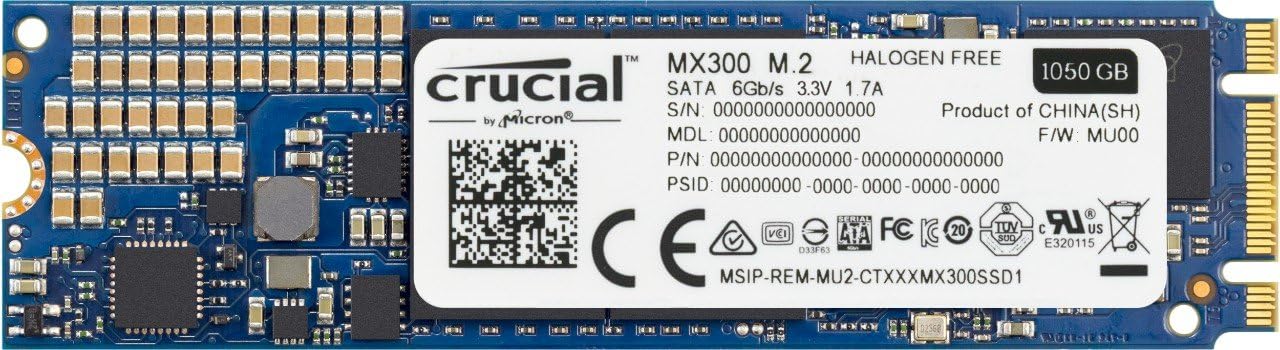
The Crucial MX300 CT1050MX300SSD4 is a 1TB M.2 2280 SATA SSD featuring Micron’s cutting-edge 3D NAND technology. Delivering sequential read/write speeds up to 530/510 MB/s and random IOPS up to 92k/83k, it offers a powerful, energy-efficient storage solution ideal for professionals demanding speed, reliability, and capacity.


| ASIN | B01L80DH1Y |
| Box Contents | Crucial MX300 1TB SSD |
| Brand | Crucial |
| Brand Name | Crucial |
| Cache Memory Installed Size | 275 |
| Color | Blue |
| Compatible Devices | Desktop |
| Compatible devices | Desktop |
| Connectivity technology | SATA |
| Customer Reviews | 4.6 out of 5 stars 1,826 Reviews |
| Data Transfer Rate | 530 Megabytes Per Second |
| Digital Storage Capacity | 1 TB |
| Digital storage capacity | 1 TB |
| Global Trade Identification Number | 00649528778314, 06953041213837 |
| Hard Disk Description | Solid State Drive |
| Hard Disk Interface | Serial ATA-600 |
| Hard disk description | Solid State Drive |
| Hard disk interface | Serial ATA-600 |
| Hard-Drive Size | 1 TB |
| Hardware Connectivity | SATA 6.0 Gb/s |
| Installation Type | Internal Hard Drive |
| Item Weight | 9 g |
| Manufacturer | Micron |
| Manufacturer Part Number | CT1050MX300SSD4 |
| Media Speed | 510 Megabytes Per Second |
| Model Name | Crucial MX300 M.2 |
| Model Number | CT1050MX300SSD4 |
| Network Connectivity Technology | SATA |
| Number of Items | 1 |
| Product Warranty | 3 year limited warranty |
| Read Speed | 530 Megabytes Per Second |
| UPC | 771591313182 649528778314 |
K**A
FAST, reliable, and horrendously inexpensive for the QUALITY you get
Windows 10 installed in less than 10 minutes. Immediate access to media libraries throughout Adobe CC, especially Premiere Pro. Not the fastest one out there, but for that price? It goes right into your m.2 port. It has a quality feel to it, nothing shaky or too sturdy. Fits perfect and safe. Enabling it as a system drive took me like 5 seconds. My computer switches on in 10seconds and I open chrome with 30 tabs loaded from memory 2 seconds later. Want something more? You can pay over 200quid for a new generation Samsung drive. This one does the SSD job perfectly and is cheap as chips for the storage. I would recommend it to any user, even in a professional environment. No need to overpay.
H**Y
A decent drive for the money
Be aware that this is a SATA mode m.2 drive, and thus performs like a normal SSD- hundreds of megs per second rather than gigs as you'd expect from an NVMe drive- and no crazy queue depth etc.. However, that's what I wanted, as it's a lot more affordable than my screamingly fast NMVe boot drive- I just wanted a second m.2 to use as a Steam drive. This is a good quality drive for a sensible price, from a reputable manufacturer. Crucial are often a safe bet, and this is a perfectly decent bit of kit. Edit: Forgot to say- don't install the "free" Acronis software. It'll clone your drive, but it's really hard to get rid of, and may brick your Windows install in the process, or do something more subtle like mess up restore points capabilities. Google and you'll see what I mean. There are loads of other good free choices, like the Easus and AOMEI and even the Macrium stuff, as well as good open source options (like nice Linux minidistros with various software, or even good old "dd"). Use anything but the Acronis software, if you want to clone an existing drive.
E**R
works with MSI GL62
Installed into am MSI GL62 6QD with no problems. Had hoped to clone the original hard drive onto it but found that that failed with the Acronis software despite trying different methods. In the end I used the MSI recovery software and put the operating system on this drive and the rest of the stuff on the other hard drive( which I also replaced with an 'old' ssd that I had from my previous laptop). Now boots in seconds and only slowed down by the time it takes to enter my pin to login to windows.
P**F
but good value for the money
The SSD it self works OK, I have made an upgrade from a 240GB Kingstone, it is not as fast as my previous one, but good value for the money... The software side, is the reason of not giving 5 stars... a piece of paper is included in the package with a registration number for Acronis True Image , but instead of asking for this serial number, the software is asking for a very detailed and personal registration, at the end I gave up and re-installed everything from scratch.
S**F
M.2 ssd
Incredibly fast once I had figured out how to go about convincing the bios to accept it, Am using an asus z170 pro gameing, already had a lite-on 64gig in the m.2 slot but too small, fitted the Crucial and the bios recognised it fine but the bios refused to boot into windows, several hours later after much roaming on the net it would appear that M.2 sdd and Pcie have to be initialised and format for the bios to accept it, borrowed an M.2 to usb3 adaptor and initialised then format and cloned with acronis, all went well but once refitted it again refused to go past bios, drive inactive, used a recovery disk at start and repaired the clone, then all was well, and it flies! very happy! Once initialised and formatted in an M.2 to usb adaptor I could have just reloaded everything on sdd but! time consuming! I did at one point load windows via a dvd just to prove the drive was fine, I think my problem with using acronis is there was a c: drive already so it must have marked it as inactive? do not believe there is anything wrong with acronis, very fast cloneing, approx 20mins for 149gbs on hhd, fiddly but well worth the effort, you do not of course get these problems using normal sata ssd in your case, and other board manufacturers may not have this stumbling block with M.2 ssd? would have helped tremendously if a note on how to initialise and format off the board was included, Very impressed with it though, A++++
A**H
All good
Installed the 275gb m.2 drive into a dell inspiron 7559 laptop. Just received it today and it comes with acronis software to clone the drive and it's not worth using. I did the full auto clone feature. It restarted and loaded it's own program before windows to clone it all. I left it alone, came back and the laptop was off so I assumed it was finished. Switched it back on and it loads a black screen in windows and eventually crashes with a bsod and a 'critical process died' message. So I don't recommend using the software the ssd comes with. Trying 'EaseUS todo backup' software at the moment. The ssd drive itself seems good. I had a Samsung 850 250gb m.2 drive before I forced a cup of tea onto it and it said goodbye. 1 small sip/drip and that was that. The Samsung was about £68 when I bought it months ago but it's too expensive now so this is why I've went to Crucial. I will update this when I've more to talk about...
J**H
Great drive no problems
No problems so far, easy installation and works straight away. The more accurate size of the 1TB drive is 977GB so if you were hoping for a little bit more space than that well you're out of luck. There is one warning I have to say about the drive and that is when you plug it in it will automatically disable 3 SATA ports on your motherboard so if you already have more than 3 hard drives or dvd drives plugged in you're gonna have a bad time.
J**H
Usually good, but failed within 6 months.
Arrived in good time, worked well for a while, but didn't last 6 months before it got a fatal error without any prior hints at the drive failing and is now just a stick of metal.
U**R
Working well in MSIGT83VR M.2 Sata slot.
Very good fast ssd ,installed in MSIGT873VR without any problems.
M**E
Preis/Leistung überwältigend
Lieferzeit: 1 Tag Verbaut in: Acer VN7-571G [Laptop] Read: 531,9 MB/s [Angabe: 530 MB/s] (im Vollbetrieb) Write: 492,1 MB/s [Angabe: 510 MB/s] (im Vollbetrieb) Echte Kapazität: 255 GB von 275 GB (Win10x64Pro 8GB RAM) Besonderheiten: - Acronis True Image Key für Backup (nicht genutzt) - SCHRAUBEN IM LIEFERUMFANG! Wer die Systemfestplatte von HDD auf SSD umstellt, wird einen enormen Geschwindigkeitszuwachs feststellen sowie eine verlängerte Akkulaufzeit, insofern diese nicht ständig angesteuert wird. Zuvor war eine Kingston 120GB M.2SSD verbaut, die jedoch aufgrund von Platzmangels ausgewechselt werden musste. Die MX300 ist sogar erheblich schneller und besser - rein subjektiv betrachtet. Der Laptop ist innerhalb weniger Sekunden einsatzbereit. Besonders schätzenswert sind die beigelegten Schrauben zur Befestigung, die notwendig zum fixieren, aber beispielsweise bei Kingston nicht beigelegt waren. Zusätzlich ist noch ein Lizenzschlüssel für Acronis Backup im Lieferumfang, zwar nicht genutzt da ich immer komplett plattmache, aber nette Beigabe. Summa Summarum wirklich bombasisches Preis/Leistungsverhältnis, auf jeden Fall sehr zu empfehlen. Update: Anhand der Verwaltungssoftware "Crucial Storage Executive", ähnlich dem Samsung Magician, lässt sich die SSD überwachen sowie Beispielsweise die Momentum Cache-Funktion aktivieren. Dadurch kommen folgende Benchmarks zustande: Read: 2354 MB/s Write: 2075 MB/s Diese Werte erscheinen mir jedoch relativ Realitätsfern.
G**H
Perfect Oculus Rift, Flyinside and room scale setup and my journey to get there
After many many hours spent over two months trying to make the Oculus Rift CV1 work consistently, I've found the best possible combination and I think this info will really help those looking for a hassle free experience. My experience will be especially relevant to folks who need their other USB ports to work for things like Joysticks and any pilots looking to use Flyinside. In short the two absoulute must haves for a good VR experience are: 1) The MSI Z270A Xpower Titanium Motherboard because it has a supplemental VR Boost power 6 pin connector on the board that ensures no drops or judders even when I'm using three sensors, the Xbox one controller, wireless USB Keybord/Mouse. The overclocking function within BIOS OR with the included physical switch is a one click wonder with OC levels from 1-11. I set mine to a maximum setting of 11 and the I5-7600K bumped up from 3.8 to 4.9 GHZ with temps at 40 deg Celcius idle/60 deg playing any Oculus games/80 deg for CPU intensive FSX at Max settings with Flyinside. 2) A Sata III or M.2 SSD because Windows 10 just doesn't work well with a mechanical HDD as these always show at 99-100% disk usage even after fresh windows installs with nothing else on the HDD! Here is my perfect VR Rig for the Oculus MB: MSI Z270A Xpower Titanium Motherboard (Amazon Warehouse deals $290) CPU: Kaby Lake I5 7600K one click OC to 4.9 GHz (Amazon new $240) GPU: ASUS GTX 1080 Rog Strix BC 1835 MHz (Amazon Warehouse deals $485) RAM: Corsair Vengeance DDR 4 LPX 8 GB 3000 MHz (Amazon new $70) HD: Crucial MX300 1TB M.2 (2280) SSD (Amazon new $270) PS: EVGA G3 850W (Amazon new $120) CASE: Corsair Graphite 780T (Amazon Warehouse Deals $150) USB: On Board Intel eXtensible ports ($0) DEVICES: Logitech USB Wireless Keyboard & Mouse / Saitek CyborgX / 3 Oculus Sensors on USB 3.0 / Oculus RIft on USB 3.0 OS: Windows 10 Education (Free for anyone with a college email address) PROGRAMS: Oculus Home, EA Origin, Steam, VorpX, Flyinside If I want I can even have a gazillion programs and overlays running without problems in the background, such as all the Motherboard utlities, GPU utilities, CPU-Z, EA Origin & Steam and still play Oculus/Unspoken/EVE Valkerie at Ultra settings. Spec'ing a similar ALienware Aurora config with slower RAM/slower GTX 1080 was ~ $300 more at $1900 while mine cost $1600 after I convinced my wife to let me go all out in the end :) Here are the combinations that DID NOT work without USB disconnects (eg. mouse/keyboard/Xbox controller stops working when running Oculus). This is after I followed the Oculus team's advice on USB cards and their Windows 10 USB power management disabling guide. 1) Dear wife, I only have to get a graphics and Inateck card because my 7 yr old OC I7-920 is still powerful. Promise to spend less than $1000 with Oculus Rift and Touch included! MB: Asus P6X58e-WS / CPU: Core I7-920 OC 3.8 GHz / GPU: ASUS GTX 1060 6 GB / RAM: OCZ 8 GB DDR 3 1600 MHz / HD: Hitachi 1 TB 5400 RPM / PS: OCZ 700W / USB: Inateck 4 port Card Didn't work due to constant USB disconnects. 2) Dear wife, I only have to get this additional $100 USB card that Oculus is recommending and I need to spend an extra $100 on a GTX 1070. MB: Asus P6X58e-WS / CPU: Core I7-920 OC 3.8 GHz / GPU: EVGA GTX 1070 8 GB / RAM: OCZ 8 GB DDR 3 1600 MHz / HD: Hitachi 1 TB 5400 RPM / PS: OCZ 700W / USB: Highpoint 4 Port USB 3.0 RocketU 1144D Didn't work due to BSOD's "System Thread Exception Not Handled" and then "Clock Watchdog Timeout". 3) Dear wife, I only have to go back to the Inateck card again and use USB 2.0 for one of the two sensors and the headset. MB: Asus P6X58e-WS / CPU: Core I7-920 OC 3.8 GHz / GPU: EVGA GTX 1070 8 GB / RAM: OCZ 8 GB DDR 3 1600 MHz / HD: Hitachi 1 TB 5400 RPM / PS: OCZ 700W / USB: Inateck 4 port Card Didn't work due to USB disconnects. 4) Dear wife, this wont cost us anything. Can you tell me where you put my old MSI X58 pro MB? Dear God, please help me:) MB: MSI X58-Pro / CPU: Core I7-920 Stock 2.66 GHz / GPU: EVGA GTX 1070 8 GB / RAM: OCZ 8 GB DDR 3 1600 MHz / HD: Hitachi 1 TB 5400 RPM / PS: OCZ 700W / USB: Inateck 4 port Card IT WORKS!!! Was working great with one sensor/headset on USB 3.0 card one on USB 2.0. No USB disconnects at all. 5) Dear God, I must have room scale and really need a 3rd sensor. Dear wife, only one more $20 Inateck card and $60 Oculus sensor plus I asked God almighty upstairs and I'm sure he'll come through like last time? I even gave $20 in charity! MB: MSI X58-Pro / CPU: Core I7-920 Stock 2.66 GHz / GPU: EVGA GTX 1070 8 GB / RAM: OCZ 8 GB DDR 3 1600 MHz / HD: Hitachi 1 TB 5400 RPM / PS: OCZ 700W / USB: 2 Inateck 4 port Cards Crap! The power went off after a split second. Lets try with only one card. Nope, system wont post. 6) Dear wife, I only have to spend $60 more to get a new relatively inexpensive XEON CPU MB: MSI X58-Pro / CPU: Xeon x5687 3.6 GHz stock / GPU: EVGA GTX 1070 8 GB / RAM: OCZ 8 GB DDR 3 1600 MHz / HD: Hitachi 1 TB 5400 RPM / PS: OCZ 700W / USB: Inateck 4 port Card Didn't work due to system still wouldn't post 7) Dear wife, I'm sure the ASUS will work with only a new power supply. I need $120. MB: Asus P6X58e-WS / CPU: Xeon x5687 3.6 GHz stock / GPU: EVGA GTX 1070 8 GB / RAM: OCZ 8 GB DDR 3 1600 MHz / HD: Hitachi 1 TB 5400 RPM / PS: EVGA G3 850W / USB: Inateck 4 port Card Didn't work, system wouldn't recognize either Inateck card. 8) Dear God, I know you love me more than my mother does and I want a great computer so I can play VR and FSX with Flyinside since my dream of flying real planes is dead; I hear you have infinite treasures and I beg you help me out pleeeease Lord. Dear Wife, I can totally explain today's orders from Amazon... Lets eat out tonight :0 MB: Asus Z270e Rog Strix (Amazon Warehouse Deals $200)/ CPU: Kaby Lake I5 7600K Stock 3.8 GHz / GPU: ASUS GTX 1080 Rog Strix BC 1835 MHz / RAM: Corsair Vengeance DDR 4 LPX 8 GB 3000 MHz / HD: Hitachi 1 TB 5400 RPM / PS: EVGA G3 850W Didn't work! Just like the old Asus X-58, constant USB drops. Hard disk always at 99%. Crap, is the Oculus returnable? 9) Dear Amazon, either Asus lied when they said VR Ready or I think you sent me a bad board so I will buy a cheaper ASUS from you. MB: Asus Z270A Prime (Amazon Warehouse Deals $160)/ CPU: Kaby Lake I5 7600K Stock 3.8 GHz / GPU: ASUS GTX 1080 Rog Strix BC 1835 MHz / RAM: Corsair Vengeance DDR 4 LPX 8 GB 3000 MHz / HD: Hitachi 1 TB 5400 RPM / PS: EVGA G3 850W Didn't work. Windows 10 would not install and I figured its time to call it quits on ASUS since the Z270e was better than this Z270A. 10) Dear wife, whats another $100 for the sake of my happiness? Its not like we can afford a vacation during your college spring break anymore anyways. $500 left in the bank will hold us to next payday I'm sure :) MB: MSI Z270A Xpower Titanium Motherboard/ CPU: Kaby Lake I5 7600K OC 4.9 GHz / GPU: ASUS GTX 1080 Rog Strix BC 1835 MHz / RAM: Corsair Vengeance DDR 4 LPX 8 GB 3000 MHz / HD: Crucial MX300 1TB M.2 (2280) SSD / PS: EVGA G3 850W It works flawlessly! Dear God, thank you! You've rewarded my faith, prayers and patience with the ultimate in gaming happiness. Dear Wife, you've got to try this! WIFE: "Oh wow this is so realistic"! Hopefully my rant above will save some of you folks some time, headaches, frustration and ultimately some money. The Oculus Rift CV1 is AMAZING but don't expect the in store demo experience if you cheap out on either the Motherboard or the SSD. The MSI Titanium Z270a Xpower and any SSD for at least the OS are a MUST HAVE. Everything else you can compromise on and build a system at 1/3rd to 1/2 the cost of mine. To be honest because of ASW the GTX 1060 6 GB was really good even with Dubug Tool Pixels set to 1.5 but I decided to futureproof. My original 17-920 system was built for FSX but the boxed edition caused way too many DLL errors. 7 years later, combined with the Steam edition of FSX ($5 for code on Amazon) I basically have 20 different airplanes in my house and a flight experience almost identical to the real thing (Thank you Flyinside)
D**A
Potencia BRUTAL
Despues de un mes de uso, puedo decir que mi pc se ha convertido en una bestia, es el mejor disco duro basandonos en su precio y la cantidad de almacenamiento, cabe mencionar que cuenta con la licencia de un software para transferir todos tus datos del antiguo disco duro a tu nuevo ssd m.2 (Acronis) este programa es bastante facil de usar, sin duda recomiento al 100% este ssd m.2 es bastante facil de instalar, solo hace falta abrir tu pc y puff conectarlo y facil, rapido y para toda la familia.
D**N
Good SSD at a price
I was in dilemma-- what to opt; this one or Samsung 850EVO. Samsung is a slightly better performer having a longer warranty for 5 years, while Crucial offers larger storage capacity at a slightly lower price. Since, my purpose is to use it as an external storage I opted Crucial (available storage 488 gb vs 465 gb of Samsung). I do have a Samsung and I compared them and the difference is hardly detectable. After all crucial is a good ssd, but the price appears to be a bit higher than I expected. Amazon should think about its price (particularly considering the fact that Samsung is a popular brand in India) so that more and more people can opt it,
Trustpilot
1 month ago
1 month ago