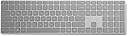
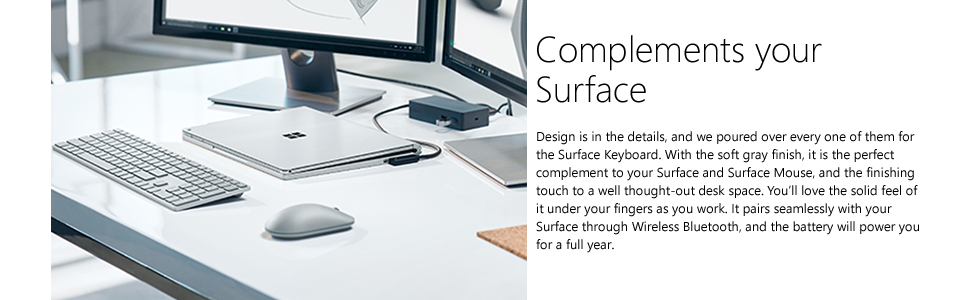
โจ๏ธ Elevate your workspace with wireless freedom and sleek durability
The Microsoft Surface Wireless Bluetooth Keyboard in Platinum offers a minimalist, durable aluminium design paired with Bluetooth 4.0 connectivity and up to 12 months of battery life. Tailored for Windows users, it delivers optimized tactile feedback and international English layout, making it an ideal accessory for professionals seeking a reliable, stylish wireless typing solution.


| ASIN | B06WLLTDYF |
| Antenna Location | Office |
| Best Sellers Rank | 18,919 in Computers & Accessories ( See Top 100 in Computers & Accessories ) 445 in Tablet Keyboards |
| Box Contents | USB Cable |
| Brand | Microsoft |
| Brand Name | Microsoft |
| Button Quantity | 78 |
| Colour | Platinum |
| Compatible Amazon Tablet Models | Amazon Fire 5th Generation, Amazon Fire 7 5th Generation, Amazon Fire 7 7th Generation, Amazon Fire 7 9th Generation, Amazon Fire HD 10 5th Generation, Amazon Fire HD 10 7th Generation, Amazon Fire HD 10 9th Generation, Amazon Fire HD 8 5th Generation, Amazon Fire HD 8 6th Generation, Amazon Fire HD 8 7th Generation, Amazon Fire HD 8 8th Generation |
| Compatible Devices | PC |
| Compatible Operating System Family | Windows |
| Compatible devices | PC |
| Connectivity Technology | Bluetooth |
| Connectivity technology | Bluetooth |
| Customer Reviews | 4.4 out of 5 stars 422 Reviews |
| Enclosure Material | Aluminium, Plastic |
| Global Trade Identification Number | 00889842103151, 08898421031510 |
| Hand Orientation | Ambidextrous |
| Item Dimensions L x W x H | 42.1L x 11.3W x 1.9H centimetres |
| Item Weight | 14.78 Ounces |
| Keyboard Backlighting Color Support | Single Color |
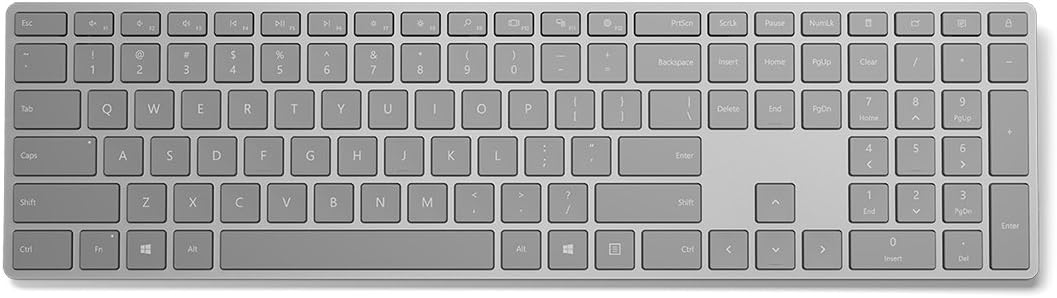
| Keyboard Description | English International layout |
| Keyboard Layout | QWERTY |
| Keyboard Plate Material | Aluminum |
| Keyboard description | English International layout |
| Manufacturer | Microsoft |
| Manufacturer Part Number | WS2-00003 |
| Minimum Required Operating System Version | Windows 10 |
| Model Name | WS2-00003 |
| Model Number | WS2-00003 |
| Number of Batteries | 1 |
| Number of Items | 1 |
| Number of Keys | 19 |
| Number of Packs | 1 |
| Power Source | Battery Powered |
| Product Features | Backlit |
| Product Warranty | 1-year Surface Warranty |
| Recommended uses for product | Office |
| Special feature | Backlit |
| Style Name | Keyboard Only |
| Switch Type | Tactile |
| Theme | Office |
| UPC | 889842103151 |
| Unit Count | 1.0 count |
M**G
A great, stylish, well built and fully featured keyboard. Don't let the minimal style & price point put you off.
Currently typing on this right now and I can tell you it's great. I've always been using a Mac keyboard with a PC for about a decade now and honestly think they make for great keyboards. The build quality, how your fingers glide across the keys and how silent it can be to type on. The Apple keyboard is a joy to use, but only one downside is that the hotkeys needs to be custom programmed to make them work. With the launch of the Microsoft Surface Keyboard, I can finally ditch the Mac keyboard and finally use all the hotkeys like they were intended to. I'm not going to lie, it feels and looks like Microsoft has literally ripped the Mac keyboard, with some minor adjustments here and there, but who cares? They took (in my eyes) a very good keyboard and made it properly work Windows computers (must be 8-10 may I add). At ยฃ72 (ยฃ89.99 rrp) is it an expensive keyboard? Not really. Considering I use this everyday, and if it's built as good as my mac keyboard, the next 5 years at least I'll still be using this. It's hard to find a decent fully featured keyboard these days for cheap, never mind it being Bluetooth and without dongles. Get one, you wont regret it.
J**O
Sublime
I had a logitech k780 keyboard, as I like typing on laptop style keyboards. That was very good, but no lights on the keyboard and no function key lock meant it had to go. I found this microsoft keyboard and its sublime in my view. Connected easily to my work laptop, it has lights for caps lock, fn lock and num lock so I was made up! Its well made, nice to touch and looks really good on my desk. It has home and end keys, ideal for command line edits. I am typing this on an alienware laptop, I have used various keyboards, from cheap to expensive and the Microsoft keys are slightly noisy/clicky but have a really nice spring to them. To say I like the keyboard is an understatement!
M**R
Excellent keyboard - especially for those who type fast
The Microsoft Surface Bluetooth Keyboard is by far the best keyboard I've used. As someone who types around 120 words per minute, I'm very picky when it comes to keyboards. The Microsoft Surface Bluetooth Keyboard has perfect key-travel, feels great to type on, doesn't miss a key-stroke, and works great with Linux (I don't use Microsoft Windows at all, period). On Linux, things like the volume control and brightness controls work, as does the "lock" key (which I find very handy). Something I really like is the perfect UK key layout - all the keys are in the "right" place (something that isn't always the case with cheap keyboards). It would have been nice if this keyboard included backlighting, but that's not a big issue for me. I also thought the name of this keyboard was rather confusing. Not sure why Microsoft threw "Surface" in to the model name. It made it more difficult for me to find online. I don't like Microsoft as a company, but this keyboard is awesome (and works with Linux!). I am keenly waiting for the Microsoft Modern keyboard to go on sale in the UK, and will probably buy a couple of those too (for my desktop computers). I like the way the new Microsoft Modern keyboard gives you the option to connect via Bluetooth or cable! I suspect it will be more expensive as it also includes a fingerprint scanner (which probably won't work on Linux - not for a while anyway).
D**S
An excellent product minus one major flaw! Why do you need the printscreen key so big?
An excellent keyboard! Typing, quality, looks, this keyboard owns all of them! But wait! Who suggested the "PrintScreen" key to be above the "Backspace" key? In 99% of the keyboards, this is where the "Delete" key is. Why exactly would you need such a big key for"printscreen", while you have such a tiny key for "delete"? What key do you use vastly more often between the two? That is a big NO to Microsoft's design, at least in my opinion! I was considering to return the keyboard just for this, but it is so nice and lovely that I could not send it back... Otherwise, dont think about it. This is the best keyboard for office use, regardless the price range!
M**W
"Wake from sleep" issue solution.
As a keyboard I'm very happy with it so far. Proper quality kit. I have other surface products (Surface Pro and matching keyboard, plus the pen and docking station). I would never have thought, ten years ago, that Microsoft's hardware division would be knocking it out of the park where classy products are concerned, but here we are. They took the fight to Apple and Dell and bested them, IMO. Nothing's perfect and there's a small but (to me) annoying issue with this keyboard. If you pair it with a Surface computer and put the PC to sleep you can wake it up by touching the keyboard. Great. However, if you pair it to a PC with a Bluetooth dongle, that (probably) won't happen. You'll have to press the power button on the PC to wake it up. A first world problem if ever I saw one, but irritating all the same. Turns out that Microsoft, for reasons I don't fully understand (something to do with power saving, I believe), insist on turning off all power to Bluetooth devices in sleep mode. Therefore you can't use a Bluetooth keyboard to wake the PC. After many, many hours searching I found a solution. You need to be comfortable editing the registry. Make sure you create a restore point before you start messing in the registry! Open registry editor and browse to: "HKEY_LOCAL_MACHINE\SYSTEM\CurrentControlSet\Services\BTHPORT\Parameters" and add "SystemRemoteWakeSupported" with a DWORD of 1 then restart the computer. After that, open device manager and find "Keyboard/HID keyboard device". Double click and select the "Power Management" tab. There you will see a checkbox that says "Allow this device to wake the computer". Tick that box (which was unavailable before the registry hack), then restart the PC again. Voila, the Surface keyboard will now wake the computer from sleep. I take no credit for this solution but I'm very grateful to the anonymous Windows Wizard, whoever he or she may be, who sussed it out. Microsoft's own tech support (there are thousands of similar complaints out there) go out of their way to offer utterly useless "solutions", none of which work. The reason is, I suspect, because they don't EVER want us, the stupid public, to go digging around in the registry, screwing things up and making work for themselves. Well, yes, I sort of get that. But why they couldn't have given us the option to "allow this device to wake the computer" is beyond me. PS: The attached pic was grabbed from @sabogusi on Reddit, which is where I finally found this solution. Props to him.
L**E
The perfect companion for a Mac user that went back to WIndows and missed his Magic Keyboard.
If there was one thing I knew would be a real struggle moving back to Windows from MacOS it was the keyboard. I loved the magic keyboard and every trip around a PC World or similar to see other chiclet style keyboards offered nothing in comparison When I saw this advertised I honestly thought, nope, it will be a good effort but not really worthwhile. How wrong was I... Honestly, this just makes me happy typing again and I type a lot. It's the same size as the magic keyboard (with number pad) and works just as well. The aluminium top gives it that quality feel, they keys themselves when pressed feel almost rubbery but they are not. They have a bit more travel than the Apple version but still, give that satisfying dull thud but not a click or clunk. You hear the keys being pressed but not annoyingly so as I find with mechanical keyboards. Another benefit it has over the magic keyboard is that it is slightly more elevated for a more comfortable typing position. The colour is very nice, not in your face bright however not so dark you get lost finding keys. Even in dim light, it is still quite visible. Sure, if there was a backlight it would take it above great however, I understand that would likely drain the battery at a rate we would all be unhappy with. If Microsoft did (and should) produce a wired version with a backlight I would likely buy it as well. There are several useful keys for Windows related shortcuts. Cortana, Task Windows, Control Panel, Calculator, lock PC, and it has all the usual media buttons. It hibernates itself, no need to switch it on and off. I am using this with a self-built PC that has no Bluetooth so had to buy a USB Bluetooth dongle. Having read reviews that suggest it drops connection I made the assumption that this could be due to using cheaper sub ยฃ5 dongles that are often flaky, so I went for something with good reviews at a higher price. To be honest, if you are going to spend this much on a keyboard make sure you get a quality Bluetooth dongle to support it, not a ยฃ2 one that will likely give you issues. I went with this one: Plugable USB Bluetooth 4.0 Low Energy Micro Adapter (Windows 10, 8.1, 8, 7, Raspberry Pi, Linux Compatible; Classic Bluetooth, and Stereo Headset Compatible) Using Windows 10, plugged it in and immediately spotted the keyboard, paired and done. No lag experienced, not dropped once (that I have noticed) and both work perfectly together. The exact steps were: 1. Plug in Bluetooth USB 2. Press and hold button under keyboard until it enters pairing mode (flashing light above the up arrow, not visible until it flashes). 3. Go to the Bluetooth menu and search for new devices then select 'Surface Keyboard' 4. Type in the 5 digit number and press enter. 5. Done. Whilst I am aiming a lot of this review at the converting Mac user that in no way suggest it is not suitable for everyone else. I highly recommend this keyboard if it is in the style you like I really can't see anyone being disappointed with this. Will update again time, however, for now, loving it :) Update: It is now the Middle of July 2018. Really just wanted to echo what I said above, the keyboard is still working away great and it really is my best keyboard yet. Still the same set of batteries running it after a year. On occasion when you leave it for a while it takes a few seconds to wake itself up. Sometimes I have started typing something to find it's not caught up. Minor point and the only niggle I have with it. There is new version of the keyboard with fingerprint sensor.
A**D
Love this keyboard
I bought this to go with a 2018 Surface Pro. It is a really attractive design and a pleasure to type on. There is no backlighting which is not an issue for me as I use it for desktop work in a lit environment. My initial complaint (which took away 2 stars) is that it did not work consistently. The first several days, every day it lost its pairing with the surface pro. This meant I had to do the dance of logging in via tablet mode, going into settings and repairing the keyboard. It was not particularly convenient and convenience is a big part of the sell for a wireless keyboard. A month or so on and something changed because now it seems to stay paired all the time and just kicks in when it is needed. I suspect it must have been background driver updates or something. The perfect keyboard. Well apart from the price that is!
W**Y
Sleeps but don't expect it to wake up
AVOID - this is a comfortable and good looking keyboard but the bluetooth battery saving sleep function is so bad the product is almost unusable. Keyboard will go to sleep after a couple of minutes and is incredibly slow to wake up. This can be as much as 90 seconds delay each time. Sometimes it is quickest to physically remove and reinsert the batteries. WTF Microsoft? However if you are looking for a keyboard ideal for smashing into pieces over your desk then this product is perfect - providing both the rage intense motivation to destroy it and the freedom for a full overhead swing that only a wireless keyboard can provide.
Trustpilot
2 months ago
3 days ago