



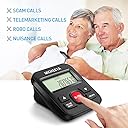
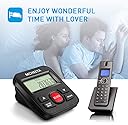
Call Blocker, MCHEETA Premium Phone Call Blocker Landline Device, Simply Block All Unwanted Calls, Robocalls, Incoming Calls and Nuisance Calls by Pressing One Button
Product ID: 44921205
🌍99% compatibility
📞4000 number capacity
🚫One-button blocking
📵 Say goodbye to unwanted calls and hello to peace of mind!
The MCHEETA Premium Phone Call Blocker is a smart device designed to eliminate unwanted calls, including robocalls and sales pitches, with a simple one-button operation. It boasts a large capacity to block up to 4000 numbers and is compatible with 99% of USA landline systems, ensuring your home remains a sanctuary from nuisance calls.


| Customer Reviews | 3.7 out of 5 stars 418 Reviews |
R**Z
So far it seems to work OK at blocking numbers ...
This is a follow up to my previous review. So far no problems with the blocking of calls. MCHEETA did reached out to me and I was able to fix the problem of not being able to see CID on the telephone display. Basically, their customer service team said to change the ring setting on the blocking device. I switched on the 1 ring setting instead of the 0 ring setting. CID now appears on the telephone display. Thanks to the MCHEETA customer service team for their assistance. Previous posting: So far it seems to work OK at blocking numbers, My complaint is that when the MCHEETA is installed on the line and phone, the phone no longer displays Caller ID. Not being able to see who is calling is inconvenient. If I disconnect the call blocker from the phone, the CID displays correctly.
F**.
Blocking Unwanted Telephone Calls
This product is fantastic. Easy to install and to operate. Just plug one end into your incoming telephone line and then plug your telephone into the MCHEETA Phone Call Blocker. To block an unwanted telephone number push the Large RED Button while your telephone is ringing, that's is all. The unwanted number is registered. I live in Washington and receive several unwanted calls from Washington USA. For example, even though you block one call from Washington USA they can still call you from a different number and when that occurs just push the RED button again. After a few more attempts the calling stops. I have blocked calls that my local telephone company said that cannot be blocked. I recommend this product without reservations. By the way Amazon has a very competitive price. One on line hight end catalogue compact, charges twice the price.
A**E
MCHEETA 801 NOT GOOD
There's no way to UNBLOCK a number. Worthless. I hate getting the robocalls but this piece is worthless. I ordered a different brand, one made in the USA. Save your money and order something else. If you make a mistake and add a number you didn't mean to blacklist, too bad. The instructions given were translated from Chinese to English, so poor translation. I have had the mcheeta for almost a month and it does block numbers and works well if you happen to be standing by the phone to press BLOCK. But adding the number later by pressing BLOCK most of the time works. A number you don't want to block: don't mistakenly want blocked just can't be unblocked, even when you press the DELETE button.
T**N
Blocker Defeats Caller ID
It was easy to install. It does work as described in the "literature". It was easy to block unwanted calls and unblock calls that I should not have blocked. What I do not like is that the blocker defeats the caller ID information on the handset. The blocker only shows a solid string of numbers which makes it difficult to make a judgement on whether to block the call or not. I started making a list of numbers that I did not want to block. The manufacturer was prompt to reply to the problem. Their solution was to answer all calls and press the BLOCK button if it is an unwanted call. They also gave instructions on how to program the blocker so that calls previously blocked would not ring at all. This might be a solution if you only have one phone. We have five phones in the house (all handsets show only "Unknown") and we do not want to be limited to answering only the one phone with the blocker.. Looking for other solutions for the unwanted calls.
T**3
It Does the Job with a Few Quirks.
I bought this to avoid those annoying calls, So far it works Great, the ONLY issue I've had over the past 2 weeks since installing it, I had it blocking a Friend of mine, even though I didn't block his number, I think what was happening is I set it to block "NO CALLED ID" calls, since he uses a cell phone, I think his information wasn't being transmitted fast enough before he was getting blocked, I un-set the No Caller ID block and haven't had any issues since. I'm not faulting the device for that, I think it lies in the phone companies, transmission and things beyond my grasp. So far other than the one hiccup, It has worked flawlessly, Two negatives I have is One, the display ONLY shows the number that called, NOT the number & name, So in order to block those who tried calling while I wasn't near the phone, I have to use my phone, go through the recent calls list and match the number up on the MCHEETA, then block the ones I want, really, just a minor inconvenience. Second,I had to hook mine up in Parallel, which is no big thing, But the manual doesn't explain What this connection is OR how to hook it up, a Quick Google, a spare splitter jack connector and I was in business. No Biggie, But the Manual should explain how to make the connection instead of just saying "Connect in Parallel" All in All, I'm pleased for the Price Point and how well it works, When someone calls that is Blocked, It rings Once and disconnects, It is Pre-Loaded with I believe 2000 Known Bad Numbers and I can Block I think 1500 or 2000 more, rest assured, I would use probably no more than a 100 I'm sure, But nice to know I have the capability if needed. All in All, I think this purchase is worth it.
W**1
Works as expected except CID and remote blocking....
don't work at the same time. Works fine except will not pass CID through to handsets while in series setup. In parallel it will not block from handset. ADDED on 2/15/2018. Changed from 3 stars to five stars. It says in the instruction booklet that they recommend that AT&T and Vtech phones be set up in series and Uniden and Panasonic be set up in parallel. I tried it with an AT&T phone and it passed the CID through OK and the blocking function could be activated from the cordless handset. Unfortunately, my phone is a Uniden, which i like fine except for this speed bump. The info on the different brands is at least included in the booklet, if not the website description. Kudos for honesty in admitting that the phone brand makes a difference in the functionality of the blocker. Other brands of blocker still present themselves as working universally and any reduced functionality is blamed on the customers line. For that reason, this one's a keeper. Maybe I'll get a different phone later for series setup.
D**N
While it worked, it was great !
We have Comcast, with an ATT phone. The McHeeta worked really well for 2-3 weeks, and we were starting to enjoy the quiet of our evenings and weekends. But then we started getting cell phone calls from friends and family that our landline phone was hanging up on their calls. We weren't getting any calls but from new solicitors that got thru. The display then stopped working, and I couldn't check anything. So I unplugged it and now family, friends and telemarketers all keep calling. To be honest, I am not electronically inclined and didn't even want to bother trying to figure out what went wrong. The company kept emailing me offering to help. But I'm not good with electronics. Either it works when you plug it in or it doesn't. Just returned it and got email my money will be back in my account in 3-4 days. Might work for you, but I'm disappointed that it did work for a while and then for some reason, failed.
S**E
Peace at last! Mcheeta CID801 Call Blocker
The Mcheeta CT-CID801 Call Blocker can store up to 2,000 numbers in its blacklist. Any incoming calls on the blacklist are silently blocked -- neither the device nor your phone will ring, but Caller ID info will still be forwarded to your phone. Non-blacklisted calls, including caller ID information, will go to your phone/answering machine as usual. I have this device hooked up (in series) to my cordless phone system with multiple handsets, and it works fine. The device is powered by the incoming phone line, and does not require any batteries. Please note that the device displays only the phone number without caller name. I believe that some other Mcheeta models show the caller name, but for me, it's not a big deal. Also, Mcheeta's customer service is very prompt in answering questions posted on Amazon. I am very pleased with this purchase as it fits my needs perfectly. UPDATE: Oct 13, 2017: Peace at last! Have had this blocker for a month now, and I LOVE IT! Once on the blacklist, robocalls and telemarketers are blocked forever. I especially like that Caller ID info is still passed on to my regular phone system so I can see both blocked and valid callers. OPERATION: The only setup required is to plug the incoming phone line into the back of the device, and then use the short phone cable provided to connect the device to the phone. Note: Use the NO CID/BACK button to exit out of any operation. 1. Adding Numbers to the Blacklist can be done in one of four ways: a. While the call is active and the number is shown on the device display, press the BLOCK button. b. While the call is active and the caller ID is shown on your phone handset, press * twice. c. Review the incoming call log on the device using the UP and DOWN buttons. Press the BLOCK button to add a displayed number to the blacklist. d. Using the phone handset, press speakerphone, press * twice, enter a phone number, and press #. 2. Reviewing New Incoming Calls Press the UP or DOWN button to review the incoming call log. To block a displayed number, press the BLOCK button and that number will be added to the blacklist. 3. Deleting New Incoming Call Numbers When reviewing incoming call numbers, press the DELETE button twice to delete the displayed number. To delete ALL incoming call numbers, press the DELETE button for 3 seconds. 4. Reviewing And Deleting Blacklist Numbers With telephone in stand-by mode, press the BLOCK button, then use the UP or DOWN buttons to review the blacklist. Numbers are stored in numerical order. To delete a displayed number, press the DELETE button twice. 5. Blocking Numbers Without Caller ID First press the NO CID/BACK button, then press the DOWN button to toggle the NO CID on or off. Press BACK when done. 6. One Ring/No Ring Press and hold the NO CID/BACK button for 5 seconds, then press the UP or DOWN buttons to choose 0 or 1 ring. Press BACK when done. 7. Brightness Adjustment Press and hold the DOWN button for 5 seconds. The display shows “lcd" + brightness level. Use the UP or DOWN buttons to choose the brightness between 1 and 4, with 4 being the brightest. When finished, press the BACK button to exit.
D**A
Great product.
This little Call Blocker is easy to install and easy to use. It took awhile for delivery but it was worth it, the amount of unwanted calls have been reduced by 98% and the ones that are still coming through , I can block by pressing the big red button ( that simple). I highly recommend.
D**.
Works as advertised
The number of nuisance calls dropped markedly after I connected the unit. Seems good so far and priced right. Could have better instructions included with the product.
A**R
very satisfied.
Instructions are a bit sketchy, but is not hard to figure out how use this call blocker. Works very well.
P**S
Très bien
Excellent
A**R
Happy with the product👍
Easy to set up and seems to be doing the job. Definitely has reduced the number of solicitation calls.
Trustpilot
1 month ago
5 days ago