Desertcart purchases this item on your behalf and handles shipping, customs, and support to British Virgin Islands.
⌨️ Compact power, endless productivity — your desk’s new best friend!
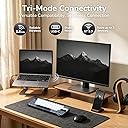
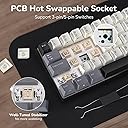
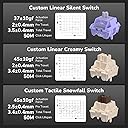
The RK ROYAL KLUDGE RK61 is a portable 60% mechanical keyboard featuring a 61-key layout optimized for space-saving and precision. It supports triple-mode connectivity (Bluetooth 5.0, 2.4GHz wireless, USB-C wired) and can pair with three devices simultaneously. Designed for enthusiasts and professionals, it offers hot-swappable switch compatibility, durable oil-resistant PBT keycaps, and a long-lasting 200-hour battery. Enhanced by pro software for full customization, this keyboard delivers a premium typing experience with satisfying tactile feedback in a compact, ergonomic form factor.


| ASIN | B0GQHDN1PT |
| Additional Features | Ergonomic, Hot-Swappable, Lightweight, Portable, Rechargeable |
| Antenna Location | Everyday Use, Gaming, Personal, Student |
| Best Sellers Rank | #1,459 in Video Games ( See Top 100 in Video Games ) #163 in PC Gaming Keyboards |
| Brand | RK ROYAL KLUDGE |
| Built-In Media | 2 in 1 Keycap & Switch Puller, 2.4GHz Receiver, USB Cable, Dust Cover, RK61 Keyboard, Replace Switches |
| Button Quantity | 61 |
| Color | Knight Black |
| Compatible Devices | Gaming Console, Laptop, PC, Smartphone |
| Connectivity Technology | Bluetooth, RF , USB-C |
| Customer Reviews | 4.5 out of 5 stars 9,749 Reviews |
| Enclosure Material | 10% Acrylonitrile butadiene styrene (ABS) (RM0268), 10% Other [Circuit board] (RM0262), 10% Polyethylene(RM0190), 5% Metal (RM0246), 5% Other [Lithium Battery] (RM0262), 60% Recycled post-consumer Acrylonitrile butadiene styrene (ABS) (RM0271) |
| Hand Orientation | Ambidextrous |
| Keyboard Backlighting Color Support | Single Color |
| Keyboard Description | RK61 Mechanical Keyboard |
| Keyboard Layout | QWERTY |
| Manufacturer | RK ROYAL KLUDGE |
| Mechanical Keyboard Switch Model | Linear Switch |
| Minimum Required Operating System Version | Windows 10 |
| Model Number | RK 61 |
| Number of Items | 1 |
| Number of Keys | 61 |
| Number of Packs | 1 |
| Power Source | Battery Powered |
| Recommended Uses For Product | Everyday Use, Gaming, Personal, Student |
| Special Feature | Ergonomic, Hot-Swappable , Lightweight, Portable, Rechargeable |
| Style Name | Classic |
| Switch Type | Linear |
| Unit Count | 1 Count |
| Warranty Description | 1 Year Manufacturer |
A**K
Nice quality, small keyboard for touch typists in a small workspace.
COVID has me working in my small home office. I have my work MacBook, my Windows Laptop, and my old iMac all jammed onto a small desktop. Wanting to clean up my desk, I was looking for a Bluetooth keyboard that would work with all three. Which brought me to this small, wireless keyboard with the ability to pair with three machines. Here's the good news, this is a well-made keyboard. It's fast. If you have the ability to type very fast, the switches on this keyboard have strong tactile feedback that allows you to actuate each key without fully depressing the key. If you aren't a touch typist, this probably isn't the keyboard for you. If you are a touch typist, you have three key combos that you will need to learn, or the benefits of this keyboard miss you entirely. This is a noisy keyboard, for a reason. If you are a touch typist, you may like the audible click each keypress makes. This is, however, not a friendly keyboard for use in a shared workspace. This is a small keyboard, but it has full-sized keys. This is great if you are a touch typist with a small, private, workspace. It does require some tradeoffs. In order to make the keyboard small, but retain full-sized keys, there are fewer keys than a standard 101 keyboard, this machine has multiple functions or layers for many of the keys. This keyboard has full-sized arrow keys that occupy one layer. Press Fn+Enter and that layer is disabled and now the up arrow becomes the /? key. Left arrow becomes the right Alt key and the Right arrow becomes the right CTRL-key. (I'm not sure what the down arrow becomes.) Tada! In my case, I also need to flip the functions of the keyboard from windows to Mac. To do that, I hit Fn+A or Fn+S Then I have access to all the windows or Apple functions. I can use Fn Q to switch to my work laptop, Fn W to switch to my windows laptop and Fn E to switch to my old iMac. Kudos to this keyboard for having EXCELLENT Bluetooth management and excellent power management. It reliably stays connected to the machine I want it connected. It reliably switches on command. It reliably reconnects after it has gone to sleep. In this regard, it is even better than my old Apple wireless keyboard. Finally, the top row of keys acts both as your regular numeral row and your Function keys. To toggle that layer, I hit Fn+Ctrl to flip back and forth. Admittedly, Remembering these three key combos takes a little getting used to. The instructions are sparse, but they exist, and the keyboard functions as advertised. This is a loud, clicky keyboard. I kinda like it, though I have to close my office door or my wife will comment on the noise. The keyboard has survived its first week of use on one charge, so that seems acceptable. It charges through its included USB cable. The battery is permanent and not hot-swappable. The key switches are permanently soldered in, so they aren't swappable either. The keycaps are swappable, and I may just buy a new keycap for the "WIN" button. Oh, it has amber lights. I have the black version of this keyboard and they look nice, though I don't really need all the wavy patterns. The layers thing doesn't bother me too much, but it is hard to get used to my wife laughing whenever I type. _____ I've spent a bit more time with this keyboard and I've added a start. It was easy for me to add the Fn+Enter to toggle the arrow keys and Fn+Ctrl to toggle the function keys. I'm super happy with the ability to switch between three devices on demand. This really is a great keyboard for the money, and the seller did a great job getting the keyboard shipped promptly. They even sent a personal follow up email to ensure everything went well and that all my questions were answered.
B**G
Overall a good starter 60% Bluetooth Mechanical Keyboard, especially given the price!
PRO * Very affordable 60% Mechanical Keyboard, especially given the Bluetooth connectivity. * OEM Keycaps are actually fairly thick in comparison to other mechanical keyboards in this price point. When measured with digital calipers the factory OEM keycaps were around 1.3mm. (EnjoyPBT or GMK keycaps are 1.4 and 1.5mm respectively). * Keyboard has fairly standard keycap sizes which makes switching to an aftermarket keyset easy and painless. * Surprisingly sturdy build especially given the price point. * On/Off toggle switch for the Bluetooth radio on the bottom of the keyboard. * LED indicator under spacebar for when keyboard is charging. CON * Bluetooth is Bluetooth version 3. However, for general typing use this shouldn't be an issue and wasn't an issue in any of my experience. However, if used for gaming you might want to play plugged in via USB to avoid any latency. * As I generally use fully programmable keyboards or keyboards such as the HHKB Professional BT where the Control key is where the Caps Lock key is placed, I'd really like to be able to reprogram the keyboard layout via a desktop application or perhaps via an Android/iOS application such as what is present on the Anne Pro from Obins. This is also true of the arrow key placement as I'd prefer to use HHKB style arrow clusters or at least vim arrow keys (hjkl). IMPROVEMENTS * Would like to see different switches offered such as Gateron Silents. * Perhaps switch to white LEDs as this would be more pleasing and would match with aftermarket keysets better. * See misc improvements or changes I'd personally prefer to see throughout the review. MISC FEEDBACK * The model I am reviewing had a generic Cherry MX Blue switch in it. Normally, I'm not one to use a clicky MX switch as I tend to prefer Cherry MX Silent Blacks (Linears) or Zealios (67g Tactile) or Topre style switches. * Personally, I'd prefer to have paid $5 more to obtain this board with a different selection of switches (Gateron Silent Blacks for linears, maybe Silent Gateron Browns for Tactiles?) over the switches included. * When utilizing the LEDs the Caps Lock key is not turned on by default, unless caps lock is active. I'd prefer to have all keys lit if LEDs are activated and when caps lock is turned ON to have the LED shine a different color via an RGB LED in this switch.
P**O
Great portable wireless mechanical keyboard.
I’m typing my review on this keyboard. I got the white one with the blue switches (I think they are Kailh Blues) and I’m pretty impressed with this keyboard for the price. Many of the reviews on this products complain about the weird placement of the arrow keys and combined functions of other keys, but in reality that the nature of most 60% keyboards. The wireless connection is solid, although using it without a cord for gaming introduces a good amount of input lag (blues are crap for gaming anyway). There seems to be an older version and an updated one, the updated one has some more ergonomic key combos to activate certain functions, and also have a USB-C cable, which is much preferable to a micro USB. Make sure you guys look at the manual and keep it in case you can't remember some of the unmarked key presses, such as ctrl + enter to disable the arrow keys. Typing on this keyboard is very satisfying, with a nice click and feedback every time you press a key. The keys are well spaced, and they each have enough heft so they can’t be pressed by accident. Someone with larger hands shouldn’t have much trouble using this to type. Also due to its size it is pretty easy to carry around in bag if you are trying to use it as a portable keyboard. I also like the fact that you can pair it to 3 separate devices at once and switch between them very easily. The backlighting is pretty great, especially when typing in the dark. All the other lighting mode other than the standard one are a little too flashy though. I usually just turn it off to save battery, which has been pretty good so far. I’m also using this on a iPad and it paired really easily and has had 0 problems with it so far. Make sure to switch to Mac mode from the Windows mode or vice versa. (Ctrl + A or ctrl + S) The downsides of this keyboard are the key legend which is a little cheesy, as well as how loud it is (that’s the nature of all blue switches though). Also if you listen closely beyond the loud clicking of the keys, there is some metallic pinging that can be heard. It isn't the greatest sounding thing in the world, but is mostly drowned out by the clickiness of the keys. Overall this is a great and rather discrete looking keyboard that is great value. Hopefully reliability is good, will update if anything happens to it. Buy this if you are considering it. EDIT: They are Outemu blues
C**A
Current version is fully hot swappable. 2.4ghz performance is pretty good too
Hey, keyboard nerd here. I've been around the hobby for a while but I got one of these to use as a beater/travel board. This version of the board seems to be a newer version that was introduced this year (or maybe in 2021). Most reviews you can find online of the older one, but the main differences are switch compatibility and the 2.4ghz receiver. The current version that I have is fully hot swap compatible. I don't think it was made clear enough, and I think the fact that this amazon page includes the reviews for the old version is confusing. The old version is only compatible with Outemu style switches with the smaller stems. This version, to my surprise, worked fine with Gateron reds and other standard switches. I looked through the listing again and there was an indication in one of the *pictures* of all things that the keyboard switches are almost fully hot swappable. All of the online reviews for this keyboard are for the older version and indicated that it only supports Outemu style switches, which is no longer the case. Switch and keycap quality are okay. They're definitely fine for the price but the switches do have a bit of wobble to them. The texture on the keycaps is fine. They probably won't last forever but they seem like they'll survive at least a few years. The 2.4ghz performance is pretty good, which is to say it's pretty standard for a 2.4ghz wireless receiver at this price point. The latency is noticeably better than bluetooth. That said, wired performance is noticeably better than 2.4ghz to me. I still think the 2.4ghz receiver is plenty good for casual games and way better than bluetooth, but if you want to be a sweaty fps gamer, I'd stick to playing wired. I obviously didn't buy this keyboard for gaming, but for reference I tested it on cod mw2 (2022) running on performance mode at 240hz, with my usual keyboard being a rog falchion. Compared to that keyboard, the rk61's 2.4ghz mode had a pretty noticeable delay for me, but the wired mode was plenty good enough for fast-paced sweaty gaming. Also, the manual could use some improvements. Below I'm adding a rundown of how the keyboard is mapped out, since I had to look some of it up and trial-and-error the rest. - fn + left control: toggles between 3 fnlock modes. 1)[fnlock for the function row (f1-f12) + fnlock for the nav cluster (prtscr, home, end, etc)] 2)[fnlock for only the function row] 3)[no fnlock at all] - to access the multimedia keys (volume up, play, stop, open browser, etc), you need to have the number row set to the function row (f1-f12) from the step above, then hold down fn and press one of the f1-f12 keys. that should activate the key's multimedia functions. - fn + enter: toggles fnlock for arrow key cluster in the bottom right corner. press it again to disable it - fn + a, fn + s: switches to windows or mac mode respectively. this just switches the function of the alt/opt and windows/cmd keys to their usual layouts on windows/mac - fn + windows key: locks the windows key and prevents it from being clicked, for gaming. press again to remove the lock - fn + esc: use the tilde key. hold shift during this to type a backtick Okay, I think that should be it. Everything else is reasonably explained in the manual or on the key legends themselves. Overall. I like this keyboard. It's good value for the money. It's fully hotswap now so you can upgrade to whatever switches you want later. Keycaps feel fine to me for the price. The 2.4ghz receiver works fine for the price and latency is fine. Bluetooth and wired modes work fine. Really my biggest gripe is that the manual doesn't properly explain how the keyboard is laid out well, which is pretty essential on any board smaller than 65%, which is why I docked a star. Still recommend the board, but I really hope the manual and documentation can get an improvement in the future.
R**H
Keyboard
It was great, and the sound is crisp.
A**O
Lightly Documented Feature Unlocks Full Functionality
This clicky-clacky little number does a fine job at providing a more satisfyingly tactile experience than your usual Bluetooth keyboard. Lots of reviews (and the product description!) suggest that you need to do some goofy key combos to get normal characters like question marks, but hidden in the manual is this handy paragraph: “Press FN+Shift (shift on the right side of the keyboard), Arrow keys turn into the second function. Press FN+Shift again, arrow keys function recovery.” Not the best translation, but it does mean you can toggle the arrow keys with a simple keyboard combo. I’ve attached a picture of the entire manual for the convenience of other potential buyers. And honestly, I recommend it. This keyboard is a steal at this price. It’s probably not the perfect gaming keyboard and your co-workers will murder you if you try to bring it to the office, but it’s a very functional device that’s a lot of fun for casual use. It also seems to be pretty trivial to customize, with easily swappable keycaps and a whole universe of little nerdy doo-dads to get the typing experience of your dreams. One imagines the more expensive models are even better if you’re trying to be some kind of Pro Gamer or you can’t type on anything less than actual ivory keys hand carved by patient artisans in a foreign country, but for the rest of us, it’ll do quite nicely. Also the whole thing lights up and makes you feel like you’re in a cheap Matrix knock-off movie, which is cool.
D**E
Great keyboard for it’s price!
I bought this keyboard for occasional use with my iPad mini. I wanted a Bluetooth mechanical keyboard that’s not too big and at a good price. Build Quality. It’s built much nicer than I expected (especially since I was going for a lower price point). I love the feel of mechanical keyboard, and i can type super fast with it. The weight of it, feels substantial giving it a quality feel. But not too heavy where I wouldn’t want to carry with me in my messenger bag to Starbucks. I’ve only had for 1 day, but I doesn’t seem like the keys will pop out easy and for no reason. Criticisms. The font choice used on the keys. I assume they are trying to appeal the ‘gamer’ market. It’s not ugly. Or that obtrusive. It’s not something I would go for if I had a choice. Definitely not a dealbreaker. Also, to pair the keyboard- you actually have to read the manual. There isn’t a separate tiny button that you would expect. You have hit fn+tab, then fn+p. Not that it’s hard, but i don’t know if it’s something i’d Remember or have the manual on me when i’m on the go. In short, this is probably the best bluetooth keyboard for under $50.
T**Y
For $39 its a damn good deal if you want small, mobile keyboard. Works so so for coding/programing
Several keys stoped working after a few years. Its a good Keyboard but I hate to buy disposable things USB-C? √ Blue tooth and wired? √ Small mobile keyboard to take on the go? √ Nice typing feel? √ Extremely low cost for mid quality? √ Never found my self with out battery for my keyboard. √ I've never owned a flashy back lit keyboard with lighting, I don't really care about this feature. Its kinda cool but distracting and kinda worthless. If you want better battery performance turn this off. The blue tooth quick switching between up to 3 devices does not work very well for iOS/iPadOS devices. I'm not really sure what the problem is but it seams to work between desktop/laptop macs. My primary use for the keyboard is general writing which it works great for, and programing. For coding/programing using vim its great (because you don't need your arrow keys and you don't need a pointing device). However if you need to use an IDE and you need to maneuver around the code using arrow keys you'll have to flip between "arrow mode" and "/?" mode. The up arrow key and the /? key are degenerate sharing the same physical key, and because your on the 60% format they want to conserve space. If you need to use arrows and /? interchangeably a lot, the switch is fast (left shift + Fn), but it might get annoying. Over all for the price its an amazing value. Obviously you can get higher quality keyboard, and maybe something that will last 20 years, but you got to pay those Benjamines.
J**L
An absolute gem of a 60% keyboard.
Well, I’ve been after a small white mechanical wireless keyboard for some time now, intended. It to look at Amazon in my hunt as when you type the parameters “gaming” and “keyboard” into the search, the amount of pure rubbish that turns up is incredible. However when I read a top 10 list of 60% keyboards on a trusted review site and this guy featured, I thought I’d take a look. When it arrived I was amazed at the quality. For less than £50 I thought it was gonna be a bit cheap feeling, but actually it’s expensive feeling. It has a solid chassis, next to no deck flex or twist. The actuation of the key switch set is fantastically clicky and tactile (if that’s what you’re after), and even though it’s Bluetooth ive not noticed any discernible input latency (though I’m not a competitive shooter kinda guy or anything). I’ve been using for over a week now and apart from the initial charge, only charged it once (after 5 days of fairly heavy use), which took no time at all due to its usb-c interface, which can also be used to make it wired. The blue backlight is excellent. It can be super bright if you want, but I turn it right down to lowest and it’s still great. Each key is individually lit and can be individually turned on or off, and there are many different lighting patterns. Colour cannot change though, it’s cyan all the time, but looks really well implemented. The one I have is the American key layout, so if you’re set on UK layout then this isn’t for you, but I just changed my windows language settings to add “English (US)” as well as “English (UK)” so I had the option to change my keyboard language to match the RK61’s key layout. It’s very easy to get used to. Overall I’m extremely pleased with my purchase and would recommend anyone to give this board a go. It really did surprise me.
S**N
Solid overall and fantastic feeling keys.
I've been trying to use a small form factor keyboard with my Pixel phone for use with desktop mode and found it frustrating to use with constant lag and especially finding it difficult to type efficiently as it was a laptop style flat keyboard, so after some quick research came to the conclusion I was going to try this one. It has been a few hours now and it's been transformative for use as a couch-keyboard. It's small thanks to the lack of numpad/arrow keys which is something I can live without for use in a mobile-use context, and the keys are a dream to use. I went for the Creamy keys and am not disappointed in the slightest. I'm still getting used to the various shortcuts, and as I'm primarily using it with an Android phone it won't ever be perfect I suppose, what with the lack of software to fully make use of it for customising it, but for basic typing it's brilliant and has a much better feel to it than my standard keyboard I use with my PC. Thoroughly recommended.
A**N
Magnifique
Le seul défaut à donner c'est que c'est compliquer à utiliser en bureautique mais pour le gaming c'est parfait , et que les touches se salissent un peu vite
F**N
Flawless Keyboard, Exceeds Expectations!
This keyboard is absolutely perfect in every way. The build quality feels premium, the keys are responsive and comfortable, and the overall design is sleek and practical. It delivers exactly what you’d expect and more, no complaints whatsoever. Highly recommended for anyone looking for reliability and performance.
R**A
klik fqrfe głośny
klik fqrfe głośny
Trustpilot
3 days ago
2 months ago