Desertcart purchases this item on your behalf and handles shipping, customs, and support to British Virgin Islands.
🔥 Level up your game with the ultimate wireless keypad experience 🎮
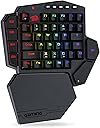
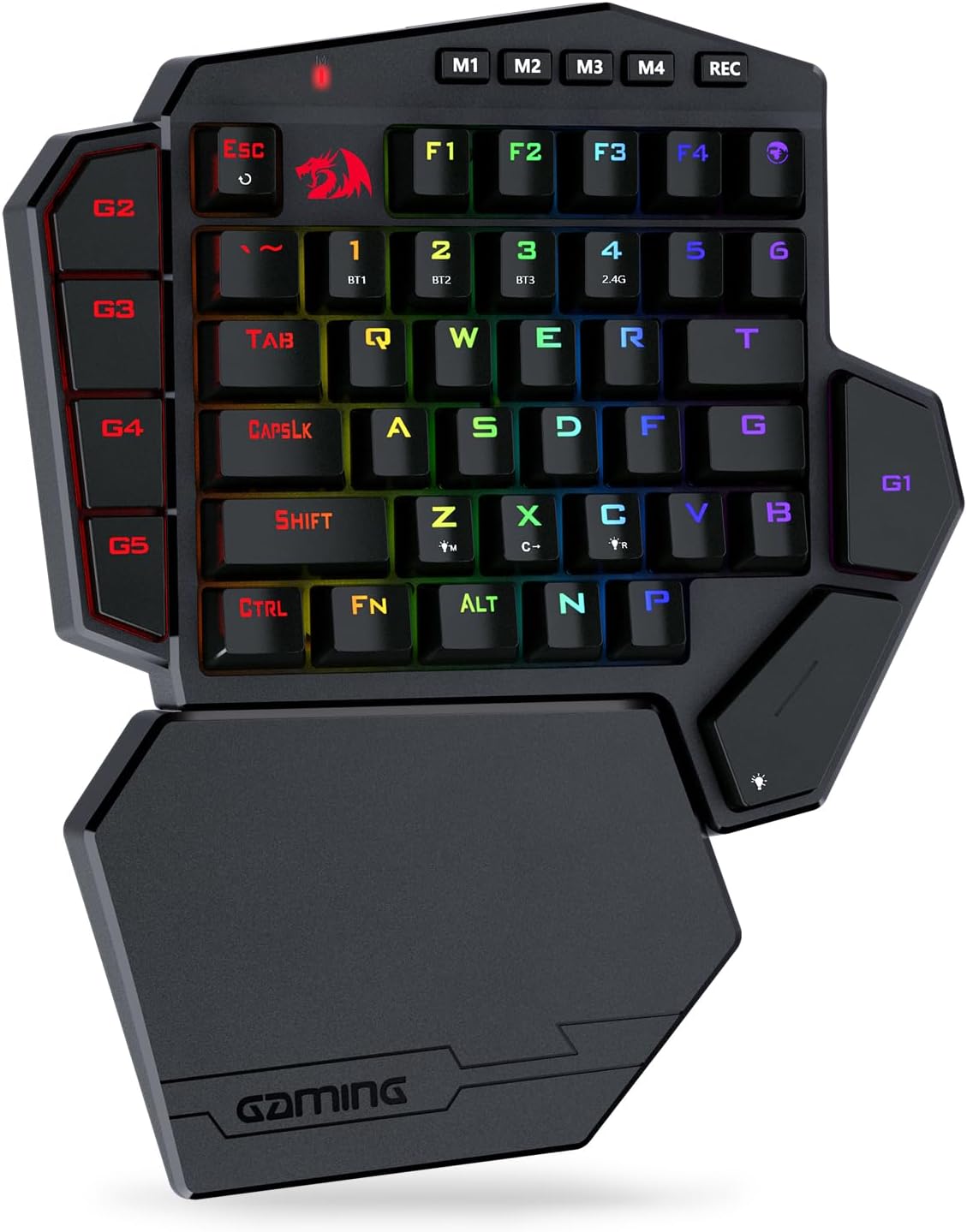
The Redragon K585 PRO is a wireless, one-handed RGB gaming keypad featuring a 42-key layout with 7 dedicated macro keys across 4 profiles, delivering 15-20 hours of uninterrupted play via Bluetooth or 2.4GHz connection. Its hot-swappable switch design supports easy customization with durable Redragon Red switches rated for 50 million keystrokes. The detachable magnetic wrist rest and customizable RGB lighting elevate both comfort and style, while Pro software offers advanced macro and lighting programming for a fully personalized gaming edge.


| ASIN | B099W5MSFM |
| Additional Features | 3-mode Wireless, Ergonomic, Hot-Swappable |
| Antenna Location | Gaming |
| Best Sellers Rank | #1,691 in Video Games ( See Top 100 in Video Games ) #181 in PC Gaming Keyboards |
| Brand | Redragon |
| Built-In Media | USB Cable |
| Button Quantity | 5 |
| Color | Red Switch |
| Compatible Amazon Tablet Models | Amazon Fire HD 10 11th Generation, Amazon Fire HD 10 13th Generation, Amazon Fire HD 8 10th Generation, Amazon Fire HD 8 11th Generation, Amazon Fire HD 8 12th Generation |
| Compatible Devices | PC, Laptop, Tablet |
| Compatible Tablet Computer Models | Amazon Fire 7 Kids 12th Generation |
| Connectivity Technology | Wireless |
| Customer Reviews | 4.2 out of 5 stars 662 Reviews |
| Enclosure Material | Plastic |
| Hand Orientation | Ambidextrous |
| Item Dimensions L x W x H | 10.83"L x 9.06"W x 1.57"H |
| Keyboard Backlighting Color Support | RGB |
| Keyboard Description | Wireless One-handed Gaming Keyboard |
| Keyboard Layout | QWERTY |
| Manufacturer | Redragon |
| Mechanical Keyboard Switch Model | OUTEMU Red |
| Mfr Part Number | 265099838 |
| Model Name | DITI |
| Model Number | DITI |
| Number of Batteries Required | 1 |
| Number of Items | 1 |
| Number of Keys | 49 |
| Number of Packs | 1 |
| Number of Sections | 1 |
| Power Source | Battery Powered |
| Recommended Uses For Product | Gaming |
| Series Number | 5 |
| Special Feature | 3-mode Wireless, Ergonomic, Hot-Swappable |
| Style Name | Gaming |
| Switch Type | Linear |
| Theme | gaming, red |
| Unit Count | 1 Count |
| Warranty Description | 1 year |
J**R
MUST have for any gamer.
I took some time to use the Keyboard prior to a review and its an amazing, amazing keyboard. For reference I use this for competitive WoW and it has performed above and beyond expectations. Pros: It's Plug and Play ready. No need for confusing setups. The detachable wrist rest it very pliable and connected to stronger magnets than what most reviewers convey. The keyboard itself is highly durable as well. Even when mashing and under stress it has not felt flimsy or like it will break down. The keys are well defined so if you have bigger fingers it will not matter. Little background is I play competitive PvP so I don't go easy on this keyboard and it allows me to Keybind and Macro to a very high degree and technicality. You can use each M1-4 setup to macro everything individually and switch flawlessly. The keys themselves are very quiet. I literally play sometimes within a couple feet of my wife and she never wakes up which in itself is a huge feat. Switching between Bluetooth and 2.4 has not had any issues and had caused me any lag with connecting or maintaining the connection at all. I havent dropped at all. The space of the spacebar is talked about a lot but once you learn the placemeny and it becomes repetitive you will learn to space your hand out more and keep it relaxed so really its helping you. The charge is more lengthy than I expected and I got 8 hours of continuous use from it. One Con: The setup of the keybinds in their program is basic and can be downloaded from their website. I couldn't get it to save my keybinds so I downloaded a different one. TL:DR; Completely worth the cost and should serve well in the long run. Works for heavy and rugged use from casual to pro gamers. If you decide this is what you need and (I highly believe you do) you need it for gaming get their 12-button mouse too. Its the perfect combo.
K**R
1/2 size gaming keyboard
Great gaming keyboard. I love the way you can record key strokes and press one button for all the recorded keys. The battery lasts for days. It has so many choices for key colors and the range of the wireless is quite far. The key response is amazing. Great keyboard for when you don't need a full size one.
S**E
It checks all the boxes, save one.
I have had a lot of experience with building and repairing computers over the years and I know what it means to sit down and plan out a new computer build from top to bottom so that you can squeeze out the very best performance and experience for your dollar. Up until about 2 years ago I always used Logitech products as my go-to for gaming oriented computer peripherals. But then I started to ask myself about what I was actually getting for my money. I had a Logitech G13 Gaming keypad that I absolutely loved but ultimately ended up selling along with my latest computer build up to that point. So I was then searching for a product to replace the one I had and after careful consideration I decided to go with the RedDragon brand. I originally purchased the K585 Wireless keypad over a year ago and I had grown to love it. It had blue switches that gave that satisfying clickity clack with every keystroke. I used it more than my actual keyboard when gaming. Then, just a few days ago I had a little accident regarding a full glass of apple juice (yes, I am a full grown adult who drinks apple juice on a regular basis...deal with it). My K585 took a good apple juice bath and although it survived after I further drenched the thing is isopropyl alcohol (works as a water displacement and evaporates quickly, you're welcome) some of the keys no longer had that clickity clack I was so used to. So I bought some blue switches with the intention of replacing said keys. And it worked! Up until I tried to replace the "G2" key, which are apparently not supposed to be removed because those pins broke off in the PCB. So then I thought, yes, I could fix it, but then I thought I don't want to. So I ordered another RedDragon K585 Pro Wireless with red switches. Here is my review: The build quality is great. It's light weight, but not so much to where you are thinking you are going to break it by looking at it. I'm not a huge fan of the shape, but this is easily overlooked after you consider how many keys there are on this thing and one cool thing about it and one of the things that was a requirement when I was looking for a product to replace my Logitech G13 was programmable keys. All of the keys can be reprogrammed to multi-keystrokes, media control, app launch, or device control, making the keypad great for both gaming and 3D/CAD software navigation. You have the option to either use USB, Bluetooth, or 2.4Ghz wireless connections. the Bluetooth has 3 profiles and therefore can be paired with three different devices. The RGB, though not as robust as it was on the G13 is still great and satisfying. I, for one like to change the theme of my setup on a regular basis so, like it or love it, it's a nice feature to have. There is also great FN control so you can do simple tasks without the use of the software including changing the RGB for specific keys. The software is not necessary unless of course you want to use macros, or change key combinations. I have the software installed and compared to my previous K585 the software has gotten a facelift and it looks and operates great! It's easy to follow and understand and any changes made are quickly saved to the device and the software can then be put away. But, I do have one major gripe about RedDragon products and that is that if you have multiple products of theirs you have to have multiple software applications to control each one. So if you have a keypad, keyboard, and mouse, you have to have 3 separate RedDragon software programs to control each one individually. This sucks. It would be exponentially better if they decided to implement a software control programs that encompassed all of their hardware devices so you didn't have to switch back and forth all the time. Aside from this, I am very pleased with the product and will consider this brand for my next PC build.
B**R
Good quality and size keyboard
Good size for one handed keyboard. I don't use the pad, just a wrist pad for a mouse is good. There's a little too much distance between the space key and surrounding keys for my liking. An angled profile might be better there. Frees up a lot of space. Sometimes I have to open the settings and go to my custom light bindings and hit save if they've gone off. The colors don't show after setting them and exiting the app.
R**T
Software to program works. Many features
This keyboard is shockingly good for the price. It feels very solid to use and the switches are smooth. The software is not easy to find, install, or use but it gives more features than most high end keyboards. It allows you to remap every key, change the colors to however you want, and each M# button at top can contain a different key mapping and/or color setup. It is fairly easy to use once it gets running. Now to install and use the software. First you have to go to red dragons web page and go to the download at top of screen. Search of the k585 and make sure you pick the wireless one. You get some zip file that has a couple of directories. Inside one directory is another archive (a rar instead of zip). If you are running the latest version of windows 11, it can handle extracting from the rar otherwise you’d need winrar. Once you extract the exe file from that rar, you run it to install the software. Then you launch the software. It seems to not load or do anything. But actually it does start running, but only shows up in your taskbar corner icons. The icon will only be in the hidden area so you have to click on the up arrow to expand those. It will be just a grayed out symbol that you can right click on. Now you have to plug in the keyboard directly via usb cable. Once the keyboard is plugged in, that task bar icon for the red dragon software will go to red from gray. You now can right click on and then click on configure. Not an easy process for sure. But it does work and is excellent once it gets going.
B**T
Great for PC gamers.
This is the second time I have purchased one of these units. The first one was wired. I liked it so much, I purchased this wireless one. It is very easy to setup. Dragon has a software package you can download from their site that allows you to setup the extra keys. Then it works like any other keyboard. Like most of Dragon's keyboards, this one is very solidly built. I use it in my recliner, and have already dropped it once. A key popped off, but it was easy to pop it back on. The LEDs ae convenient for helping identify keys in the dark while you are getting used to it. It does come with a palm rest, but I don't use that. I find it uncomfortable. I have 4 Dragon keyboards, and will continue to use them. Their quality and support are unbeatable.
T**K
Wireless is abysmal
I really want to love this keyboard but I just can't because it's main feature doesn't work. It looks nice, feels well built and has great features but it may as well be wired due to the poor range of the wireless feature. This is my experience using windows 11 The maximum range is only 5-7 feet from the dongle with a completely unobstructed view. If *anything* is between the KB and dongle the connection is completely lost. I already boxed mine up for return but decided to take some photos for a review. Circled in red is where I tried the dongle with my laptop. Both in a USB hub and connected directly to my laptops usb C port. As you can see in the photos it would not work on the white table as my legs are in between the keyboard and dongle. If I put the KB on my lap, elevated on a higher table or even lifted it up a few inches from the table it would begin working. As soon as I set it back down it would stop. I did more testing by walking towards and away from the laptop while holding the KB in hand with no obstruction. Signal would drop completely around 7 feet. Additionally if I stood about 3 or 4 feet away and turned my back to the laptop with my body blocking the dongle, the signal was also lost. I updated keyboard drivers thru windows with no change. I downloaded red dragons software hoping that i could update the firmware and/or drivers to improve signal quality. *the software would not even launch once installed. * TLDR: If using wired it's a 4/5 but the wireless signal is maximum 7 foot range and you can't have anything obstructing line of sight from the dongle. Red dragon software does not work. Avoid buying.
K**.
Cannot disable key repeats
I like it, it's pretty disappointing that there is no way (in redragon software or windows) to disable key repeating (i.e. pressing a key repeats the key a *minimum* of 2.5x per second, max 30x. The keyboard bypasses windows filter keys and even the redragon software macro creator disallows a macro that does not repeat: you *must* select one of three repeat options in order to save a macro. Case in point: the keyboard doesn't have a windows key. I assigned the windows key to G1. Even at the slowest repeat settings and with wi does filter keys ON, pressing G1 triggers the windows key 2.5x per second and accessing a most basic windows tool becomes an annoying slot machine minigame. Further, I've found the repeat frequency settings for the letter keys does not change the frequency of the macro keys, they are independent and lack control altogether. It's an OK keyboard, good for the price, it's very disappointing when a device has a global lockout like this, reaching for my other keyboard to use the windows key defeats the purchase/purpose.
C**T
Handig voor fps games
Dit half draadloos gamerskeyboard is echt een aanrader voor first person shooters. Hij kan simpel gebruikt worden op computers maar via de 3 bluetooth connecties ook op Android tablets en Steamdeck. In combinatie met een draadloze muis is het voor elk systeem de ideale bediening voor fps games. Gewoon verbinden en de toetsen instellen en je bent klaar om te gamen. De toetsen zijn geluidsarm en ik merk nauwelijks of geen vertraging bij aanslag. De RGB verlchting is een leuke extra die je ook nog naar eigen smaak kan aanpassen. Ik heb lang gezocht naar een BT gamerskeyboard en deze voldoet aan mijn verwachtingen.
C**K
The BEST One-Handed Keyboard (and only one) I've had so far.
Not a generic cheap "one like another" stuff, but yet if comes to the price, you WILL NOT GET ANYTHING close to Redragon K585 PRO Wireless Keyboard in the same price range, it's worth all the penny paid. See I have moved to a "bed play" mode now, and in 2 years I have struggled with my actuall full size keyboard, was really uncomfortable to play any game, and especially FPS ones, until I have ordered this one, IT IS A REAL GAME CHANGER, fits my left hand preatty well, wristle rest size is just right, but it's deatachable, so you can take it off, red cherry buttons are damn good, it's responsive and no delays noticed, also love the sound of clicking it, and the battery last for days, so you don't have to worry if you let it charge over the night or when at work/school. I've had it for over a year now, still in perfect working contition, I can recommend it with clear conscience, I know you gonna love it, as I do.
J**X
Recomendable
Teclado de buena calidad. Si es cierto que la tecla que hace de "espacio" esta lejos. Las teclas "g" me costo configurarlas. E leido que algunos lo devuelven por no conseguir configurarlas, e de decir que el software depende de que web lo descargues yo lo descargaba de la web .es y ese no me funcionaba. Al final lo descargue de la .com, digo esto porque redragon tiene distintas webs y en algunas esta actualizado y otras no. Quitando todos estos inconvenientes es un teclado de 10. Lo compre en junio de 2026.
H**.
Genauso wertig, wie die Kabel-Version, ... aber .... gibt da schon noch Luft nach Oben
Beinahe hätte es 1 Stern gegeben ... wollte Sie schon zurückschicken. Leider ist be der Ausführung mit USB-Kabel schon nach einer Woche die Buchse von der Platine gerissen, da es da keinerlei Zugentlastung gab. Wieso passiert sowas heutzutage noch? Nach 20 Jahren sollten die Konstrukteure doch kapieren, dass man sowas in Gummi lagern muss. Aber andere Geschichte. Rücksendung ging problemlos. Da mir das Teil eigentlich gefällt, habe ich also die Kabellose bestellt, in der Hoffnung, dass da nichts abreißen kann, wenn man lädt. Nur: Wieso muss da zum Programmieren das USB-Kabel rein? Wieder ein Risiko. Das sollte doch auch über Funk gehen. Ich habe es zumindest nicht hinbekommen. Die Software behauptet, es wäre nichts angeschlossen. + Wertig und ergonomisch gut. Tasten reagieren beim Spielen gut ° Programmierung nur über Kabel möglich. Schade, dass die Tasten nicht einzeln farblich einstellbar sind. Ging aber bei der mit Kabel auch nicht. Space-Taste nur beim Laden beleuchtet? 4 Modi-Tasten sind ja gut, aber wozu sind die Profile? Wäre auch nett, wenn man die Modi benennen könnte, damit man sich die Spieleinordnung nicht merken muss. - Handbuch? Handbuch? Handbuch? Wieso also FAST zurückgeschickt? Ohne Handbuch ist die Programmierung nicht selbsterklärend, aber was nervt: Andere Software als bei Version, mit Kabel und Einstellungen nicht vernehmbar, obwohl es die gleichen Tasten sind. Was soll das? Die Makroprogrammierung funktioniert völlig anders und man muss Sie erst mal findenund es gibt keine virtuelle Tastatur. Man muss sich durch Menüs klickern. Wenn man das mal geschafft hat, ist alles gut. Aber bis dahin ist man eine Weile beschäftigt.
B**R
Harika
Guzel
Trustpilot
1 week ago
2 days ago