Desertcart purchases this item on your behalf and handles shipping, customs, and support to British Virgin Islands.
🎯 Level up your PC gaming with Xbox’s ultimate wired & wireless controller!
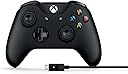
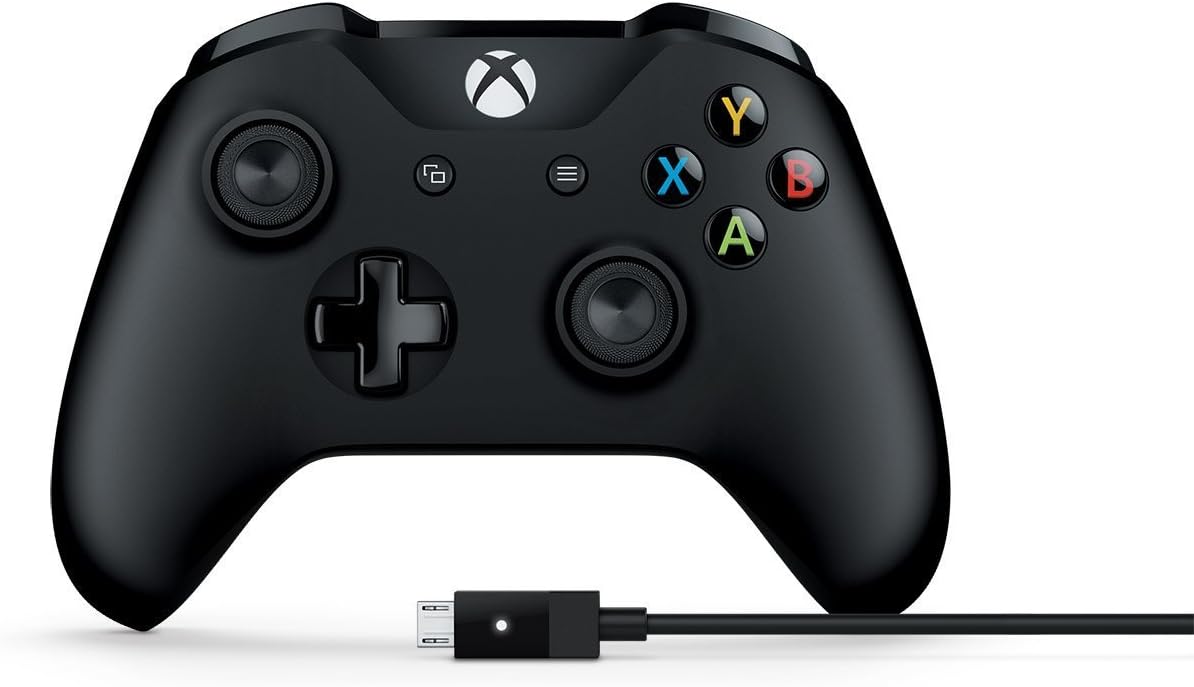
The Microsoft 4N6-00001 Xbox Controller + Cable for Windows is a sleek, ergonomically designed gamepad featuring 17 buttons, dual wired/wireless connectivity, and up to 12 meters of wireless range. Compatible with Windows 7, 8.1, and 10, it offers plug-and-play ease, a textured grip for comfort, and a removable USB cable for reliable, uninterrupted gaming sessions. Perfect for professionals seeking seamless PC gaming with Xbox-grade precision and durability.


| ASIN | B01LPNKGGI |
| Additional Features | Wireless |
| Best Sellers Rank | #25,218 in Video Games ( See Top 100 in Video Games ) #32 in Xbox One Game Joysticks #344 in Xbox 360 Accessories #546 in Xbox Accessories |
| Brand | Xbox |
| Brand Name | Xbox |
| Button Quantity | 17 |
| Color | Black |
| Compatible Devices | Windows, Xbox One |
| Compatible Video Game Console Models | Microsoft Xbox One S |
| Connectivity Technology | Cable|Wireless |
| Controller Type | Gamepad |
| Customer Reviews | 4.4 out of 5 stars 9,836 Reviews |
| Global Trade Identification Number | 00889842121964 |
| Hardware Platform | Xbox 360, Xbox One S,Xbox One,PC, xbox one |
| Item Dimensions | 2.76 x 1.97 x 2.32 inches |
| Item Type Name | Xbox Controller + Cable for Windows |
| Item Weight | 231 g |
| Manufacturer | Microsoft |
| Manufacturer Part Number | 4N6-00001 |
| Model Name | MICROSOFT CORP/LICENSING |
| Model Number | 4N6-00001 |
| Package Quantity | 1 |
| Power Source | Battery Powered,Usb Cable |
| UPC | 889842121964 |
| Unit Count | 1 Count |
| Warranty Description | 1 year limited manufacturer warranty |
E**E
One of the best controllers for your PC
I was reluctant to buy this controller for my PC because I had an X-Box 360 controller I had gotten used to (which had subsequently broken), and this seemed to have a somewhat different form factor. Since Microsoft doesn't make the 360 version anymore, I thought I'd give this one a shot. The first one had a finnicky "A" button, so I returned it and the replacement I got works perfectly. Controls are tight and responsive, the analog sticks are definitely different than the 360 version and took a little getting used to, but I can see why so many people like these ones better. I almost took a star off for not being closer to the older form factor, but I decided that would be unfair, and honestly this controller feels more comfortable every time I use it. It's less bulky and more streamlined. There are a few major advantages you're gonna have with this controller-- to start, being a Microsoft controller, you KNOW it'll be compatible with the vast majority of PC games, esp. games on Steam; so there's no need to worry about downloading external drivers like with the PS4 controller, or hoping whatever off-brand controller you've bought is compatible with all your games. You plug this thing in, it works. Period. And tons of modern games are designed with an X-Box controller in mind anyway. No fuss, no hassle. Second-- hallelujah, the D-Pad on this thing is actually USABLE. I even prefer using it to the analog stick for some games, shockingly. The D-Pad on the 360 controller was trash; really only good for selecting weapons/options for your character and stuff like that. This new one, while not as good as say your typical Nintendo or Playstation controller, is pretty darn decent. Third -- and this is important -- the cable connecting your controller to your PC is removable. The reason I trashed my old 360 controller is because there was some kind of break in the controller wire, which meant it couldn't reliably keep a connection with my PC. Seems like that should be a relatively small problem, but my controller was well out of warranty, and I didn't know how to fix it or remove and replace the cable myself (looking up how-to videos on youtube showed me it would have been WAY too much hassle). But guess what? That'll never be a problem on this controller since if the controller wire ever did break, it takes all of 3 seconds to unplug the broken cable and plug in a new one. So unless Microsoft stops making USB wires for this thing, you should be golden. One less potential issue to worry about. Overall I highly recommend this thing. Without going into a higher tier like the Elite series, you're likely not going to find a better controller for your PC for the money.
N**S
10x Better than keyboard/mouse for MSFS2020 and actually available!
I bought this for MSFS2020 on my PC and just opened it a few hours ago, so this review will not cover durability. This is my first flight simulator, so I naively bought the program thinking my mouse and keyboard would be sufficient. After crashing about 30 times in the traffic pattern training module before starting to land (only sometimes, and very badly), I decided to follow the advice of literally every Youtube review/comment and get a real controller. I considered a joystick, a HOTAS or even a fancy yoke/throttle/pedal setup, but realized I was late to the party and all online stores were sold out or triple the price. I decided to try this Xbox controller and was blown away by how much easier flying is now. I have a Nintendo Switch and the quality of those controllers is noticeably inferior to this one. The Bluetooth connection was easy to set up and there is no lag time; the program reacts instantly to my movements. I'm still getting used to what the buttons do since I already memorized the basic keyboard controls, but the "yoke" joystick and rudder buttons are very intuitive. The trim and flap controls are also on the controller. I'm still using the keyboard for throttle, but so far that has been perfectly adequate. I'm hoping I can reduce the sensitivity somehow, but just out of the box, this is a huge improvement over the mouse/keyboard. I recommend it to any FS2020 beginner because it works so well, is reasonably priced and is, quite literally, the only option out there for the moment.
J**S
Plug-&-play for PC and Bluetooth brought me here.
Still pretty new to getting this 4N6-00001 Xbox Controller with Windows Cable, so will follow up with a performance update if needed. Feels nice and sturdy. I do not have an Xbox One and the last time I played an up-to-date Xbox console was 2013, so my review is going to be focused on the PC side of things. I picked this controller over other budget controllers for PC because I wanted something that will last and can withstand up to action/intense gaming while still delivering quality results. Since Microsoft makes Xbox and they need durable console controllers, was a no brainier. Pros: - Cable can be used to plug-and-play on Windows 10 with no problem. Have not double-checked if any drivers need updated. If they do, runs nice out of box. - If you just use the cable to connect to PC, you don't need the batteries. I kid you not, and still haven't installed any. - Instructions say it is Bluetooth compatible (Xbox link on packaging says only for Windows 10 and certain Android devices) and also works on Xbox One. - Sturdy controller construction and feel. Currently withstood about 10-15 hours of total action gaming time and seems durable. - Has an audio jack (have not tested) - Has not slipped while holding it at all during my few hour gaming session. After all, had to test it for extended game play, comfort, and durability. - USB cable is 8 ft long. This is a huge, huge plus right there. - I do not find the light from the Xbox logo distracting while gaming (I know this has been a frequent complaint with other light-logo or LED PC controllers). Cons: - The D-pad is only 4-directional. I know some prefer a round pad that allows for an 8-directional navigation, but I think this D-pad is standard on Xbox controllers - Usually I have more cons for products, but I can't think of any right now. Currently very satisfied with this purchase.
J**O
Easy Plug and Play
Bought this for my PC setup. Just arrived today. I was easily able to connect it to my keyboard pass through usb port (with the cable for windows) and windows recognized and installed the drivers without me having to do anything. Opened up Steam to try out Dark Souls 2. Controls were great. Have to get used to a controller but everything seems to went smooth in terms of connection and compatibility with Windows and Steam. The controller is hard plastic so did not feel very premium to me but i did not want to spend $100+ on a controller i would only use on certain titles like Dark Souls 2 or the like. The USB cable pass through is at the top where it should be, and the bottom holds the headphone jack (come on apple even this controller has one....). There is also a port for charging the batteries in the back if you buy a charging stand (i did not). Have not tried Bluetooth functionality yet, will let you know in the future if i decide to go that route. I give it 4 stars. You pay for what you get and it gets the job done without any issues so far.
B**Y
Perfect With Windows 10 and Bluetooth
If you are running Windows 10 and have Bluetooth connectivity on your PC the cable is not needed. Simply turn it on, push the pairing button on the front and pair it in PC Settings / Devices / Bluetooth & other devices. Click on the + tab and select the first option (Bluetooth). Your controller should show up almost immediately. Once paired with your PC it will stay paired until you remove it from your devices list. By default it connects as an Xinput device. If you use an Xbox controller often, a rechargeable battery option is a big plus. You can spend the extra money up front on a rechargeable battery solution or continue to toss AA batteries in it for years to come. I think these are the best and most durable game pads for PC available to date. If you buy one and your PC does not have Bluetooth connectivity, adding an inexpensive USB dongle is WELL worth the cost to be wireless. You will find plenty of high quality Bluetooth dongles right here on Amazon at fair prices. Don't let the lack of built in Bluetooth stop you from enjoying this fine controller. It's my number one "go to" controller for gaming on PC. I've tried a lot of other wireless PC controller options with varying degrees of success. This one beats them all. There are other brands of wireless controllers that work well with PC but I think the Xbox One Bluetooth controller is the best at this time. It may cost a bit more than some other brands but it's well worth the price.
T**T
Bluetooth does connect automatically!
EDIT: Previously in this review I claimed that you have to reconnect blu tooth manually every time you turn on your controller, that is actually false! All you have to do is wait about 10 seconds for your controller to connect itself automatically. If 10 seconds is too long to wait then just plug it in or spend the 30 seconds to manually reconnect, I guess. Lovely controller, the first one i've ever bought for myself and i'm glad I spent the extra money as opposed to taking a used one from a friend or buying one of the older xbox models. As for why i'd recommend this? The matte surface feels impeccable, your hands won't slip or feel greasy when you're really sweating up a storm at that intense video game (and when the controller vibrates it feels nicer in my opinion lol). The layout of the joysticks, dpad and buttons also is more roomy which makes it much harder to accidentally bump into the wrong thing + just feels nicer in general. It has a nice sturdy feeling build with a bit of weight that only makes it easier to handle. Overall i'm enamored with this product and even if it is a bit more pricey it works, feels and looks great. If you have the extra change i'd totally give it a shot.
J**U
PS4 user needing a more reliable PC controller
Been using a ps4 controller on the PC, generally speaking it works (I even have overpriced Sony Remote play bluetooth dongle, tho pricing seems about the same on the xbox version too) Well the micro USB slot has become loose over the years so I was in the market to buy a new controller. My gf recently has taken up some console gaming and started using the controller on PC as well due to hand pains from mouse and keyboard. This has been a solid controller so far (1 month Aug 2020) and ergonomically my gf favors this over the PS4. It's hard for me to say, the left joystick is positioned differently, which I would say is the biggest difference in layout. I could go either or tbh. I don't regret the purchase despite not owning a xbox one. This is exclusively for PC gaming and it fulfills that need, well my gf's I suppose, and I get my PS4 controller back for my PS4 so... win win lol My only gripe would be, wish it was cheaper and it was actually a hardwired controller like some of the old xbox controllers back in the day. I don't plan to use it wirelessly so if they made a wired version for a slightly cheaper price, I'd take that.
M**A
First the bumper sticking (which I fixed), now completely unresponsive RB.
This is the fourth Xbox controller I've bought in just under a year. 1 had a broken y-button on arrival, and one had very bad stick drift on arrival, enough to make playing driving games impossible. This one seemed great at first, had almost non-existent drift (testing with Open Joystick Display for PC) and every button worked great. I put about 200 hours into this controller and the right trigger started sticking. Looked it up online and found a quick fix, had to remove the plastic casing and scrape off this tiny foam pad that had slipped from where it was meant to be. Now the trigger was just a bit louder but working like new. Then, the right button starts unpressing while being held. Played a few more hours on it and the button is completely unresponsive now, even though it can still be pressed and still makes the normal clicking noise. I have never dropped the controller, never spilled anything near it, and don't press hard on the buttons. The trigger sound-dampening pad slipping after 200 hours is honestly quite ridiculous for a $60 product but at least I could fix it. There is no way to fix this button from what I can tell and I have given up. I don't recommend you buy any controller products from Microsoft. They make it an absolute nightmare to go through their warranty process and it took several months for one of my broken-on-arrivals to be replaced. I have an original Xbox 360 controller from 2008 with thousands of hours played on it, and the left stick has just a slight drift to it. Never any sticking buttons or issues with non-responsive clicks. These new controllers are not built to last, and have probably the worst quality-assurance process of anything I've bought from Microsoft.
A**R
Five Stars
You don't need this one, just order the wireless controller and attach a USB cable, that's it.
M**X
Happy Hubby
Bought as a present. The fella was happy with it, as he wanted an official microsoft one. Came within 24 hours of ordering.
F**E
Très bien
Correspond parfaitement à la description
C**O
É tudo o que eu queria!
O controle é original, com um acabamento e precisão IMPECÁVEIS!! Super prático de usar (é só conectar e ir jogar) e excelente para suas jogatinas. Vale super a pena quando você consegue desconto ou promoção, além disso eu recomendo comprar uma capinha de silicone para proteger o controle e aumentar ainda mais o tempo de vida do controle. No mais, 10/10 o controle!
J**E
Una sola palabra GENIAL!
Vamos a empezar por lo mejor, el precio. Encontré el control remoto con descuento; al parecer era seminuevo, pero inspeccionado y garantizado por amazon a un excelente precio; $637 pesos mexicanos con envío gratis (prime). Cabe mencionar que la apariencia del control es prácticamente de un articulo nuevo; llego en su caja impecable con todo lo que debía contener, al día siguiente del pedido y en perfectas condiciones. El uso que le he dado al control es para jugar en mi laptop Alienware 15R3 video juegos mediante la plataforma Steam. Antes de utilizar este control jugaba con un mando del Xbox 360 el cual conectaba a mi computadora con un adaptador USB para poder usarlo de manera inalambrica; el cual dejo de funcionar tras varios años de servicio. Lo mejor Lo que más agrada de este control es que no es necesario el adaptador USB para conectarlo a la computadora, este control puede conectarse directamente a la pc (con Windows 10) mediante el bluetooth, solo basta encenderlo y presionar el botón superior de emparejar para que la computadora detecte que esta el control disponible y te permita jugar sin tener que instalar drivers ni nada, asi que el cable USB que viene incluido sale sobrando. Las áreas de oportunidad El control puedes utilizarlo con baterias AA de toda la vida, ya sean las de tienda de un solo uso o recargables y es aquí en donde encontramos el único punto que podrían mejorar; ya que las baterias recargables no se recargan al conectar el cable micro USB (incluido) y tienes que utilizar un cargador independiente para hacerlo. Entiendo que es un tema de marketing ya que microsoft vende su propio set de baterias especiales para este control, aun así el rendimiento de mis baterías recargables energizer de 1500 mAh (que dicho sea de paso ya tienen un par de años) ah sido muy bueno y me permite jugar por varias horas sin tener que volver a cargarlas. En general es un muy buen producto, la calidad de los botones y del plástico no tiene comparación, son geniales y característicos de los mandos de Microsoft, esperemos que este control me dure los 4 o 5 años de servicio que me dio el anterior modelo.
Trustpilot
1 week ago
1 day ago