Desertcart purchases this item on your behalf and handles shipping, customs, and support to British Virgin Islands.
🌡️ Stay ahead of the curve with Ambient Weather’s ultimate thermo-hygrometer setup!
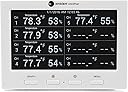
The Ambient Weather WS-3000-X3 is a wireless thermo-hygrometer system featuring a compact console and 5 remote sensors (expandable to 8). It offers real-time graphing, data logging via micro-SD, PC software for advanced analysis, and customizable alarms for temperature, humidity, and heat index. With a 915 MHz wireless range of up to 100 feet, it’s perfect for indoor/outdoor multi-zone monitoring, making it an essential tool for professionals who demand precise environmental insights.


| ASIN | B01IPOESHI |
| Additional Features | Alarm, Clock, Hygrometer |
| Best Sellers Rank | #93,016 in Patio, Lawn & Garden ( See Top 100 in Patio, Lawn & Garden ) #61 in Weather Hygrometers |
| Brand | Ambient Weather |
| Brand Name | Ambient Weather |
| Color | White |
| Connectivity Technology | Wireless, 915 MHz |
| Customer Reviews | 4.5 out of 5 stars 604 Reviews |
| Display Type | Graphical |
| Frequency | 915 MHz |
| Global Trade Identification Number | 00816982017499 |
| Included Components | console^5 thermo-hygrometer sensors^user manual |
| Is Used Where | Indoor, Outdoor |
| Item Dimensions D x W x H | 3.25"D x 3.25"W x 4.5"H |
| Item Type Name | Ambient Weather WS-3000-X5 Wireless Thermo-Hygrometer with Logging, Graphing, Alarming, Radio Controlled Clock with 5 Remote Sensors |
| Manufacturer | Ambient Weather |
| Material | Plastic |
| Material Type | Plastic |
| Model | WS-3000-X5 |
| Number of Items | 1 |
| Part Number | WS-3000-X5 |
| Power Source | Corded Electric |
| Recommended Uses For Product | Home |
| Sensor Technology | wireless |
| Shape | Rectangular |
| Special Feature | Alarm, Clock, Hygrometer |
| Specific Uses For Product | Temperature |
| Style Name | 1 Console/5 Remotes |
| Temperature Accuracy | 1°C to 2°C |
| UPC | 816982017499 |
| Upper Temperature Range | 140 °F |
M**D
Best Thermometer/Humidity/Heat Index Monitor I've ever owned!
This is simply the coolest and best Thermal monitor I've had the pleasure to own. Let's break down why- 1). It's super easy to set up. Just put batteries in all of the remotes. Set the dip switches for what channel you want them to be. THEN plug in the base station. It set's itself up, including time, (although you have to set the std time) . Then you see 5 channels displayed within minutes. And for simple basic temperature display, you're done! Distribute them up to a football field away (line of sight), or ~100 ft thru walls etc. 2). Each sensor has a local display, so you can pick it up and gawk at it on site, instead of having to go back to the main unit. I like that. Temp and Rel Humidity. And you can read heat index at the main unit (if set up to do so). 3). It graphs a history of all 5 (up to 8) sensors at once, in color. Up to 72 hours. And it can store a history for years on a micro usb chip (just buy a small cheap one-not needed if you don't want this). ....now if you have the time and desire: 4). It has temp/rel hum/heat index alarms hi&lo for all 8 channels! 5). The display for all 5 on-screen channels (and 6-8) can be independently programmed to display temp/hum/Heat Ind for each channel (or all at once - it scrolls for that). So it's a super flexible display. It's all in the manual. I recommend grouping them all together a few feet away from the base unit, then you can calibrate them to each other (what I did - to the middle one), or to a liquid bulb thermometer. Most of mine did not need more than .2 degrees F of tweaking. Then scatter them about your environment and have fun watching the graphs. I use lithium AA batteries for their long life, but a requirement if any of your sensors expect to get much below freezing. So I've got 1 at the base in the kitchen, 2 Outside, 3 in the bedroom, 4 downstairs and 5 in the cave. Now the one subtle downside: after you hit the menu key, there's a + key that functions as 'Enter', which takes you to screens where often you can increase '+' or decrease '-'. So it's confusing at first because you'd think + is incremental, not 'enter'. They should have come up with an 'enter' icon different from +. Didn't take me long to figure that out, but that was odd at first. Just know that and you're good. This is a great unit for basic users that want 5 spots T monitored (up to 8), or for tweakerheads that want more control. Best Thermometer + more I've ever owned. (The last was an Ambient Weather one too).
R**N
My review
I have been looking for something like this for a while, and now I have it. I have been using this for a few months. I like... - all options and display options - have no issues with the range - remote sensors seem like good quality (as does the display) - can schedule the screen to turn off and on at different times (good for sleeping) - the results can be saved to a sd card. drawback... - the display is small (but I knew this when I ordered it) - the chart on the display is even smaller. (will need reading glasses if you use them) I wish... - I wish it had a mode where the graph could be the entire screen!!!!, as it is somewhat tiny...but it works. - There are many "names" to choose from for each sensor; however, I wish they could be renamed manually. It looks like this can be done with a computer/sd card but I have not tried it. 5 stars from me...but just barely because the graph is so small but it's the only think like this... if another product came out with the same then I would give those 5 stars and this one 4.
J**D
Great Sensors With a Poor User Interface
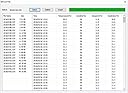
I've looked everywhere for a weather station with multiple sensors *and* which allows you to save/download the data. I'm interested in understanding the difference in temperature in different rooms in our house versus the outside temperature over days as well as longer trends like over years, and the WS-3000 does exactly that. I love that I also get a real-time plot of the temperature history: I can't tell you how much better you understand both the inside and outside temperature/humidity when you can see the trend rather than just the instantaneous value. The accuracy of the 5 included sensors is amazing. I verified this by letting all 5 sit together for a few hours after which their temperatures all read within a 0.5 deg F of each other and humidity was within 2 percentage points. I've attached the picture showing this. Note: when I first powered the sensors up after adding batteries, they were not very accurate and initially I was concerned. But as the instructions clearly state, you have to wait quite a while (1-2 hours) for them to stabilize. And after doing that, they indeed are very accurate. There are two reasons I can't give this device 5 stars. First, the interface on the main station is poor. In this day and age of mobile phone apps where user interface is everything, looking at the screen of the station is the equivalent of looking at a website from the 1990s. it's just clunky and non-intuitive. Just look at my attached image and you can see how hard it is to figure out which temp is which on the graph. And the customization of the interface is poor. Why can't I set the colors of each graph? Or set the y-axis? You can at least choose to set the x-axis between 12, 24, 48, and 72 hours (I believe those are the options), but need the same for the y-axis. Each number should be color coded where the temp is listed so we don't need to read the tiny little legend to figure out which temp is which on the plot. And clicking through the settings menu is also painful. It's like using an old TV menu interface. Anyway, these guys should hire someone from a company like Uber or Lyft who have made the interface the top priority. It's really old school to spend so much time on the underlying functionality (which is great) but then fail to appreciate that this functionality is diminished without providing a good interface to fully realize that functionality. My second major complaint is how clunky interfacing with the weather station is via a laptop. First, you have to supply your own Micro SD card if you want the data archived. That's all fine, but what they don't make clear is that the card can't be bigger than 32 Gb or it doesn't work. These days, that restriction seems so unnecessary given that most of us are buying SD cards bigger than that. I bought a 64 Gb just for this device not knowing about the limit. Fortunately, you can partition your card so that one partition is 32 Gb, but it's such a pain. Also, the app that you can download to your laptop that allows you to interface with the SD card has an even worse user interface than the weather station itself. Of course, you can just grab the data (it's in a text file) and pull it up yourself in whatever software you want (like Excel), but it's nice to be able to quickly explore the datasets with the software and this is brutally clunky. A request: like my digital photoframe, Ambient Weather needs to add a motion sensor to the station that turns the screen off when it doesn't sense motion for, say, 5 minutes, and then turns it on when it does sense motion. This works really great for my digital photoframe and all digital devices these days because it's such a waste to have so much energy being burned and so much unnecessary light being produced. Conclusion: I've been using the WS-3000 for about 4 months now and the basic functionality is great. After doing research, this seems to be the best station in terms of allowing you to have multiple sensors and download the data. But Ambient Weather needs to make the user interface a priority rather than an afterthought.
R**E
Accurate, able to calibrate, easy to read from several feet away
I got this 5 sensor system to replace an older, cheaper setup from a different manufacturer that was acting up on me. This beauty came pretty much calibrated out of the box, but I love that if a sensor were to regularly drift, I could try re-calibrating it. The screen is very bright and visible from several feet away (which I love). The graphs give me some really great visual history that is helpful for me. I have sensors upstairs, downstairs, in a room with a lot of electronics, outdoors, and inside a hobbyist greenhouse. I can see at a glance on the graph exactly how much hotter the greenhouse gets than the outdoors on sunny days, what time of day would be best to activate a misting system to cool down that greenhouse, and how long it takes for the misting system to lower the temp and/or raise the humidity to match outdoors or beyond. I can even see how long it takes after the misting system has been turned off before the greenhouse starts to heat back up again and/or reach an unacceptable temp again. That's the primary reason I purchased it, but it's also great to see how hot or humid rooms in the house are and the general weather outside... and I can take a sensor anywhere in range if I need to know if the attic is too hot or what not. But, back to the general use. I am a bit disheartened that the screen doesn't have any noticeable mount points for mounting to a wall or even a way to attach magnets to stick it to a refrigerator. The base is small and flat, but the screen is tilted at an angle, so it's meant to rest on a flat surface like a desk or shelf, but being able to mount it somewhere on a wall by a thermostat or a doorway would have been nice. It does flash really bright for a second when it's first plugged in, and that made me wonder if it was defective or if I was harming it when I had to unplug and plug it back in multiple times while moving it around to find the perfect spot for it. I think the graph re-started on resets, too. I'm sure if you have a memory card, it'll keep the data, but the actual graph may reset on a power outage - don't know if it does that when a card is installed. I did have a slight issue with placement. I noticed that if I put my screen in my laundry room, 2 sensors that were outdoors and in the greenhouse would drop out every so often. I hadn't had that issue with my older setup, but these use a higher frequency. I assume that there were just too many walls, pipes, and air ducts blocking the way for a proper signal. Moving the screen closer to an exterior wall resolved the issue. I love this unit. I may even buy the 3-sensor unit to have 2 screens and 8 sensors since they're all compatible. I saw where instead of a graph, the firmware could be flashed to show all 8 sensors instead of a graph, but I'd love it if I could program 1 to have just the graph and the second to have just the real-time numbers.
K**R
Great for monitor your whole home
We have a small apartment with very different temperature zones. It is very nice to be able to track the temperature in each room from one location and to track it over time. There are three issues with this system. 1. The sensors are hard to read, they are a bit faint. I don't know if this is related to me using rechargeable batteries or the display is always faint. This is not necessarily a problem as the base unit is very easy to read. 2. The base unit does not have any memory and you have to reprogram when you unplug the unit. The close apparently synchronizes using a radio transmitter. This has never worked for me, but our base unit is in a area with poor radio reception 3. The names/locations that you can assign to the remote units are limited to the predefined set. It would be nice to be able to create custom names. Pros: 1. You can record and export readings. If you install a mini-SD card the reading will be recorded and can be download to your Windows PC. There is no Mac Software. 2. It came with 5 units, can be expanded to 8 3. You can set low and high alarms. This is nice as we use this to track temperature range in a fridge that must stay within a defined range. Great little product that could be easily taken with you.
D**M
Accurate, connects to sensors easily
So I just got this today, and my initial impression is that this was engineered very carefully. All the sensors connected easily, even after unplugging and moving the base unit. When I had the sensors all together after putting batteries in them, they all were very close in their readings. Despite the base unit's small size it is easy to read. Each zone/sensor shows temp, humidity, battery, and signal strength. The zones can be named, but the options are very limited (see other reviews). My opinion is that it does the important part very well: showing remote temps and humidity. I also like that the sensors themselves also display the temp and humidity. Okay, now the nit-picky part. The display could have some better layout options. Like only showing the graph only when I want to see it, and otherwise using the space for bigger display of the time. Or maybe showing the graph fullscreen when I want to see the history. Or having more labels for the zones. (Why have Wine Cellar and Cigar as options but not Shop or Garage?) So, one other note that I feel I should mention is that this has readable documentation written by native English speakers. I read a lot of documentation, and I've written it myself; this company really put in the effort to provide the end-user with good instructions. I will update this review in the future if the product doesn't live up to its initial promise, but as of today I am very impressed.
J**R
Excellent for monitoring multiple remote locations
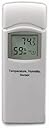
This review is for an Ambient Weather WS-3000-X5 unit received at no cost in exchange for an unbiased review. Now that we have that bit of business out of the way, on with the review! The WS-3000 is a multi-function, multi-sensor Thermo-Hygrometer, Dew Point, Heat Index Wireless Monitor with Graphing, Alarming, and Radio Controlled Clock that comes with 5 wireless remote sensor units. Also included are: AC adapter for base unit, micro-USB cable, screws for mounting remote units, nylon zip ties, mini-CD with PC software, operation manual. Base station: Powered by an included AC adapter, the base station displays temperature and humidity for up to 5 remote sensors. Optionally, it can also display dewpoint and/or heat index, alternating with temperature. The display’s backlight can be set to turn off between specified hours, if you wish. You can set audible alarms for high/low temperature and/or humidity. Each remote sensor can have its own set of alarm limits. There is also a color graph that can display temperature, humidity, dew point or heat index for up to 8 sensors for the last 12, 24, 48 or 72 hours. Each sensor is graphed in a different color. There are buttons on the front for Graph, screen brightness control, and Menu. On the side are slots for a micro-SD card (not included) and micro-USB (for connecting to a computer). If a micro-SD card is installed, data for the sensors is logged to CSV files at configurable intervals. Remote sensors: The remote sensors have a small LCD display (no backlight) that shows temperature, humidity and channel number. Each remote sensor unit takes 2 AA batteries (not included) and can be located up to 300 feet from the base station (in unobstructed situations), or, typically, up to 100 feet from the base station. Screws are provided for mounting the sensors to a solid surface, and nylon zip ties are included for suspending them (preferably not in direct sunlight). The transmitter channel number and temperature units (C or F) are set via DIP switches in the battery compartment. Mine came already set for channels 1 – 5 and Fahrenheit units. Setup: After connecting the AC adapter to the base station and putting batteries in the remote sensors, the base station display should begin showing readings for each of the sensors. I had to take the batteries out of 2 of the remote units momentarily before they would establish communications with the base station, but they have fine since. All of the setup can be accomplished via the buttons on the base unit, but it is MUCH easier to accomplish by connecting the base unit to a Windows computer and running the included software. I would really like to be able to change the channel descriptions to something more meaningful than "CH 1", "CH2", etc. With 5 remote sensors, it's hard to remember where each of them are located. Conclusion: I can see many situations where it would be useful to monitor temp and humidity remotely for 5 locations, and this unit is perfect for those situations.
E**R
Display on the console is very easy to read; seems accurate, calibration is easy.
An Ambient Weather WS3000x5 arrived a couple of weeks ago and provided at no cost in exchange for this review.. This is an interesting product if you need environmental measurements and tracking in different places - mostly indoors, or at least well protected outdoors. In the box are the small display console, five remote sensors, instruction manual, AC power adapter, USB cable and tie wraps, service card, an optical disc with Windows software and mounting hardware. The sensors are simple enough and came pre-set up with channels 1 through 5 already set on the DIP switches. That means all you need to do is add 2 AA batteries to each sensor. They power up and do their job. One of the sensors had a problem - it could not sync with the console, but an email to Ambient Weather’s great customer service resulted in a replacement received in a couple of days. On the display, there is a USB connector, port for a microSD card to store historical information and power connection. A few seconds after providing power, the remote sensors and console sync. Sensor 3 had the problem I mentioned - but was quickly resolved by Ambient Weather customer service. The manual says the first step after the sensors and console sync is to calibrate the console. The sensor display will not change, but the console will be calibrated. Go through the various menu items to set stuff. The manual is very helpful. These are the different graph representations. I ended up with Temperature and 48 hours. There is no battery in the console. When power is removed from the console, the graph will reset. Locate the sensors where you want them. In my case, our home office, wine storage, back porch, garage and attic. Note that the console time is now “radio controlled” - that takes a couple of days to sync up. To get to the historical data on the microSD card, I take the card out. Just push it and it will pop enough to remove. Put it in a SD card adapter and my Macintosh can deal with it. I don’t know why the file timestamp is December 31, 1969, but for my needs, the important and accurate timestamp is inside the file. Apparently with the included Windows software, just connect the USB cable to the computer and console and there all sorts of stuff you can do. The AA batteries and microSD card are not included and must be purchased separately. I recommend this WS-3000-X5 if you need to monitor temperature and humidity in different places within a home or small business. It would have gotten 5 stars if the display console could use batteries to continue data collection (even better, continue the display, too) during a power outage.
D**N
Three Stars
While it was expensive it was the only multichannel data logging thermometer I could find.
C**Y
Extrêmement dispendieux..arnaque pour faire de l'argent
Très dispendieux Petit écran Produit devrait valoir au moins 80 % moins cher...c'est une arnaque pour faire de l'argent
Trustpilot
1 week ago
2 weeks ago