🖋️ Elevate your digital note-taking game — because your ideas deserve precision and style.
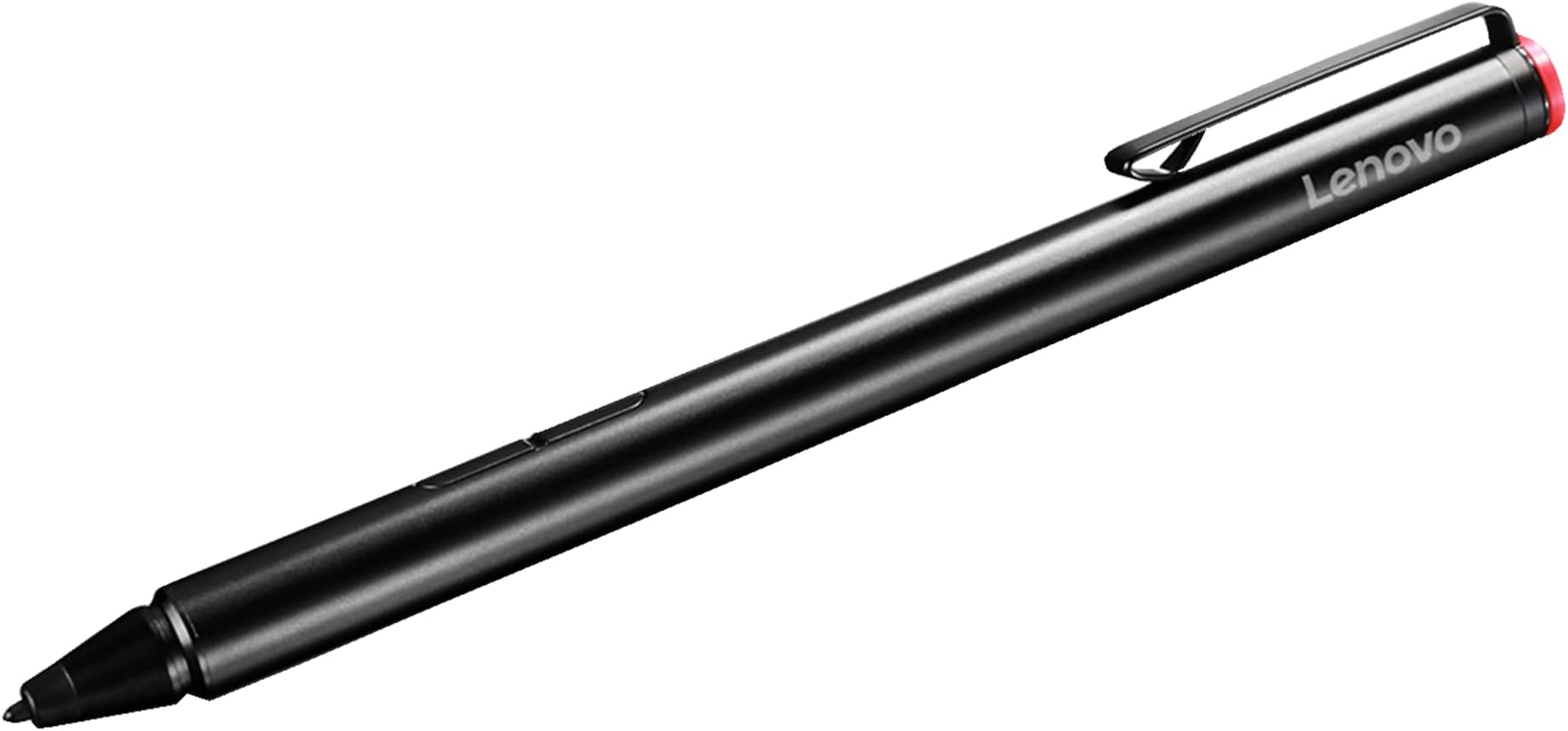
The Lenovo Active Capacity Pen is a sleek, metal-bodied stylus designed for Lenovo Yoga and Miix touchscreen laptops. Featuring 2048 pressure sensitivity levels and palm rejection technology, it delivers precise, natural writing and drawing experiences. Powered by a single AAAA battery (included), it offers reliable, Bluetooth-free operation. The pen includes two side buttons for quick app access, a USB pen holder for secure storage, and three replacement tips for extended durability. Compatible across multiple Lenovo 2-in-1 models, it’s the perfect tool for professionals and students seeking seamless digital interaction.


| ASIN | B01AZC3HF2 |
| Are Batteries Included | Yes |
| Are Batteries Required | Yes |
| Battery Description | Alkaline |
| Best Sellers Rank | #66,232 in Cell Phones & Accessories ( See Top 100 in Cell Phones & Accessories ) #1,458 in Styluses |
| Brand | Lenovo |
| Built-In Media | Pen. Pen Holder, 3 replacement tips |
| Color | Black |
| Compatible Devices | Yoga C930-13, 730-13/15, 920-13, 720-12/13/15, Flex 14/15 IWL, Flex 6-11/14, Flex 5-14/15, ThinkPad X1 Yoga Gen 3, X1 Extreme, X1 Tablet Gen 3, Miix 720/720/700-12, Miix 520/510-12, Lenovo C340-14/15, Lenovo 300e Compatible Devices Yoga C930-13, 730-13/15, 920-13, 720-12/13/15, Flex 14/15 IWL, Flex 6-11/14, Flex 5-14/15, ThinkPad X1 Yoga Gen 3, X1 Extreme, X1 Tablet Gen 3, Miix 720/720/700-12, Miix 520/510-12, Lenovo C340-14/15, Lenovo 300e See more |
| Compatible Tablet Computer Models | Lenovo Miix 720, Lenovo ThinkPad X1 |
| Customer Reviews | 4.3 out of 5 stars 6,208 Reviews |
| Enclosure Material | Metal |
| Global Trade Identification Number | 00889955072474 |
| Item Dimensions | 5.53 x 0.37 x 0.05 inches |
| Item Part Number | GX80K32882 |
| Item Weight | 18.14 g |
| Manufacturer | Lenovo Direct |
| Material | Metal |
| Mfr Part Number | GX80K32882 |
| Model Number | GX80K32882 |
| Number of Batteries | 1 AAA batteries required. (included) |
| Pressure Sensitivity | 2048 Levels |
| UPC | 889955072474 |
| Unit Count | 1.0 Count |
| Warranty Description | Limited warranty |
M**G
Artist's stake: Wacom's pens failed so I tried this and it's great.
Ok, I'll start with the pen review before diving into my frustration with Wacom. The pen is really solid, I got it for $30 and it's really nice to work with on my Lenovo Yoga 730 2-in-1. The pen has a hard, smooth tip which I prefer for working digitally, lets the pen slide nicely instead of having friction. I included work in progress pic, (fanart of Alex Ahad's Octavia) where I started, inked, colored and started shading with this pen only and I've been very happy with the performance. There's no disconnects, no weird bugs, I can easily and consistently ink with no issues. The activation force is also very low so it starts drawing when the pen touches the glass. For $30? I'm VERY happy with this pen. Biggest complaint I have is that they give you a pen stand that is honestly a headscratcher. It ..plugs into your USB port and you can slide it in the side or put it in the top. This just seems like it'd damage the USB port of anything were to bop it the right way. Maybe that's just me. It comes with 3 replacement nibs and a tool to remove them, very good. There is a second version to this pen which- I saw reviews say has a rubberized tip, so maybe that's for you but I don't like adding artificial friction to my art. It's supposed to have more pressure range but honestly 2k is more than fine for me. Though, the box for the pen claims this one can do upto 4000 levels depending on your laptop. How do you tell that? No idea. On to my frustration with wacom: I got 2 pens from wacom, a $100 pen, Bamboo Ink which was pretty good, my problem was it felt like you had to activate it by pressing it, it didn't start drawing till you felt a very slight give and it just did not feel natural or good. It made it hard to get things right. For $100? That's incredibly disappointing. The Bamboo Ink Smart Stylus was $50 and it wrote just about as good as this pen, however it took me 3 attempts to get one that wasn't defective and yes I tried it on another laptop- of a person it ALSO took 3 pens to get one that worked (also it died in 3 months so, great QC Wacom. Wacom's pens also are buggy as heck. If you rotate your display and the display changes? The Wacom pens will both require you to restart the art software OR the laptop, and neither work with Miracast (wireless display adapter). If you turn it on? It'll be a good 2 inches to the side of where you draw. Which is annoying because it's a good way to put some video or references on a TV while you work. The lenovo pen which, I believe is wacom based tech, works with miracast on and I've not had a single disconnect problem or any accuracy problems even when letting the screen rotate. I ran it through anything I could think of and I'm happily drawing away in Clip Studio Paint the entire time. Get the wacom driver from the windows store and it'll work perfectly with this pen. I didn't have to do any set up at all besides that, put the pen to glass and it was drawing. The wacom pens are going to be tossed in a drawer as back ups at best but this lenovo pen I'm happy to use as a tool for art. Hopefully this helps someone because I know how Wacom gets talked up but I've honestly switched off their stuff since I, and my friends and so on have had enough problems for their excessively expensive devices to be avoided. Uh, ending rant here.
C**N
This product works great for me
This product works great for me. As a college student, taking notes in class can be difficult when the professor runs through their slides fast. Not leaving a lot of time to take notes down in a notebook. This stylus works great for me because I download the professors lecture slides into Microsoft OneNote. Then I can just write right on the screen all the extra notes said. I gave this stylus a 5 star because it works great for me. • Its durable o It can withstand the beating it takes being in my backpack throughout the day. Whether it’s my bag being thrown on the ground or crush in a seat on the bus. It still holds up great. o The tip of the stylus is strong. I haven’t broken it so far but if you do there are 3 replacement tips o The only bad thing I would say is that the tips are shorter then I would like it to be but it still works great for me • Very reliable o You don’t have to worry about spotty Bluetooth because it doesn’t even use Bluetooth o You just need to put the battery in and it’s good to go o The touch screen connect ability is great. I haven’t ever had any problems with writing on the screen • Overall Look o The design of the stylus is great. The aluminum body is strong and feels good in your hand o The one thing I would say is that it feels a little slippery when you first start using the stylus. Its not slippery to the point where it will fly out, but your hand can slide on the stylus o The button placement (can be used to erase and select a group of writing) could be in a different place. Sometimes I’m erasing my writing because I accidentally press the button • Final thought This stylus works great for me and I don’t have a lot of bad comments for it. It does everything that I need it to as a college student for taking notes in class. It is priced great. You get a great quality stylus for the price. You probably can’t find the same quality stylus for the same price as this one. If you need a stylus to be able to take notes in class on your computer because you don’t have enough time to write them down on your computer, then this is the stylus for you. It is a much cheaper option and works the exact same way as a high-end stylus would. So, if this is something that you need for your class then I would recommend this.
A**A
Good product, just not sure it's worth the money.
I bought this pen to use with my HP Spectre x2 (because after doing some poking around on the internet, I learned that it is essentially equivalent to HP's pen for the Spectre x2). The reason I subtracted a star actually has more to do with the computers than the pen (but does pertain to the pen if you consider the value--a much cheaper capacitative stylus would be almost as good, IF it is the type that allows for smaller nibs). The issue is that while these computers (Lenovo Miix 700 and Yoga 900s, and HP Spectre x2) are advertised as being compatible with pens using Wacom technology, the touch panels are manufactured by a different company called Elan (most screen designed for Wacom pens use Wacom panels). Therefore, these pens are not compatible with the Wacom Feel Driver. The biggest issue with this is that it means you cannot adjust the sensitivity of this pen. I have found that I have to write/draw VERY lightly in order for a drawing or any writing to look like the pen is at all sensitive to pressure. This may vary from person to person, but I do not feel like I am normally an exceptionally hard writer/drawer. If this feature was adjustable, I would definitely give this product 5 stars. But as it is, I'm just not sure if the added expense of "2048 levels of pressure sensitivity" is worth the extra ~$20 over a simple capacitative (or "passive") stylus, as programs that support writing and drawing do allow you to change the thickness of the ink--they only thing you're losing is the pressure sensitivity. The only other criticism I have of this pen is that, while the pen itself is rather light, the battery sits at the very back of the pen, which makes the balance of the pen feel awkward in my hand. (I assume that there is no way around the location of the battery and that the only solution to this would be to weight the front of the pen, leading to a much heavier pen.) Overall, I recommend this pen. If it's not a big deal for you to shell out the money for this product, I'd definitely tell you to buy it. If not (especially if pressure sensitivity is not an absolute deal breaker for you), chew on it for awhile and consider a capacitative pen instead (around $10-15--or less--on Amazon).
M**E
Worth the money
I have a Lenovo Yoga 730 laptop that's touchscreen and I always wanted to buy a pen that I could take notes or draw with. However, I didn't have the budget to purchase a Apple pen, the Lenovo active pen 2, nor the other highly raved stylus pens on amazon. When I checked out other stylus pens within this price range, there were always quite some bad reviews so I was always worried to purchase it in case it doesn't work. BUT THIS, THIS IS THE PEN! For its price, it is a total steal. It comes with a piece that plugs into the laptop that connects the pen and also works as a holder. It allows a place to put your pen without fear of losing it and definitely makes taking notes easier. When you take notes and place your palm on your screen, it doesn't detect it. It's comfortable to use and is easily detectable by the laptop where once it gets close to the screen, it automatically shifts to pen mode. This allows me to type notes and then draw diagrams during lectures easily. The instructions that comes with the pen is also fairly easy, the diagrams are pretty self explanatory. This is coming from a college student who has bought their first touch screen pen :) so I may sound a little excited
A**N
Responsive and Accurate. Just the ticket for OneNote. No drivers necessary.
I bought this pen for the Lenovo Miix 700 64gb/4gb version. I removed Windows 10 Home and did a clean install of Windows 10 Enterprise. The pen was recognized instantly without the need for extra Lenovo drivers (stupid bloat) and works beautifully in OneNote. I did some amateur sketches in AutoDesk SketchBook and it was responsive and accurate. The pen has a very nice heft to it that gives it a premium feel. Both apps that I've used the pen with had automatic palm rejection and made for a great writing experience. I planned on using this to take notes in class, but have not used it for that purpose yet. It's current use is for simple note jotting while on my desktop. I also use to highlight and annotate PDFs in OneNote. Cons: 1) I can foresee tip replacement causing some trouble. The directions on how to replace the tip are extremely vague. I attempted to replace the tip (just as a test), but could not, so this might cause some headache in the future. 2) Nowhere to stow the pen. This isn't really a con of the pen, but more of a con on Lenovo and the Miix 700 as a whole. There's no room on the leather case, and there's no room inside of the device either, which makes for some awkwardness. Summary: -> No drivers necessary -> Responsive and accurate -> Automatic palm rejection in Microsoft applications -> Premium feel
T**.
Very disappointed.
I got this to work with a Lenovo Chromebook. I went to Lenovo's own website and found my specific Chromebook and clicked "suggested accessories" and got the model number for this pen before ordering from Amazon due to shipping speed. First, the listing and the box both say the battery is included, but there was no battery in the box and the packed instructions indicate no battery is included, so that's confusing. After some frustration, and another order for the rare AAAA battery size, and a day or two for shipping, I got batteries for the pen. I eagerly inserted one and... nothing. The pen doesn't do anything. There is no indication whatsoever there is any power going to it. None of my devices recognize the pen, including the Chromebook that's made by the same manufacturer. There are buttons on the pen that don't seem to do anything. I changed batteries multiple times. The instructions give no explanation on how to make the pen work. It shows how to insert the batteries and that's about it. Online guides just make it seem like it just magically works. But with no indication of anything happening with the pen I have no idea how to troubleshoot. Are my battery bad? Does my device not support it, what about the other tablets and phones that do have USI pen support? The whole situation was just a bunch of unanswered questions and wasted time. I am returning and don't plan to order another Lenovo pen period.
D**E
Great Pen, Great Price, but do your research on compatibility!!!
~Review~ tldr; Was looking for an alternative to the $70 Bamboo Ink and decided to give this a go. Overall, super satisfying despite original doubt. Pros: - Easy set-up basically out of the box it is ready to go. - Comes with 3 replacement nibs with replacement tool, one AAAA battery, and a little laptop carrying attachment that fits into a USB port. - I use it on a Lenovo Yoga 720 13" and it works like a dream, very responsive on Adobe apps (PS, AE, PR) and Microsoft apps like Fresh Paint and One Note. - Very good build quality does not feel cheap, has a solid aluminum feel to it, stronger than a pen/pencil feeling. Almost feels like a metal rod. - Feels very natural and in my experience has palm rejection once the pen makes contact with the screen Cons: - A tad slippery, feels very smooth (not to the point where it is flying out of you hand) but the ability to use a duct tape grip or attach a pencil/pen grip is there if you can forego the pen carrying laptop attachment. - There is a bit of a learning curve especially if using this stylus for the first time, especially on Photoshop I might add but is great once accustomed. - The buttons on the side weren't really explained and I have not used either of them once but it does not feel like a necessity. - WORKS on the Yoga 720 13" but does not work on my iPad, Nexus 6P or Nexus 7 AT ALL no touch, no hover. So be sure to CHECK COMPATABILITY before purchasing! Final Thoughts: I love it, it works great for me and at this price point compared to a cheap $9 - $15 stylus with limited accuracy or the more expensive Bamboo INK ($70), Apple Pencil ($99) or the new Pixelbook Pen ($99) this pen does a swell job for just under $30 but if you're not doing work that requires accuracy such as design or drawing and just want something to touch your screen with, a cheaper stylus might be a more economic choice and will most likely be more compatible with more devices.
M**N
Good, with minor complaints
The stylist itself is good no problems, works smoothly. However the product description says it comes with extra tips and a USB port holder; mine did not. It only came with the pen. Also it does use a less common battery (AAAA) which is included with the pen. Although the pen does not have any kind of off switch so the battery is constantly, but slowly draining. I didn't use mine much but put the battery in about 8-9 months ago and when I tried to use it the battery was dead. I don't know for sure when it died. Anyway it's not a huge problem but you do have to replace batteries sami often and they are not easy to find.
M**O
Excelente uso
éste lápiz digital vino perfecto para mi yoga 7 series, muy buen precio, producto de calidad y gran funcionalidad.
R**Y
Works Well but delivery is bad
Works very well and genuine product The only issue which i am disappointed is that i paid extra to have it delivered the next but amazon didn’t even calling them several times they were not able to help i speak to 4 customer service then other promised to be delivered by 8pm i wait until 9pm in office no one came! By far ramzi (customer sevice) did his best to help me out on my delivery the rest 3 customer service terrible they hang up on me and the other one told it cannot be delivered and i ask i paid extra amount after that hand up!
R**E
Been using it non stop!
Great device, very intuitive! Ergonomic, great to hold and quite natural in the hand, which I was surprised about! Easy to set up and to use, was able to begin drawing away in seconds. Love the fact that the pen can be customized so that the buttons serve the functions the user requires, although this does depend on the software or application as I downloaded a drawing app that doesn't respect my button choices but it seems to work perfectly well with the rest of my computer. The included Wacom application enabled me to set up the pen's pressure sensitivity quickly and made the overall calibration process very swift and easy. The app is also quite helpful as it lets me see how much battery is left on the pen. Found the USB holder rather helpful as it keeps the pen close, and being able to place the pen in 2 different positions depending on what I might be doing with it at the time was equally handy. Palm rejection is a treat and greatly appreciated, although sometimes you need to hover the pen slightly above the screen before you start using it so that your computer registers the device and therefore disables its normal touchscreen function. Although I appreciate the battery being included, wished Lenovo had come up with a rechargeable option. I use a Lenovo 720
M**Z
Stylus 1
Sadly the Lenovo laptop didnt come with this Pen so had to buy it separately . Uses a AAA battery which is ok- needs to have a LED indicator so we can see the battery status. Battery lasts about 6 months with 50min a day use, which is ok but it works good easy setup and connection blu tooth works well.
C**Y
Perfeita
Caneta perfeita para o Lenovo Ideapad. Basta tocar na tela e ela se comunica com o notebook. As configurações são super intuitivas também. Ah, vi que alguns falaram sobre a pilha AAAA… a minha veio com a pilha, pontas extras e suporte.
Trustpilot
4 days ago
2 weeks ago